The same product arrives from three suppliers as three different records. One says Navy, one says navy blue and one says Dk Blue. One lists the width as 50cm, one as 0.5 m and one as 500 mm. The brand is HP, Hewlett Packard and hp inc., and every title follows a different pattern.
Load those records into a PIM as they are and your filters split one color three ways. Search misses products, feeds get rejected, and your product pages read like three different stores. Even the product details for one item change depending on which supplier's row loaded last. Ecommerce product data normalization is how you fix that.
But you cannot normalize to nothing. Before any values/fields can be made consistent, you need a written product data standard to make it consistent with. In this article are the three definitions that a product data standard needs and how to normalize every field against them. You will also see where rules work, where AI is needed, and how Pumice runs the process for every field.
Key Takeaways
Normalization makes every product field conform to one defined standard, so the same thing is always stored the same way.
Create the product schema standard first: a catalog schema, an attribute schema per category and a PDP outline.
Every field has a rule, from identifiers and units to titles and images.
Rules handle known variants; AI with validation handles missing, unmapped and wrong values.
The Pumice Merchandising Pipeline conforms every field to your three definitions, and flags what it cannot verify.
What Is Ecommerce Product Data Normalization?
Ecommerce product data normalization is the process of making every product field conform to one defined product data standard. Values that mean the same thing are stored the same way and in the same format (lb vs pounds), every product has the fields its category requires, and long form text fields (titles, descriptions) follow the same schema.
✂️ The short answer
What is ecommerce product data normalization?
Ecommerce product data normalization is the process of making every product field conform to one defined standard, so values that mean the same thing are stored the same way and every product has the fields its category requires. Size L, Lg and Large become L; 50cm, 0.5 m and 500 mm become 50 cm; and every title follows the same pattern.
PIM vendor WISEPIM defines it as "bringing values that mean the same thing into one consistent format." That covers spellings, units, number formats, categories and the structure of titles and descriptions. Some vendors call the same work product data standardization; in practice the two terms describe the same job.
This task is not the same as general database normalization. Database normalization focuses more on organizing data in a database to remove redundancy, using rules called normal forms. In a relational database, an unnormalized table with repeating groups is split into related tables, each with a primary key or a composite key, so that non-key attributes depend on that key alone and the same information is not stored as redundant data in many rows. The stages are first normal form (1NF), second normal form (2NF) and third normal form (3NF). The textbook example is a customers table: customer information is stored once and orders reference it by key, instead of repeating the same customer details on every order row, which is how data redundancy creeps into customer data. Product data normalization changes values, not table structures.
Two kinds of normalization
Product data normalization vs database normalization
Product data normalization
Database normalization
What it changes
Values: spellings, units, formats, categories and copy
Structure: how tables are split and related
Goal
Every field conforms to your catalog, attribute and PDP standards
Less redundancy and fewer update errors (1NF, 2NF, 3NF)
Who does it
Catalog, merchandising and PIM teams
Database designers and engineers
Same word, different jobs. This guide covers the first.
Normalization work also overlaps with enrichment work. Enrichment adds values that are missing; normalization makes the values you have consistent. In practice they run together, because a supplier file usually needs both.
It matters more now that machines read your product catalog. Filters, site search, marketplace feeds and AI shopping assistants all depend on structured, consistent attributes. A value they cannot match is a product that drops out of filters and feeds. For shoppers, that is a worse customer experience: search results that miss products they would have bought. The more sales channels you sell through, the more places that inconsistent information shows up. Clean data here means structured data that matches your definitions, not a spreadsheet that looks tidy.
The cost of skipping it is real. Gartner estimates that poor data quality costs organizations an average of $12.9 million a year. For ecommerce businesses it shows up as rejected feeds, returns and lower conversion rates.
Normalize to What? Define Your Catalog, Attribute and PDP Standards First
A consistent format only works if someone has created and recorded it. Write these three definitions first, and every rule after them has something to point to.
The Catalog Schema
The catalog schema lists the fields every product has and the format of each. It says the SKU is unique and the GTIN is digits only. The brand comes from one master list, the category is a path in your own taxonomy, and the price is a number with a separate currency code. Those standardized formats are what every rule in this guide points back to.
Lean on public standards where they exist. GS1 sets the rules for GTINs, including a calculated check digit, and Google Merchant Center expects prices as a number plus an ISO 4217 currency code, such as 15.00 USD.
The Attribute Schema per Category
The attribute schema says which attributes each category needs, which values each attribute allows and which unit each number uses. A lamp needs wattage, bulb base and color temperature in kelvin. A shirt needs a size system, fit and sleeve length. Those category-specific requirements are exactly what a catalog-wide rule cannot express.
Industrial catalogs can borrow a shared one. ETIM is an open, industry-governed classification standard for technical products, with classes, features and values that suppliers and retailers both use. Our guide to product taxonomy best practices covers how to design categories and attributes as separate schemas.
The PDP Outline
The PDP outline says how product page content is built. It sets the title pattern and length, how many bullets there are and what each covers, the order of the description and the image rules. Our product detail page guide uses a title of brand, model and core attribute, a short benefit paragraph, then specs as bullets.
Who Owns the Standard
One team should own the three definitions, usually catalog management or merchandising operations. Keep them in one place, version every change, and share the parts suppliers need. A supplier who knows your allowed values usually sends fewer values you have to map.
Review the definitions when you add a category or a channel. A new category needs its own attribute list before the first product arrives, not after.
Channel requirements are outputs, not the standard. Google Merchant Center, Amazon and schema.org's Product type each map from your schema. Normalize once to your own definitions, then map to each channel. Normalizing once and mapping to multiple channels is also what makes channel readiness measurable: a product is ready for a channel when its normalized record passes that channel's map.
Field-by-Field: How to Normalize Each Part of a Product Record
Here is every field in a typical product record, the variants suppliers send, the rule that fixes them, which definition governs it and an example.
Field-by-field normalization
How to normalize each field, and which definition governs it
Field
Common supplier variants
Normalization rule
Governed by
Example
Identifiers
Missing leading zeros, spaces, wrong length
GTIN as digits only, valid length and check digit; MPN as the maker writes it
Catalog schema
12345678905 becomes 012345678905
Brand
Aliases and legal names
Match against one master brand list
Catalog schema
HP, Hewlett Packard, hp inc. become HP
Category
The supplier's own tree
Map to your taxonomy, one primary category
Catalog schema
Power Tools/Drills becomes Tools > Power Tools > Drills
Attribute names
Colour, color, Color Family
One key per attribute, per category
Attribute schema
All become color
Attribute values
Free-text spellings
Values from the allowed list only
Attribute schema
Navy, navy blue, Dk Blue become Navy
Units
Mixed systems, unit inside the value
Number and unit separate; one unit per attribute
Attribute schema
50cm, 0.5 m, 500 mm become 50 cm
Variants
Sizes in one cell, mixed size systems
One row per variant, one size system per category
Attribute schema
S-XL in one cell becomes 4 rows
Price
Comma decimals, currency in the value
Number plus ISO 4217 currency in its own field
Catalog schema
19,95 EUR becomes 19.95 and EUR
Titles
Supplier codes, ALL CAPS, missing attributes
Your title pattern and length limit
PDP outline
Brand + product type + key attributes
Bullets and descriptions
Pasted spec dumps, inconsistent tone
Your section order, bullet count and tone
PDP outline
Five bullets, then a short description
Images
Colored backgrounds, mixed sizes
Background, minimum size and file naming
PDP outline
White background, resized, named by SKU
Brand, color, unit, size and price examples follow WISEPIM's product data normalization examples.
Identifiers, Brands and Categories
Identifiers anchor everything else, so fix them first. Strip spaces and restore leading zeros. Check the length and the check digit. Keep the maker's part number exactly as the maker writes it. A clean GTIN is also how you catch duplicate data: two rows with the same GTIN are one product, however different their titles look.
Brands go against one master list, so aliases and legal names collapse to one name. Categories go into your own taxonomy, not the supplier's, with one primary category per product.
Attribute Names, Values and Units
Attribute names come first: Colour, color and Color Family must all become one key. Values come second, and should only ever come from the allowed list for that attribute.
Store numbers and units in separate fields, and pick one unit per attribute. A width of 50 cm is a number, 50, and a unit, cm. A field that holds "50cm" as text cannot be sorted, filtered or converted.
Variants and Prices
Give every variant its own row, and use one size system per category. Store the price as a number with a decimal point and the currency in its own field, so 19,95 EUR becomes 19.95 and EUR.
Titles, Descriptions and Images
These fields follow the PDP outline rather than a value list. Every title uses the same pattern and length. The pattern also keeps unnecessary information, such as internal supplier codes, out of the title. Every product has the same bullets. Every main image meets the same background, size and naming rules.
A Worked Example: One Product, Three Suppliers
Here is the same illustrative desk lamp as three suppliers send it, and as it looks once normalized against the three definitions. Each supplier describes it with different specifications, units and spellings.
Desk Lamp - Lumen (black) | color: black | 9 watt | base E‑26 | 45.7 cm | 24.99
Supplier C
Lumen LED desk lamp | Color Family: Black | wattage: 9 | height 457 mm | $24.99
↓ Normalized record
Title
Example Lighting Lumen LED Desk Lamp, 9 W, Black
Brand
Example Lighting
Category
Lighting > Lamps > Desk Lamps
Color
Black
Wattage
9 (W)
Bulb base
E26
Height
45.7 (cm)
Price
24.99
Currency
USD
Illustrative product. The raw supplier values stay stored beside the normalized ones as the audit trail.
Three color spellings become one value from the allowed list. Three height formats become one number in one unit. Three conflicting records become one record. The title follows the PDP outline, and the brand and category come from the catalog schema. The raw supplier values stay stored beside the normalized ones. That is not duplicate information; the raw column is the audit trail.
Rules for Every Field
Keep the original supplier value: store the raw value next to the normalized one. WISEPIM lists deleting it among the common mistakes, because later checks become impossible. It is the cheapest data integrity check you have.
Normalize on every import: every new supplier file brings new spellings, so normalization is a step in the pipeline, not a one-time cleanup.
Log every mapping: keep a mapping table from supplier values to yours and reuse it, so the same variant is never mapped twice by hand.
Rules vs AI: What Each Can Normalize
Rules and mapping tables do much of the work. They handle known synonyms, brand aliases, casing, number formats and unit conversions quickly and cheaply. Use them first.
They break on four kinds of value: values that are not in the mapping table yet, values buried in free text such as "100% cotton jersey, machine wash," values the supplier never sent, and values that look valid but are wrong, such as a GTIN that belongs to a different variant.
Think of it as a funnel. Rules clear the easy cases first, and they are fast and cheap. AI takes what is left, and validation checks both. A person sees only the few values that still do not fit, which is where human time is worth spending.
Rules vs AI
What rules can normalize, and where AI with validation takes over
Problem
Rules and mapping tables
AI with validation
Known synonyms and aliases
Handle well
Not needed
Units and number formats
Handle well
Not needed
Values not in the mapping table
Fail until someone adds them
Map to the allowed list, then validate
Values buried in free text
Fail
Extract only what the source states
Values the supplier never sent
Fail
Research the manufacturer source, or predict and flag
Values that look valid and are wrong
Pass them through
Catch them by checking the record against its source
Titles and descriptions
Templates only
Write to your PDP outline, then check against your rules
Use rules first, AI on what is left, and validation on everything.
AI handles those cases, but only with your schema as its instructions and validation behind it. It should extract only what the source states and map to your allowed values. It should research the manufacturer's source for missing fields, and send anything it cannot verify to a person.
Done that way, the numbers hold up. In our supplier catalog ingestion agent, the identity check confirms correct matches at 97.57% with a 0.07% false positive rate on a 120,000-SKU catalog. In a categorization project for an ecommerce solutions company, we reached 97% accuracy on both the top and bottom levels of a five-level taxonomy, on a held-out test set.
A Product Data Normalization Process That Holds Up
The process has six steps.
1. Define: write the catalog schema, the attribute schema per category and the PDP outline.
2. Ingest: load every supplier file as it arrives, and keep the raw values.
3. Map and standardize: apply rules and mapping tables first, then AI on what is left.
4. Research and fill: find missing required fields on the manufacturer's own pages.
5. Validate: check required fields, allowed values, units and PDP rules, and fix or flag every failure.
6. Publish and monitor: export to your PIM and channels, normalize every new import and audit regularly.
Nventory's guide adds a rule worth keeping: build one master record per product first, then generate every channel listing from it. That master catalog is the single system every channel pulls from, and it is where the normalized values live. Its monthly data quality audit is a sensible cadence for step six.
How to Measure Normalization
Measure normalization by category, not across the whole catalog. A catalog can look 95% complete on average while every lamp is missing its bulb base. Judged on the average, the normalization efforts look finished; judged by category, they are not.
Required-field completeness: the share of products in each category with every required attribute filled.
Allowed-value conformance: the share of values that come from the allowed list, per attribute.
Unmapped values per import: how many new supplier values needed a person to map them.
Feed rejections: products rejected by channels for missing or invalid fields.
Track these after every import. Each one catches a different failure: incomplete records, inconsistent entries that slipped past the allowed list, and data errors that only a channel rejection reveals. If unmapped values keep rising, your mapping table or your allowed lists need updating.
Common Product Data Normalization Mistakes
WISEPIM lists five common mistakes, and each is easy to make. The first is treating normalization as a one-off cleanup, when every new supplier file brings new spellings. The second is leaving fields as free text with no allowed values, so the variants keep coming.
The other three are storing a unit inside the value, mistaking this work for database normalization and restructuring tables that were fine, and throwing away the supplier's original value so nothing can be checked later.
Add over-collapsing to that list. Merging values that differ, such as two shades of blue that customers search for separately, hides real choices. Also avoid normalizing to a channel's format instead of your own. That leaves you rebuilding the catalog every time you add a channel.
How Pumice Normalizes Every Field Against Your Schemas
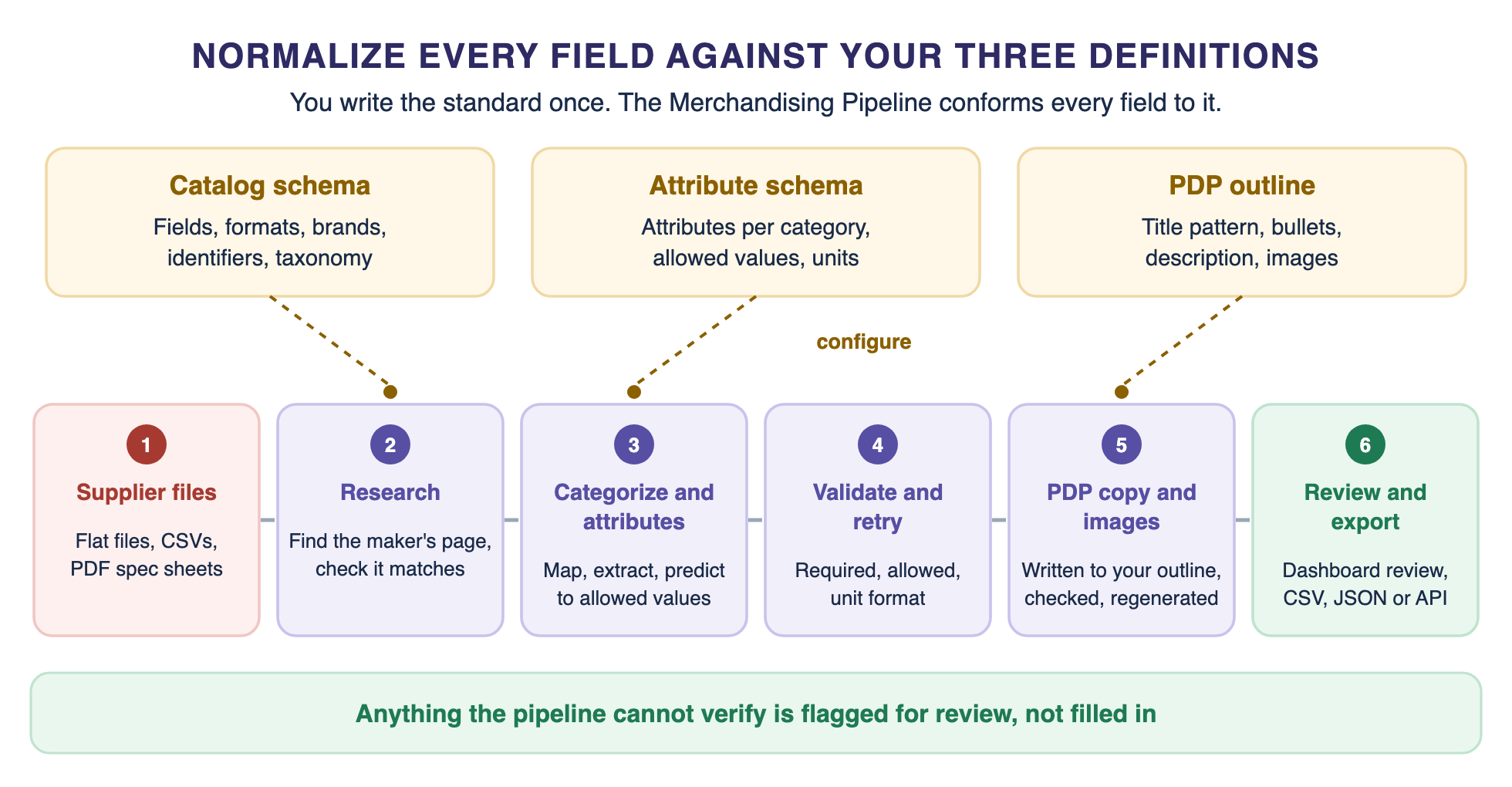
The Pumice Merchandising Pipeline runs that process for every field, against your catalog schema, attribute schema and PDP outline. Here is how each step works.
Your three definitions configure every step of the Merchandising Pipeline.
Step 1: Your Definitions Become the Configuration
You provide your brand guidelines, rules and data schemas to control the structure of every field Pumice touches. That is where the three definitions live. Custom rules are written in plain language, and our product tagging guide describes them as programmatic data cleaning steps expressed in plain English.
A rule can do what a mapping table would. In most teams those transformation rules live in scripts and spreadsheets; here they live beside the schema. One example from that guide splits a combined height, width and depth in imperial units into three separate attributes in metric. Another adds ISO 3166 country codes as tags for compliance workflows.
Step 2: Ingest and Research
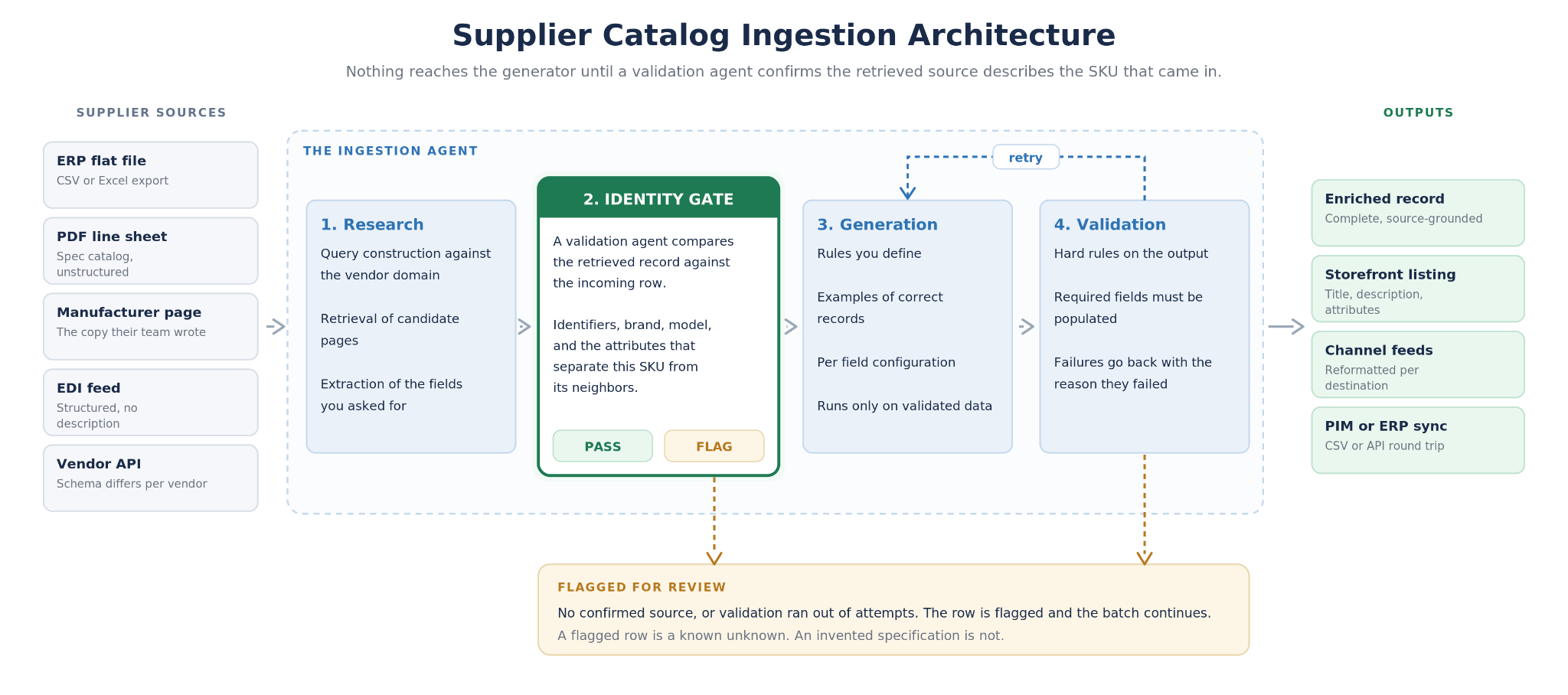
Supplier flat files and CSVs load as rows, and PDF spec sheets can be added as extra context. The research phase then finds each product on the manufacturer's site by its MPN, UPC or name, extracts the data from that page and runs a validation agent to check the page matches the original row. That is how missing values get filled from a real source instead of a guess. The source file is kept as delivered, so any value can be traced back to the row it came from.
How the ingestion agent handles Step 2: supplier files flow through research, then an identity validation gate confirms the retrieved page describes the same SKU before anything is generated.
Attribute enrichment uses a category-to-attribute mapping file and a possible values list for each attribute, which keeps every value inside your controlled vocabulary. It extracts values from product text and images, and rules can stop it inventing values, for example by writing Unknown instead of guessing.
Step 4: Validate and Retry
Validation runs after generation and enforces hard validation rules. Required fields must be populated, values must come from the possible values list, and numbers must match the expected unit format. If an output fails, the pipeline retries it with more structure.
Step 5: Write PDP Content to Your Outline
Titles, bullets and descriptions are generated against your PDP outline, using your rules and examples of high-quality listings. Per category you define the title pattern and its character budget. Validation checks each output against your rules, and a built-in retry loop regenerates anything that fails, as described in our catalog optimization workflow.
Validation covers the page as a whole: required attributes present, character limits respected and product schema valid. A record that fails goes back to generation rather than forward to the site, and anything the pipeline cannot verify is flagged rather than filled in. Our guide to optimizing a product page for SEO covers the title and description patterns in more depth.
Images go through the same pipeline. Pumice can remove a background and replace it with white, and resize images to the dimensions you need.
What You Provide
To start, Pumice needs your three definitions and your data. That means your taxonomy, your category-to-attribute mapping with allowed values, your rules for titles and descriptions, a few examples of listings you consider good, and the supplier files as they arrive. Everything else runs from those.
Step 6: Review and Export
Generated attributes appear in the Pumice dashboard beside their source data, for a merchandiser to approve, refine or reject, and teams can review specific fields or categories. Approved, normalized product data exports as CSV or JSON, or connects through the API to your PIM, ecommerce platforms and catalog tools.
Pumice says this approach is 17x faster than manual categorization and removes up to 90% of the manual labor for PIM tasks. Those are Pumice's own figures; the point that matters more is that every field is checked against definitions you wrote.
Where to Start This Week
You do not need every category done before you start. Pick your top category by revenue. Write its attribute list, its allowed values and its title pattern. Run one supplier file through it. Then run your existing data for that category through the same rules.
Look at what failed. Add the new values to your lists, fix the rules that missed, and run the file again. Then move to the next category. The first categories usually take longest, because later ones can reuse the same brands, units and patterns.
Define the Standard, Then Let Every Field Conform
Ecommerce product data normalization starts with three definitions: a catalog schema, an attribute schema per category and a PDP outline. Normalize every field against them, use rules for the known variants and AI with validation for the rest, and keep the raw supplier values.
Ecommerce product data normalization is easier to keep than to catch up on. The Merchandising Pipeline runs that process for every field and every supplier file, and flags what it cannot verify, so your team reviews exceptions instead of cleaning catalogs by hand.
Send Us 50 SKUs From Two Suppliers
Send 50 SKUs from two different suppliers, plus your catalog schema, attribute schema and PDP outline. We will run them through the Merchandising Pipeline and return them normalized to your standards.
• Every field conformed to your catalog and attribute schemas
• Missing values researched on manufacturer sources
• Titles, bullets and descriptions written to your PDP outline
• Every output validated, with anything unverified flagged for review
Pumice for normalization
Send Us 50 SKUs From Two Suppliers
Send 50 SKUs from two different suppliers, plus your catalog schema, attribute schema and PDP outline. We will run them through the Merchandising Pipeline and return them normalized to your standards.
Every field conformed to your catalog and attribute schemas
Missing values researched on manufacturer sources
Titles, bullets and descriptions written to your PDP outline
Every output validated, with anything unverified flagged for review
A supplier sends a jacket as "Navy, size Lg, 0.5 m, 19,95 EUR." Normalized, it becomes color Navy, size L, length 50 cm and price 19.95 with currency EUR, each in its own field.
What is the best way to normalize data?
Write the target first, as a catalog schema, attribute schema and PDP outline. Then apply rules for known variants, AI with validation for the rest, and check every import.
When should you not normalize data?
Do not overwrite the raw supplier value, and do not force a value into a list where it does not fit. Keep variants that mean something different, such as two different shades, as separate values.
How do you standardize product data from different suppliers?
Keep one mapping table from each supplier's values to yours, reuse it on every import, and send anything unmapped to review. A shared schema means every supplier conforms to the same target.
Is product data normalization the same as database normalization?
No. Database normalization restructures tables using normal forms such as 1NF, 2NF and 3NF, while product data normalization makes values consistent within a schema.