Two-thirds of shoppers abandoned a purchase in the past year because the product information was missing or inaccurate. That is product data costing real revenue, and it is exactly what the PIM vs ERP question is about. A Product Information Management (PIM) system and an Enterprise Resource Planning (ERP) system both manage business-critical data, but they do very different jobs, and knowing which handles what is the difference between a catalog that scales cleanly and one that drowns in spreadsheets.
This guide breaks down what a PIM is, what an ERP is, the main differences between them, the advantages of each, and how the two work together to reach shoppers. At the end we’ll talk about how to improve the process of going from sparse ERP data to fully enriched product content ready to convert.
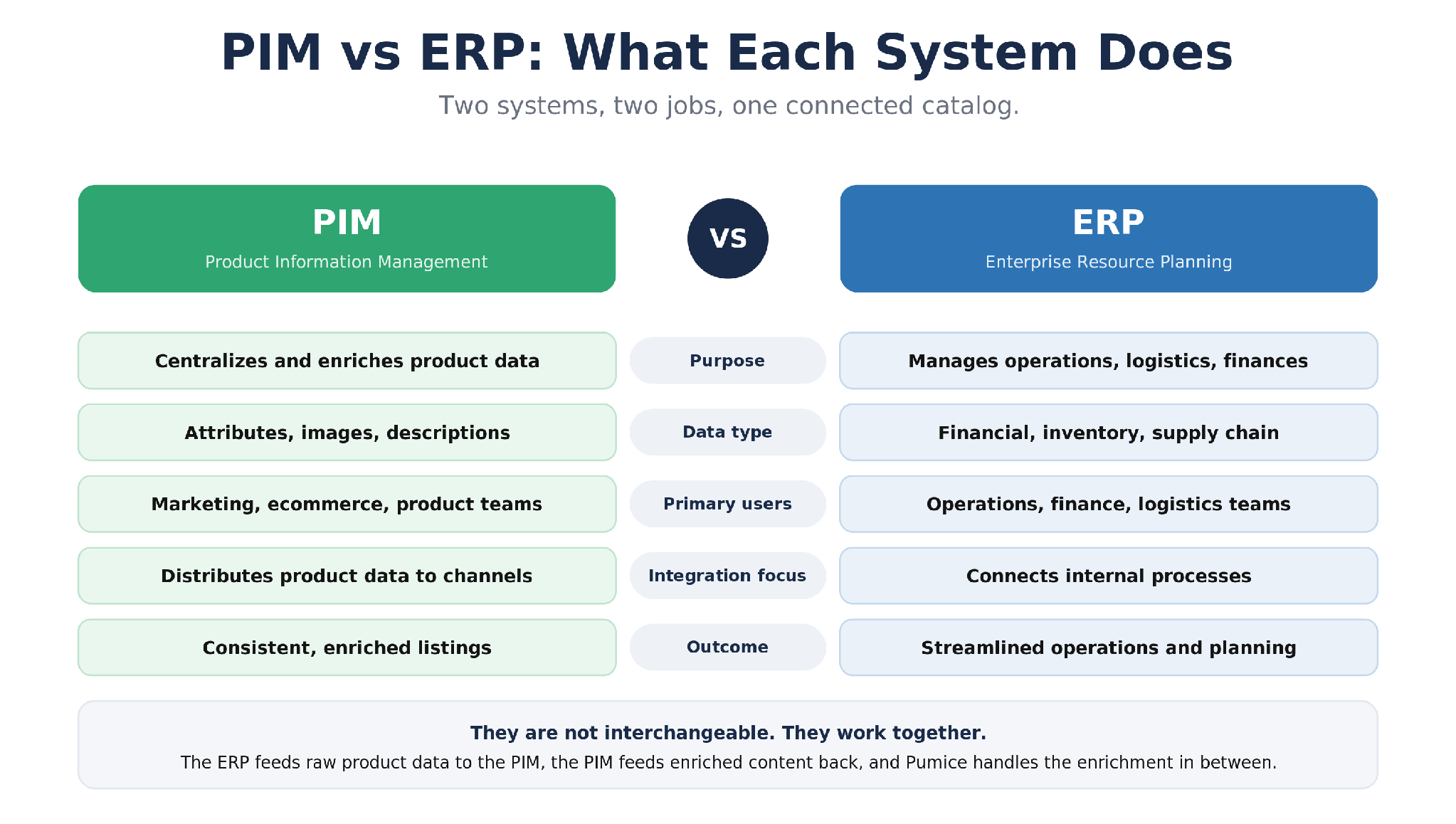
PIM vs ERP at a glance: what each system does, and why they are complementary rather than interchangeable.
Before the deep dive, here is the short version:
A PIM manages product information (attributes, images, descriptions) and keeps it consistent across every sales channel; an ERP manages operations (finance, inventory, procurement, and the supply chain).
An ERP runs the business, while a PIM represents that business accurately to customers. They overlap on product data, but they are not interchangeable.
Most growing brands need both, connected by a PIM ERP integration so the ERP feeds raw product data to the PIM and the PIM feeds rich product data to sales channels.
A PIM's biggest win is accurate, omnichannel-ready product data at scale; an ERP's is a single, automated view of operations.
The hard part of the integration is enrichment, because ERP product data is sparse. The Pumice Merchandising Pipeline fills that gap automatically at catalog scale.
What Is a PIM (Product Information Management) System?
A Product Information Management (PIM) system centralizes all product-related data in one place and makes sure every detail, from specifications and attributes to images and marketing descriptions, is complete, accurate, and consistent across every channel. Without a PIM, product data tends to scatter across spreadsheets, supplier feeds, and internal databases, which leads to duplication, human error, and listings that contradict each other from one platform to the next.
A PIM aggregates data from many sources, including your ERP system, suppliers, and manual input, and turns it into product information that is ready for customers, search engines, and digital storefronts.
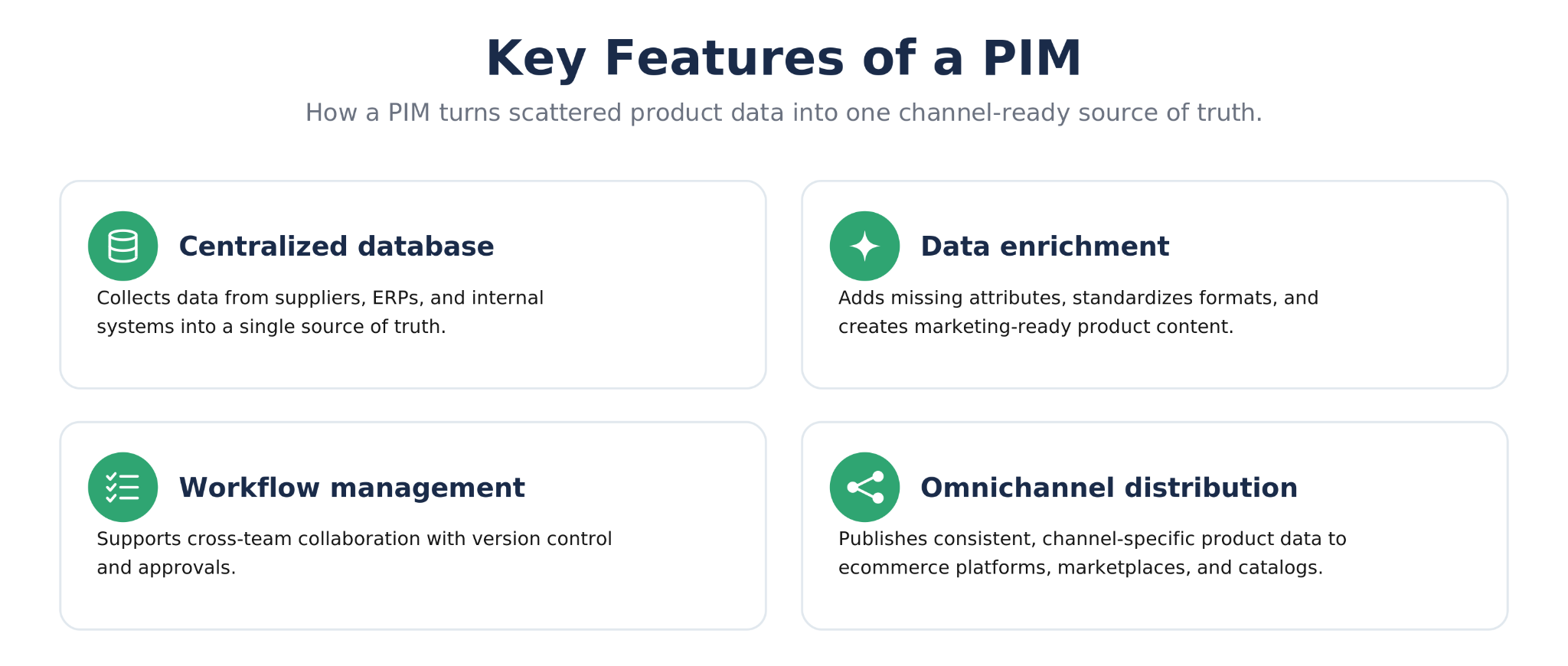
Key Features of a PIM
Centralized database: collects data from suppliers, ERPs, and internal systems into a single source of truth.
Product data enrichment: adds missing attributes, standardizes formats, and creates marketing-ready product content.
Workflow management: supports cross-team collaboration with version control and approvals.
Omnichannel distribution: publishes consistent, channel-specific product data to ecommerce platforms, marketplaces, and catalogs.
Example: How a PIM Streamlines Product Launches
Imagine a retailer preparing to launch a new line of kitchen appliances sourced from several suppliers. Each supplier provides data in a different format, such as Excel sheets, PDFs, or ERP feeds. Product titles are inconsistent, measurements use mixed units, and some listings are missing key details like energy ratings or material specifications. Without a PIM, the merchandising and marketing teams spend weeks cleaning, rewriting, and reformatting data before it can go live, and mistakes are common.
With a PIM in place, all supplier data is collected and organized into a single structured format. The system flags missing information, fills in attributes, and standardizes measurements, then enriches each product with complete, optimized descriptions and images suitable for every channel, including the brand's ecommerce site, Amazon listings, and retail partner catalogs.
What Is an ERP (Enterprise Resource Planning) System?
An Enterprise Resource Planning (ERP) system manages the internal operations of a business: finance, procurement, inventory, human resources, and the supply chain. It gives the organization a single, unified view of its performance and resources. Where a PIM manages what a product is and how it appears to customers, the ERP manages how that product moves through production, storage, and distribution.
Key Features of an ERP
Financial management and reporting.
Procurement and supply chain planning.
Inventory tracking and demand forecasting.
HR and payroll management.
Operational reporting and analytics.
By connecting these functions, an ERP system keeps operations efficient and data current across departments.
This is relevant for product data as most companies interact with ERPs in two different ways:
The vendor stores their product data in their own ERP and provides you a catalog export from it
Your company uses an ERP to hold incoming product data from vendors before migrating it to a PIM for various channels (marketplaces, your own catalog)
Example: How an ERP Improves Operational Efficiency
Consider a furniture manufacturer managing hundreds of product components and suppliers. The ERP monitors stock levels, forecasts demand, and automatically issues purchase orders when materials run low. As production continues, the ERP updates inventory, records costs, and adjusts schedules based on real-time data. This automation removes the need for manual tracking, reduces errors, and keeps every department aligned, so finance knows the cost of each production run, procurement knows when to reorder, and logistics can plan shipping accurately.
PIM vs ERP: The Key Differences
Both systems centralize data, but they do it for different reasons and for different teams. Here is how PIM and ERP compare across the dimensions that matter most:
Feature
PIM
ERP
Purpose
Centralizes and enriches product data
Core business processes: Manages operations, logistics, and finances
Data type
Product attributes, images, and descriptions
Financial, inventory, and supply chain data
Primary users
Marketing, ecommerce, and product teams
Operations, finance, customer relationship management, and logistics teams
Integration focus
Distributes product data to external channels
Connects internal processes across departments
Outcome
Consistent, enriched, customer-facing content, easier data management
ERP systems provide streamlined business operations and planning
Put simply, an ERP runs the business while a PIM makes sure that business is represented accurately to customers. Both are necessary for brands that want to operate efficiently and grow across multiple markets.
A common point of confusion is whether a PIM is just a feature of an ERP. Some ERPs do include a basic product data module, but it is built to store internal records, not to produce the rich, channel-ready content and omnichannel publishing a dedicated PIM provides. As catalogs and sales channels multiply, that gap is what pushes teams to run a purpose-built PIM system alongside the ERP rather than stretch the ERP to do a job it was never designed for.
Advantages of Using a PIM
Product data accuracy and consistency
A PIM centralizes product information so that descriptions, dimensions, and images stay accurate and aligned across multiple sales channels. That consistency reduces errors, prevents the contradictions that confuse buyers, and protects brand reputation.
Omnichannel readiness
Multi-platform selling means tailoring product data for ecommerce sites, marketplaces like Amazon, and retail partners. Good PIM software makes it easy to customize and distribute that content per channel, so a single source of truth fans out into channel-specific listings without manual rework.
Scalability across thousands of SKUs
Managing a large catalog becomes manageable when a PIM system handles structure, validation, and bulk updates. New lines and seasonal ranges can go live quickly instead of stalling behind manual data entry. Modern PIM platforms are built for this level of digital asset management.
Better SEO and discoverability
A PIM improves both external and on-site discoverability by keeping product data complete, structured, and keyword-rich. Enriched product pages rank better in search and in AI answers, and consistent attributes power on-site search, filters, and curated feeds.
Advantages of Using an ERP
A single, integrated view of operations
An ERP system consolidates operational data, from supply chain logistics to financial records, into one interface. That unified view makes it easier to spot trends and bottlenecks and to make decisions with current numbers.
Optimized resource planning
By automating demand forecasting and inventory management, an ERP helps allocate resources efficiently. It can flag likely stock shortages and suggest production adjustments based on sales data before they become problems.
Workflow automation
Tasks like purchase order generation, invoicing, and payroll can be automated, which reduces manual errors and frees teams for higher-value work. Operations stay responsive as volume grows.
Compliance and reporting
ERP systems often include modules that help meet industry standards and legal requirements, automatically generating financial reports and audit trails that reduce the risk of penalties.
How PIM and ERP Work Together
PIM and ERP systems complement one another by connecting operational accuracy with enriched, customer-facing product information. The ERP manages the backend details, such as inventory, cost, and logistics, while the PIM transforms that data into complete, marketing-ready product information. A PIM ERP integration usually runs in two directions:
The PIM pulls raw product data from the ERP, such as SKUs, prices, and specifications, for enrichment and distribution.
The ERP retrieves updated information from the PIM, including enriched descriptions, attributes, and imagery, to support downstream operations like manufacturing, warehouse management, and logistics.
For example, a retailer running both systems lets the ERP track stock levels and update production schedules, while the PIM enriches that data with visuals, features, and content for customer-facing platforms such as the ecommerce store and marketplace listings. When inventory or pricing changes, the ERP updates the PIM automatically, keeping every product page current and accurate.
Enrich Sparse ERP Data for Your PIM With the Pumice Merchandising Pipeline
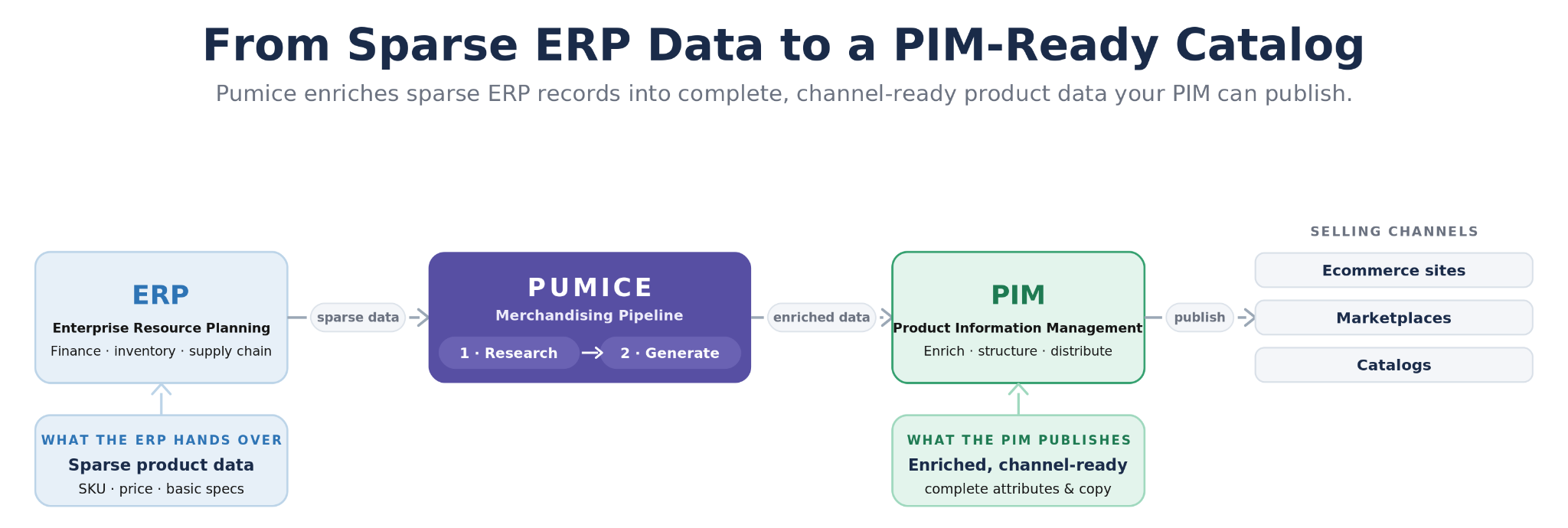
There is one catch in that handoff. The product data an ERP hands to a PIM is usually sparse: a SKU, a price, a short internal name, and maybe a few basic specs. That is enough to run operations, but it is nowhere near the complete, enriched, channel-ready content a PIM is supposed to publish. Someone still has to turn those bare records into full product information, and across thousands of SKUs that manual enrichment is where most teams stall.
The Pumice Merchandising Pipeline closes that gap automatically. It takes a sparse ERP export and enriches every record into the complete, structured product data your PIM needs, grounded in real sources rather than guessed or ChatGPT hallucinated.
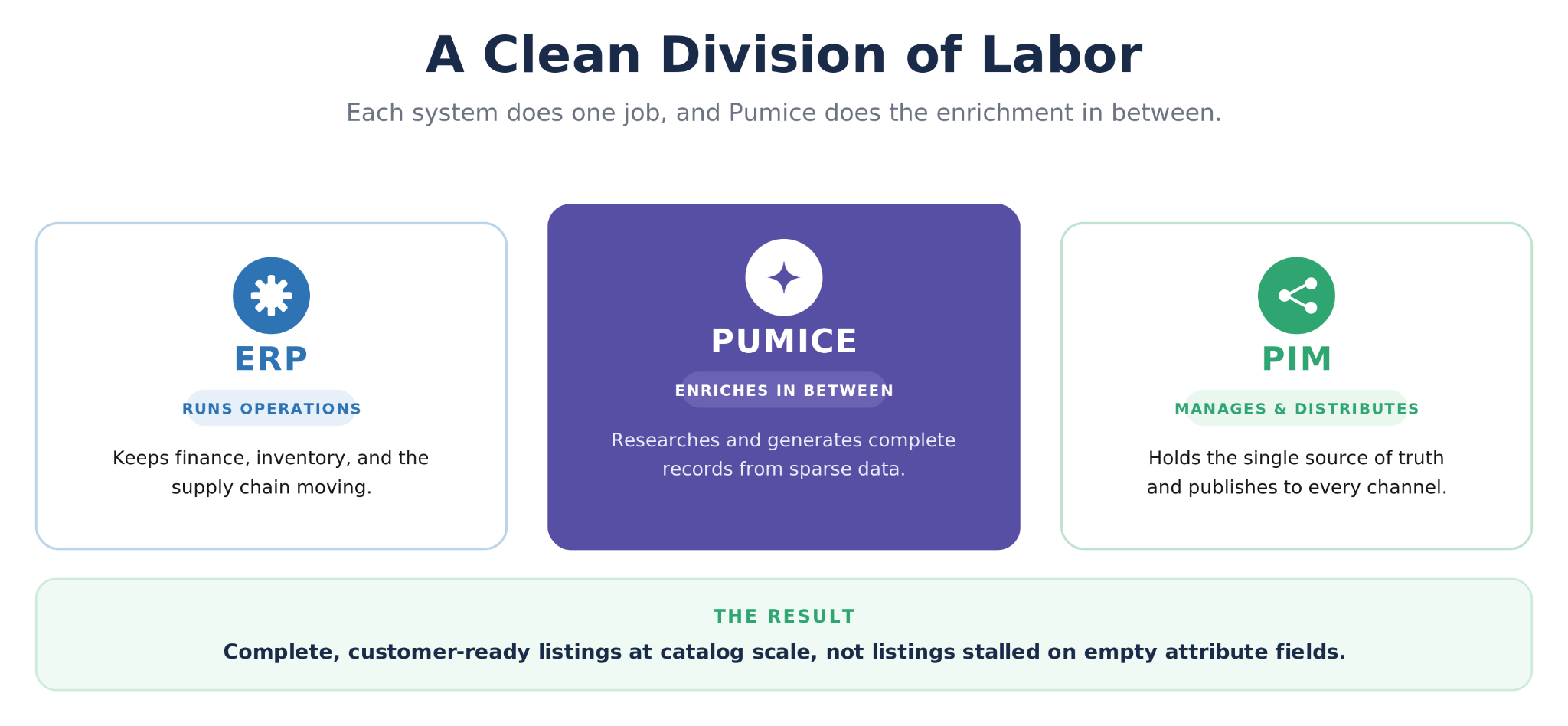
How ERP and PIM connect, with Pumice enriching sparse ERP data into PIM-ready product information.
Research: pull real attributes and specs from the Vendor/Manufacturer Site
Pumice's Research Phase finds each product by name, SKU, or model number, then scrapes the manufacturer page and other authoritative sources to extract the real attributes the vendor’s marketing team used for the live product, but not in the ERP export you were give: materials, dimensions, certifications, compatibility, use cases, and more. A validation step confirms the scraped data matches the right product, by brand and core attributes, before any of it moves forward, so enrichment is grounded rather than hallucinated.
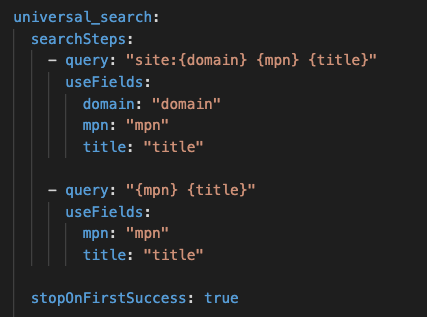
Universal Search configuration in the research step that first searches the domain provided in the uploaded catalog for pages with a matching MPN and title, with a fallback web search for products with similar MPN and title
Generate: complete, PIM-ready records
The generation step writes the enriched fields and product copy from those validated attributes, shaped by rules, examples, and validation that mirror your PIM's schema and brand standards. The output is a structured, consistent record for every SKU, with attributes filled, formats standardized, and product descriptions written, ready to import into the PIM and distribute to every channel. Because the whole catalog runs through one shared configuration, the enriched records stay consistent in voice and structure, and when your ERP adds products or changes specs, you rerun only the affected SKUs rather than redoing the work by hand.
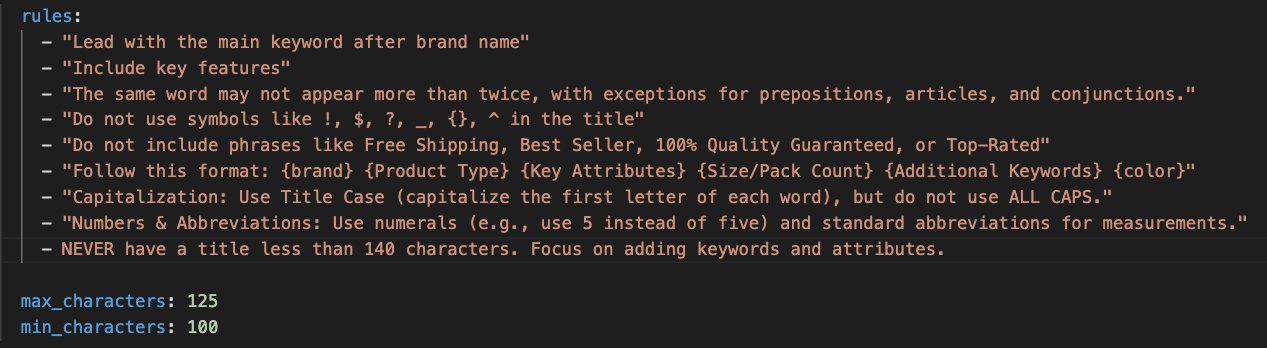
Configuration rules for title generation with a character range validation
The result is a clean division of labor. The ERP keeps running operations, the PIM keeps managing and distributing product information, and Pumice does the heavy enrichment in between, so the integration actually produces complete, customer-ready listings at catalog scale instead of stalling on empty attribute fields.
Conclusion: PIM + ERP Systems
PIM and ERP systems serve distinct but complementary purposes. The ERP streamlines business operations, while the PIM optimizes product data for customer-facing channels. By integrating the two, businesses improve efficiency, deliver better customer experiences, and scale across markets without drowning in spreadsheets. The one piece that is easy to underestimate is enrichment: ERP data is sparse, and turning it into PIM-ready content by hand does not scale. That is exactly the gap the Pumice Merchandising Pipeline fills, so the two systems can do what each does best while your catalog ships complete, accurate, and channel-ready.
Headline: Turn Sparse ERP Data Into Accurate Product Data
Pumice's Merchandising Pipeline takes your ERP export, researches the real attributes from the web, and generates complete, validated, PIM-ready records for every SKU, so your PIM ERP integration produces customer-ready listings instead of half-empty product entries. Bring a sample of 20 to 50 SKUs and watch sparse records get enriched and structured in minutes.
Frequently Asked Questions
What is the difference between PIM and ERP?
A PIM manages product information, such as attributes, images, and descriptions, and distributes it to sales channels. ERP solutions manage back-office operations, such as finance, inventory, procurement, and the supply chain. An ERP runs the business, and a PIM presents its products accurately to customers.
Can a PIM system replace an existing ERP system?
No. They solve different problems. PIM solutions do not handle finance, procurement, or supply chain operations, and an ERP is not built to enrich and distribute customer-facing product content. Most brands run both and connect them.
Do I need both a PIM and an ERP?
Most growing ecommerce and multi-channel brands do. The ERP software keeps operations efficient, while the PIM keeps product data accurate and channel-ready. Smaller catalogs sometimes start with an ERP plus spreadsheets, but that approach breaks down as SKU counts and channels grow. The PIM also allows for scaled data governance across your whole catalog.
How do PIM and ERP integrate?
Through a PIM ERP integration that syncs data both ways: the PIM pulls raw product data (SKUs, prices, specs) from the ERP, and the ERP pulls enriched content (descriptions, attributes, imagery) back from the PIM. The hard part is enriching the sparse ERP data into complete records the PIM can use.
How does Pumice work with PIM and ERP platforms?
Pumice sits between them. Its Merchandising Pipeline takes sparse ERP exports, researches real product attributes from the web, and generates complete, validated, PIM-ready records at catalog scale, so the integration produces customer-ready listings instead of half-empty product entries with few manual tasks.




.png)