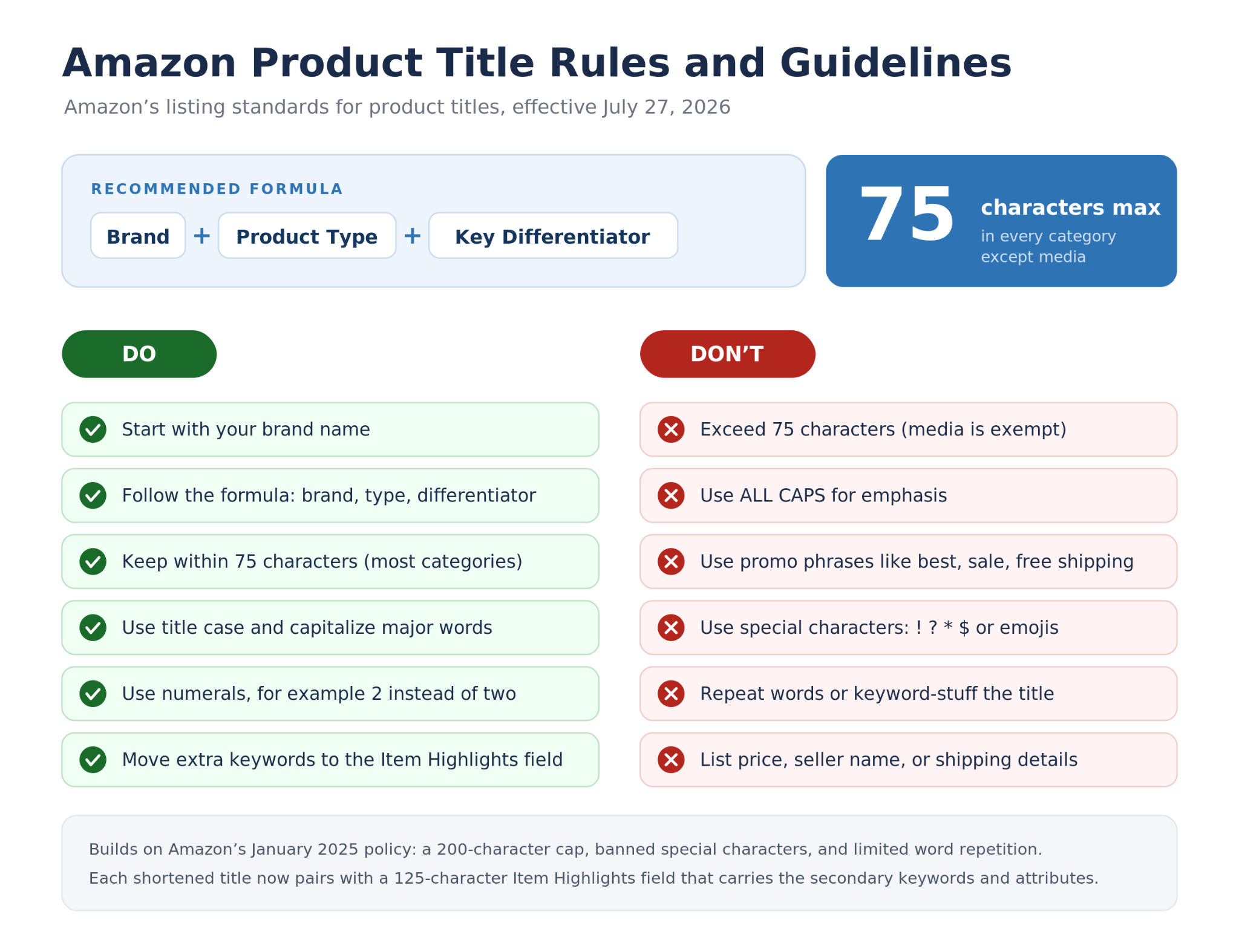
On July 27, 2026, Amazon is changing how product listings work (Amazon). Product titles in every category except media drop to a 75-character limit, and a new field called Amazon Item Highlights appears, giving sellers 125 additional searchable characters that show up directly below the title in search results and on the product detail page. It is similar to the 200 characters of indexable real estate you had before, split into two fields with two different jobs. If you don’t make this change, Amazon will use its Ai to rewrite your fields which can hurt your rankings and conversion rates.
This guide explains what the Amazon Item Highlights field is, what it is used for, the exact rules Amazon enforces, and how you can automate creating it for every product in your catalog to go from weeks to minutes for this change.
Why not just use ChatGPT? ChatGPT doesn't know your product data, key benefits, and will make up features that can lead to listings being removed
Before we dive in, here’s where we’ll focus:
Amazon Item Highlights is a new 125-character, searchable field that appears below the product title in search results and on the detail page, launching with the 75-character title limit on July 27, 2026.
It holds what used to be stuffed at the back of a long title: materials, use cases, size and pack details, certifications, and secondary keywords.
Amazon enforces real rules: a 125-character cap, source-supported details only, no repeated title wording, no promotional fluff, and a block if you use multiple semantically related words, even within the limit. Don’t follow these guidelines - and your products will be killed in search.
If you do not act, Amazon's AI rewrites your title and Item Highlights for you, which can quietly drop your rankings.
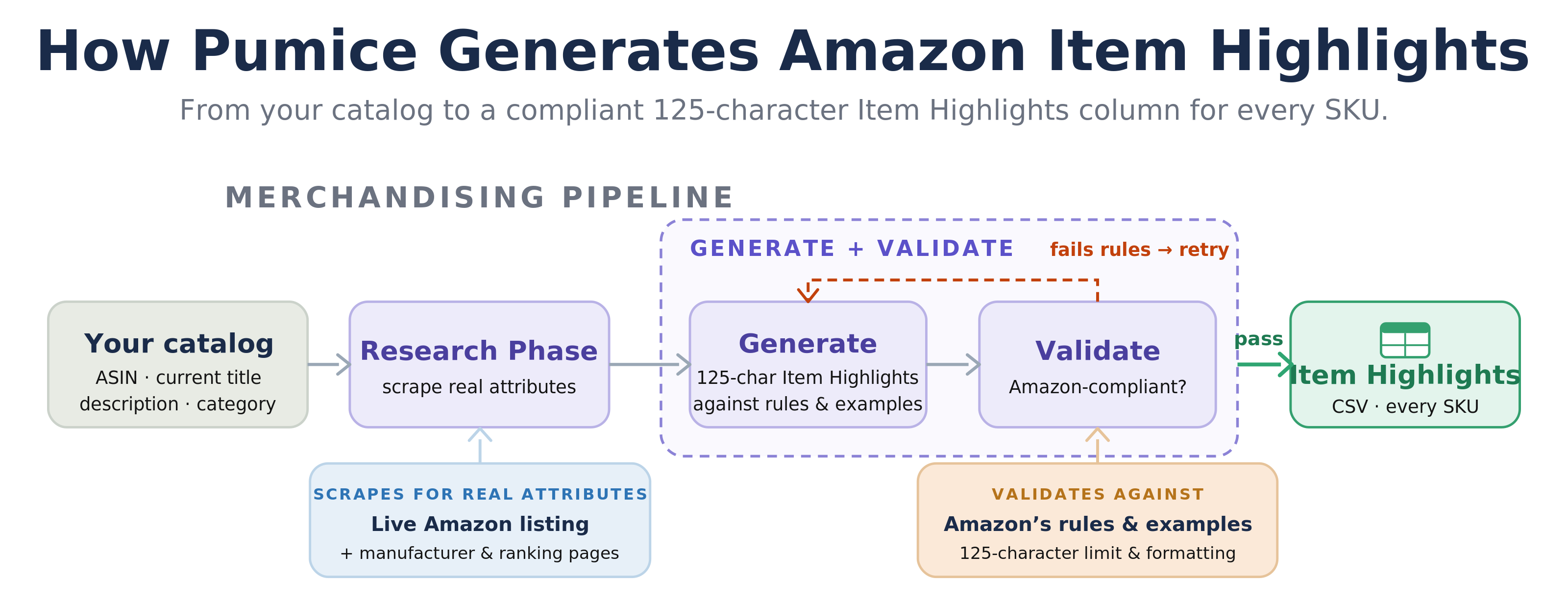
The Pumice Merchandising Pipeline generates a compliant Item Highlights field for every SKU from your current Amazon listings and the web, validated against Amazon's rules at catalog scale.
✂️ Definition
Amazon Item Highlights is a new 125-character, searchable listing field, launching July 27, 2026 alongside the 75-character title limit, that appears directly below the product title in search results and on the product detail page. It holds source-supported details such as materials, use cases, size and pack information, certifications, and secondary keywords that no longer fit in the shorter title.
What Is the Amazon Item Highlights Field?
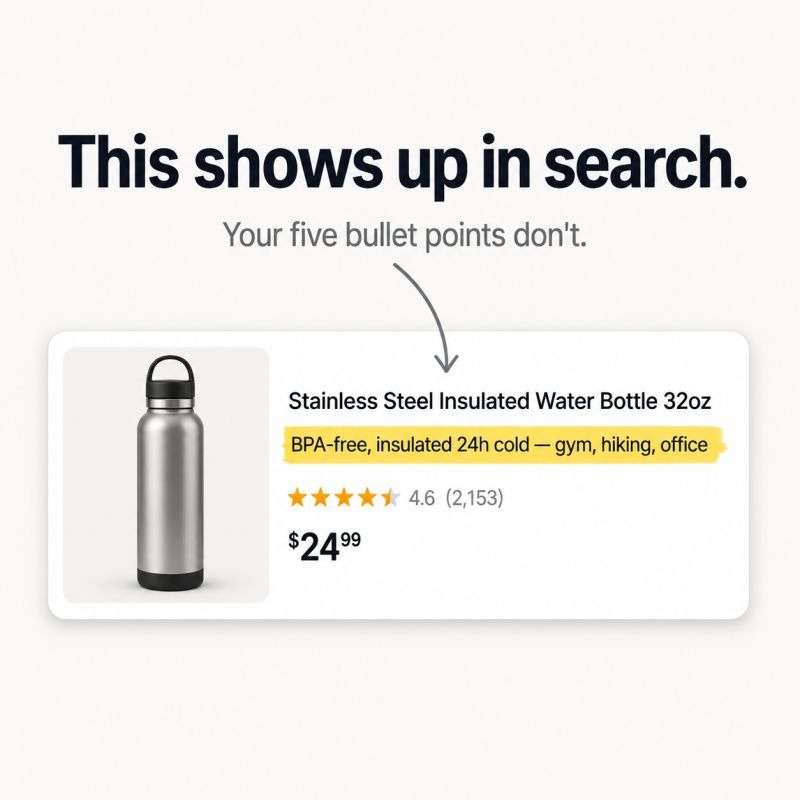
Amazon Item Highlights is a new listing field that gives sellers 125 additional searchable characters. It appears directly below the product title in search results and on the product detail page, making it visible to shoppers rather than hidden like backend search terms. Amazon introduced the field alongside its July 27, 2026 update that limits product titles to 75 characters in every category except media.
The easiest way to think about the change is as a redistribution of listing content. Instead of fitting roughly 200 searchable characters into a single title, sellers now have a 75-character title plus 125 characters of Item Highlights. The title becomes a concise headline, while Item Highlights provides space for supporting details that remain searchable.
This change continues Amazon's broader shift toward cleaner, more structured listings. A January 2025 policy had already imposed a 200-character title limit, restricted special characters, and reduced keyword repetition. Separating titles from Item Highlights is the next step, giving each field a distinct purpose while making listings easier for both shoppers and Amazon's search systems to interpret.
What Amazon Item Highlights Is Used For
Item Highlights is designed for the information that no longer fits comfortably in the title. It typically includes materials, sizes, pack quantities, use cases, compatibility, key features, and relevant secondary keywords. While the title should quickly communicate the brand, product type, and primary differentiator, Item Highlights expands on those details without overloading the headline.
Because the field is both visible and searchable, it serves two purposes. It gives shoppers additional context before they click, particularly on mobile devices, while also providing Amazon's search index with valuable product attributes that may not appear in the title. For products competing on similar primary keywords, these supporting details can help improve discoverability and communicate what makes the listing different.
Completing the field is also important from a competitive standpoint. Early observations suggest Item Highlights is indexed independently from the title and bullet points, so leaving it empty may mean forfeiting searchable space. Amazon may also generate Item Highlights automatically for some listings, making it worthwhile to provide accurate, intentional content rather than relying on default text.
Amazon's Rules for the Item Highlights Field
Just like other fields in the Amazon PDP, Item Highlights are governed by specific listing rules, and failure to follow these guidelines can lead to listings being removed.
Character Limit and Placement
Item Highlights allows up to 125 characters, including spaces. The content is searchable and appears directly below the title in search results and on the detail page. Treat it as compact supporting detail, not full feature-and-benefit copy, since it is shorter than your bullet points and sits in a tight space.
What to Include
Use source-supported details that help a shopper compare options: materials, ingredients, benefits, use cases, compatibility, fragrance, intended audience, size, certifications, pack counts, and other secondary differentiators. Think of Item Highlights as a secondary keyword field, where the modifiers and attributes shoppers filter by belong. A useful test: if a shopper would use a detail to choose between two similar products, it is a good candidate for Item Highlights.
What Is Prohibited
Avoid unsupported claims, keyword stuffing, wording repeated from the title, long sentences, vague promotional phrases, and any sensitive claims that would need review. One rule trips up a lot of sellers: when you use multiple words that are semantically related, Amazon blocks the Item Highlights field even when you are within the 125-character limit. So the field rewards distinct, non-redundant attributes and punishes synonym padding.
How Item Highlights Differs From Bullet Points and Backend Keywords
It helps to place Item Highlights against the fields sellers already know. Bullet points are longer feature-and-benefit copy further down the detail page; Item Highlights is shorter, more compact, and sits right under the title. Backend search terms are hidden keywords only Amazon sees; Item Highlights is public and shown to shoppers. So the field is a hybrid: a searchable place for the secondary attributes that are too important to bury in the backend but no longer fit in a 75-character title.
An Example
A legacy title like “Premium Stainless Steel Insulated Water Bottle Keeps Drinks Cold for 24 Hours, Hot for 12 Hours BPA-Free Leak-Proof Stainless Steel Lid Blue” (140 characters) splits cleanly into the two new fields. The title becomes “Premium Stainless Steel Water Bottle, BPA-Free, 24 oz, Blue with Stainless Steel Lid” (84 characters), and the Item Highlights becomes “Keeps drinks cold 24 hours, hot 12 hours. Leak-proof lid. Dishwasher safe.” (75 characters). Same information, reorganized so the title is a clean headline and the highlights carry the supporting detail.
What Happens If You Do Not Act
After July 27, any title still over 75 characters is gradually updated to Amazon's AI-generated recommendation, and Amazon's Enhance My Listing tool already drafts both titles and Item Highlights from your product attributes. Listings stay active, and brand owners get up to 14 days to review the AI suggestions before they go live. The risk is not suppression, it is that an algorithm rewrites your highest-revenue listings and may drop a primary keyword or a positioning choice you made on purpose. The safer path is to own the rewrite, including the Item Highlights, before Amazon does it for you.
Automate Amazon Item Highlights With the Pumice Merchandising Pipeline
Writing a compliant Item Highlights field by hand is manageable for a few products, but a real bottleneck across a catalog of thousands of ASINs, each with its own attributes and its own title. The Pumice Merchandising Pipeline generates the field for every SKU automatically, validated against Amazon's rules, guidelines and your own internal Amazon SEO practices.
Pumice runs in two phases: an optional Research Phase and a Generation Phase.
Research (Optional): Pull Extra Attributes For Your Amazon Catalog with Live Search of Amazon
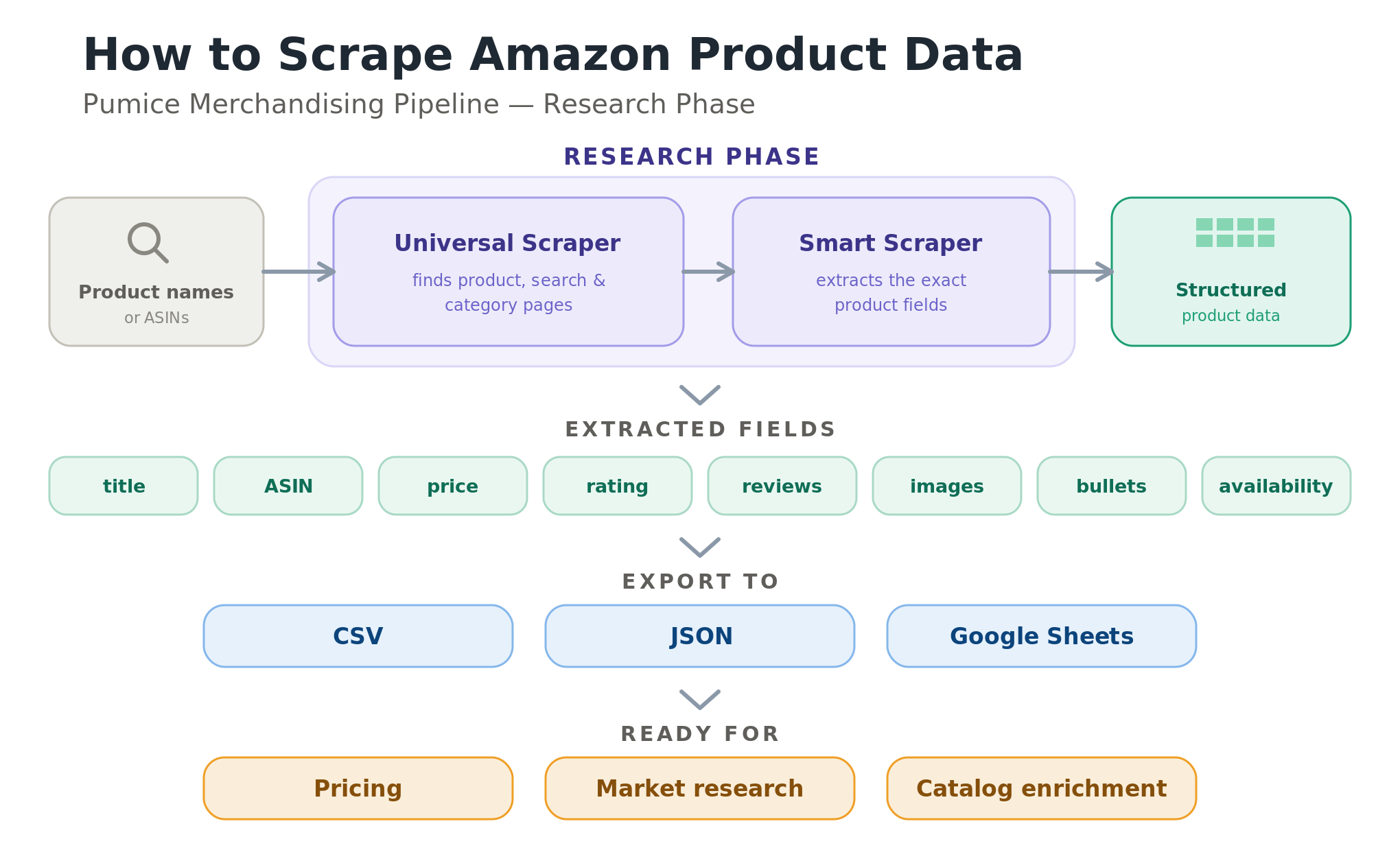
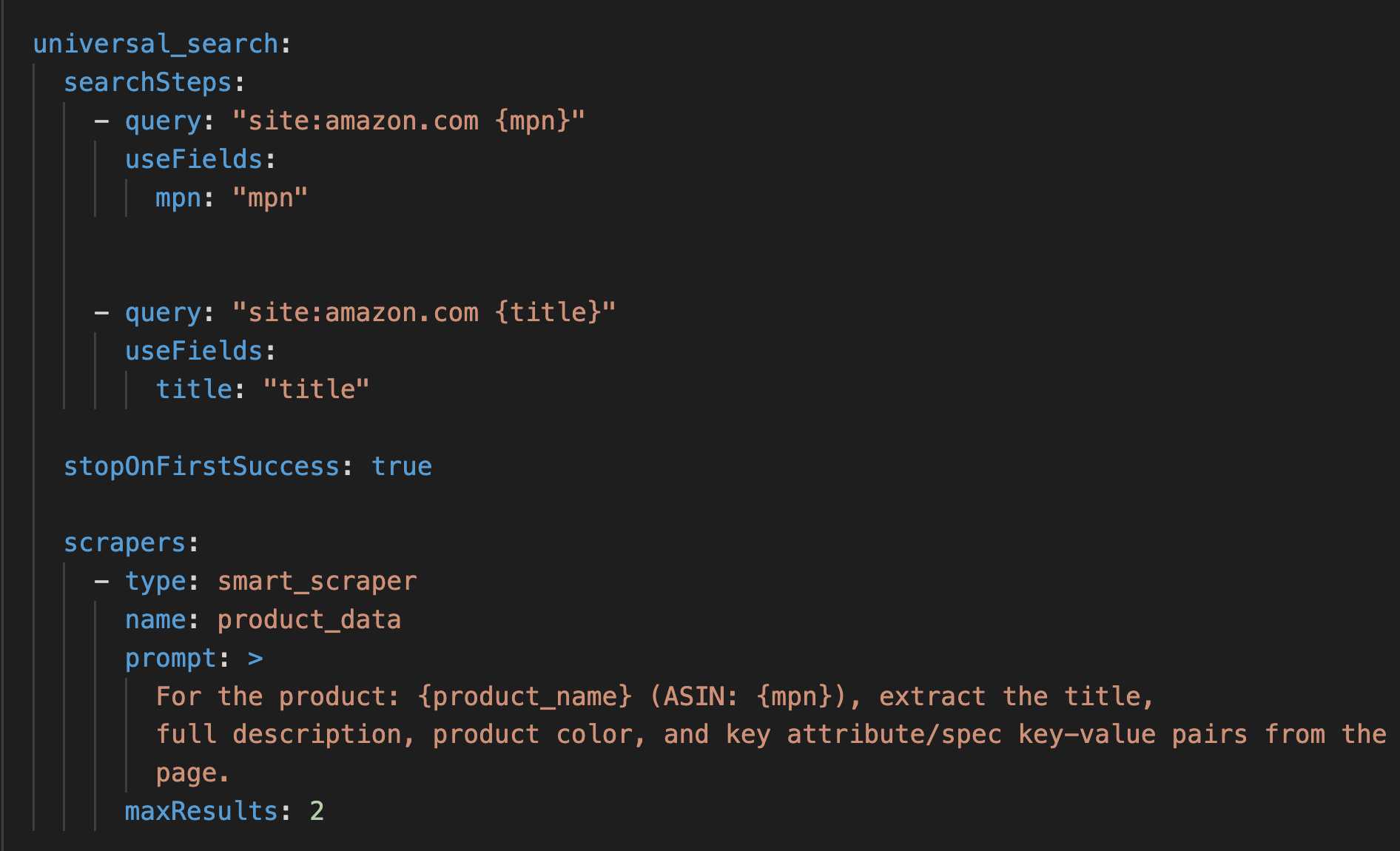
If your product page is already complete, with the materials, specs, and use cases you would want in Item Highlights, you can skip this step and go straight to generation. Run the Research Phase only when you want to enrich a thin listing or pull supporting detail you do not already have in your product listing. When you do run it, the Universal Scraper finds each product by ASIN or name, and the Smart Scraper opens the live Amazon listing plus the manufacturer or top-ranking pages and extracts the real attributes: materials, specifications, use cases, certifications, sizes, and pack counts. A validation agent then confirms the scraped data matches the right product, by brand, category, and core attributes, before any of it flows into generation, so the field is grounded rather than guessed. This matters because Amazon requires source-supported details, and a generic AI prompt like ChatGPT or Claude will happily invent a certification or a material that is not real, so grounding generation in scraped, validated attributes is what keeps the Item Highlights both compliant and accurate.
The Pumice Research Phase configured for pulling product information from relevant ASINs: the Universal Scraper finding a product by ASIN, and the Smart Scraper extraction prompt pulling materials, specs, use cases, and certifications from the live Amazon listing.
Generate: Rules, Examples, and Validation Tuned to Item Highlights
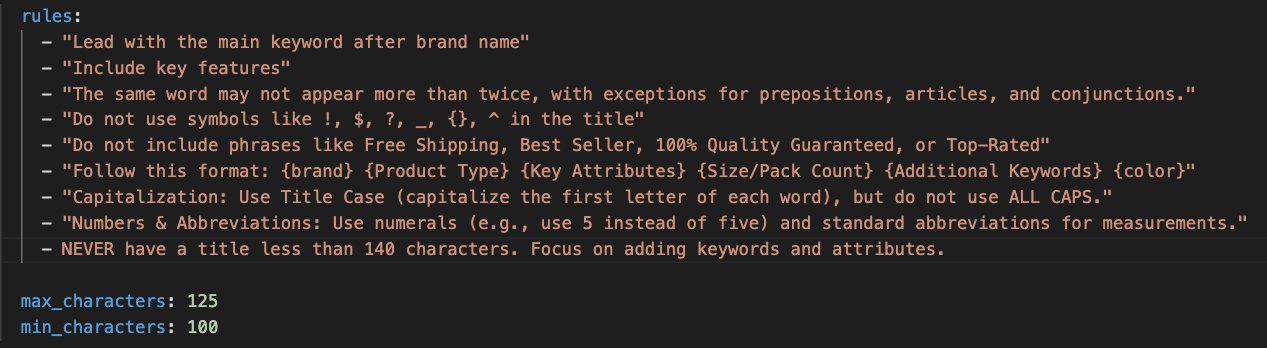
The generation step is where the field is actually written, and for most sellers it is the starting point. It writes the Item Highlights string from your product data, whether that is the attributes already on your complete listing or the validated ones the optional Research Phase added, shaped by rules, examples, and validation. The rules translate Amazon's Item Highlights guidelines into plain language: stay under 125 characters, lead with a material or use case, include only source-supported details, do not repeat any wording already in the title, avoid promotional phrases and unsupported claims, and keep it compact rather than full sentences. Because the generator also receives your current title, it knows exactly which words it cannot reuse. Examples are strong Item Highlights from top-ranking ASINs in your category, which show the model the finished shape the rules describe in words. Running the whole catalog through one shared configuration also keeps the voice consistent, so a thousand SKUs read as one brand instead of a thousand slightly different hand-written attempts.
Snippet of a configuration file for the Item Highlights field with length validations and standard Amazon guidelines provided as rules
Validate Against Amazon's Rules So the Field Is Not Blocked
Validation enforces the hard limits the model must obey: the 125-character cap, no wording repeated from the title, and a check for the semantically related words that cause Amazon to block the field even inside the limit. When a candidate fails validation Pumice will automatically work to optimize the Item Highlight to refit the rules.
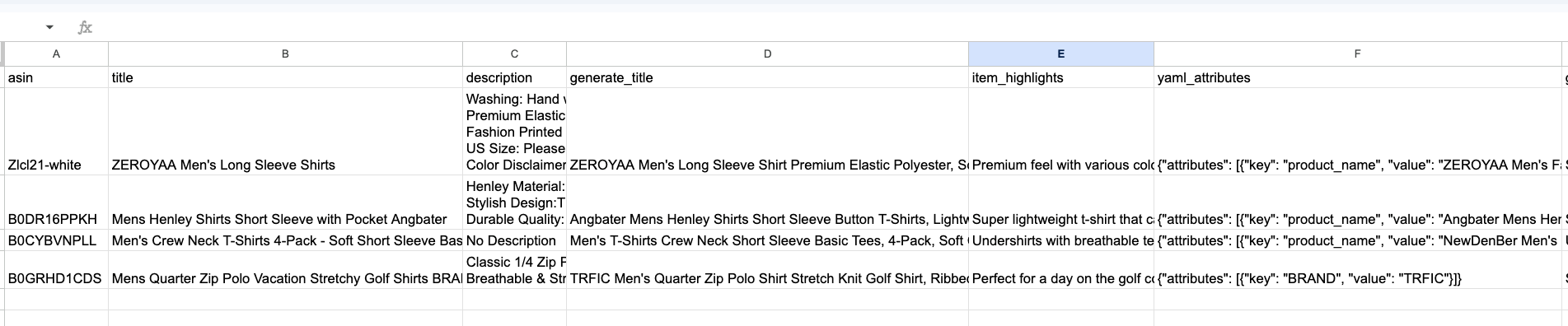
The Pumice output CSV with a new Item Highlights column for each SKU, alongside additional newly generated fields for title and description. Input fields are always returned as well
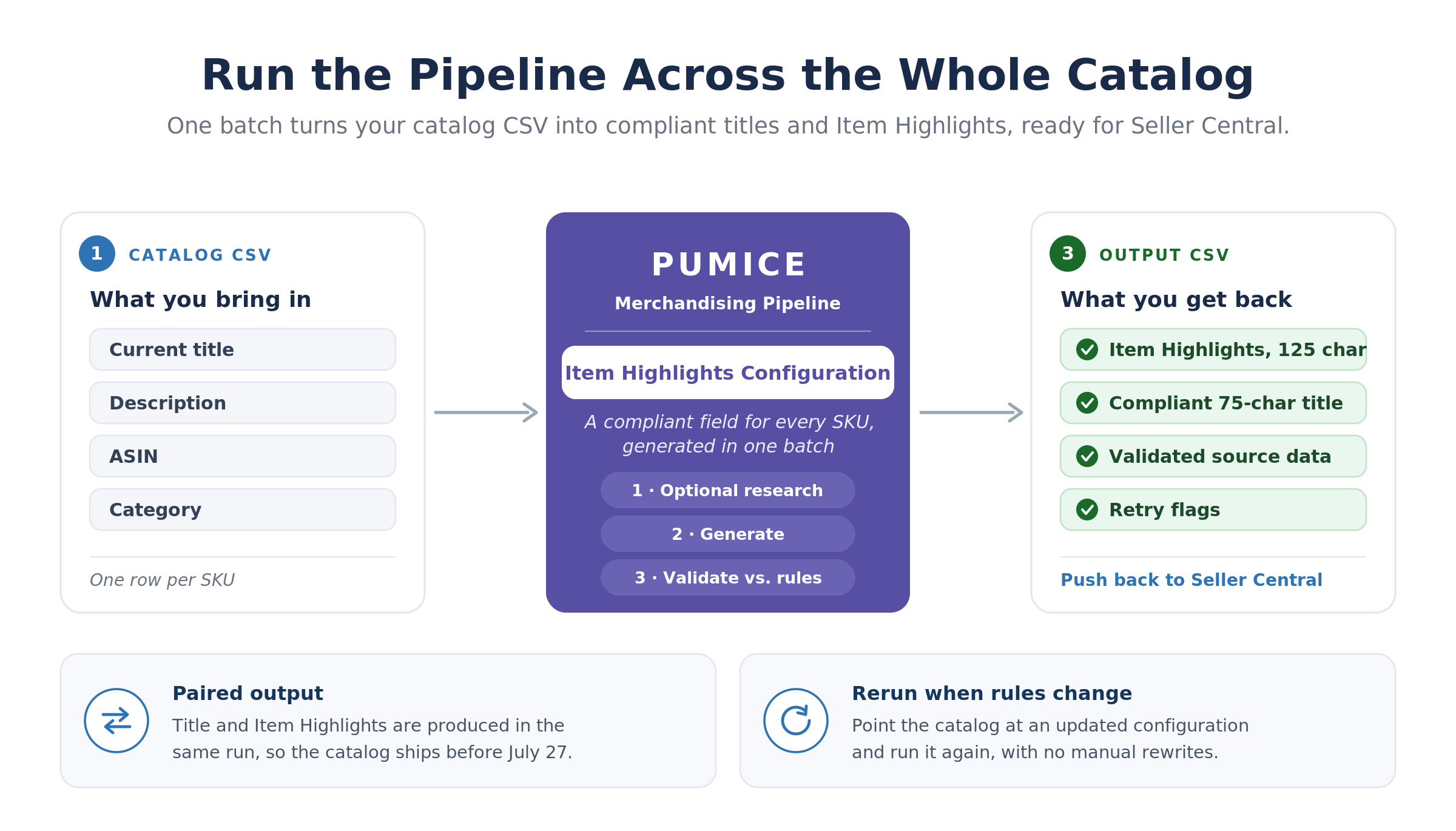
Bring a CSV of your catalog with a current title column, a description column, an ASIN, and a category, point the pipeline at the Item Highlights configuration, and it generates a compliant field for every SKU in one batch. The output CSV carries the new Item Highlights column plus the validated source data and any retry flags, ready to push back to Seller Central. Because the title and Item Highlights are paired in the July 27 change, the same run can produce the compliant 75-character title and the 125-character Item Highlights together, so the whole catalog ships ahead of the deadline and you, not Amazon's AI, decide what each field says. When Amazon's rules change again, you rerun the catalog against an updated configuration.
Different Amazon categories carry different rules, so most teams keep a folder of configurations, one per category, and pass the right one into each run. A grocery configuration can require ingredient and allergen attributes, while an electronics configuration can prioritize compatibility and specs. The pattern is the same in every case: bring a small sample of 20 to 50 ASINs into a first run, check the generated Item Highlights against the products you know best, then scale to the full catalog once the configuration is dialed in. The same setup makes maintenance cheap later, since when you add products, reprice, or change packaging, you rerun only the affected ASINs against the existing configuration rather than rewriting anything by hand.
Conclusion: Own the Field Before Amazon Does
Amazon Item Highlights is a small field with outsized consequences. It is searchable, it is visible next to your title, it carries the secondary keywords your shortened title can no longer hold, and after July 27 it gets written by Amazon's AI if you do not write it yourself. The rules are specific, the 125-character window is tight, and the semantic-redundancy block is easy to trip. Doing it well for one product is straightforward; doing it well for a whole catalog is where the Pumice Merchandising Pipeline pays off, pulling real attributes from your Amazon listings and the web and generating a compliant Item Highlights field for every SKU, validated and ready to publish before the deadline. Get it in place now, and the July 27 change becomes an opportunity to ship cleaner, more searchable listings rather than a scramble to stay compliant.
Fill Amazon Item Highlights for Your Whole Catalog
Pumice's Merchandising Pipeline scrapes the real attributes from your current Amazon listings and the web, then generates a compliant, validated 125-character Item Highlights field for every SKU, with the 75-character title to match, before the July 27 deadline. Free to try, no credit card required. Bring 20 to 50 ASINs and see the field written and validated in minutes. Sign up today.
Frequently Asked Questions
What is the Amazon Item Highlights field?
Item Highlights is a new 125-character, searchable Amazon listing field that appears below the product title in search results and on the product detail page. Amazon introduced it on July 27, 2026 alongside the 75-character title limit to hold the secondary keywords, materials, and use cases that no longer fit in the shorter title.
How many characters are allowed in Amazon Item Highlights?
Up to 125 characters, including spaces. Combined with the new 75-character title, that is roughly 200 characters of searchable content, the same budget sellers had before, now split across two fields with different jobs.
What should I put in Item Highlights?
Source-supported details that help shoppers compare options: materials, ingredients, benefits, use cases, compatibility, audience, size, certifications, pack counts, and secondary differentiators. Treat it as a compact secondary keyword field, not overflow from the title and not full feature-benefit copy.
What is prohibited in Item Highlights?
Unsupported claims, keyword stuffing, wording repeated from the title, long sentences, and vague promotional phrases. Amazon also blocks the field if you use multiple semantically related words, even when you are within the 125-character limit, so use distinct, non-redundant attributes.
Can you automate Item Highlights for a whole catalog?
Yes. The Pumice Merchandising Pipeline scrapes the real attributes from your current Amazon listings and the web, then generates a compliant Item Highlights field for every SKU against rules, examples, and validation that mirror Amazon's guidelines, including the 125-character cap and the no-title-repetition rule. It runs across thousands of ASINs in one batch and flags anything that needs a human look.




.png)