You have a product page live on your site, customers are buying in person or through ads, but organic traffic from Google is practically zero. The problem is rarely just one thing. Product pages face a unique set of challenges that blog posts and landing pages simply don't encounter, from duplicate content across variants to category pages stealing visibility.
This guide walks through the ten most common reasons your product page isn't ranking, with step-by-step diagnostics and fixes tailored specifically to ecommerce.
Key Takeaways
Most "product not ranking" problems fall into four buckets: indexing failures, intent mismatches, weak authority, and unrealistic keyword targeting. Before diving into content rewrites or link building, run three fast checks first.
Is the product actually indexed? Use Google Search Console's URL Inspection tool to confirm Google even knows your product URL exists. If it's stuck in "Crawled – currently not indexed," nothing else matters until you resolve that.
Is a different page on your own site outranking it? Your help centre, blog post, or category page might be stealing impressions for your product name. Check the Performance report in Search Console to see which URL appears for product queries.
Are you targeting realistic keywords? Chasing "running shoes" with a single product page on a new website is a losing battle. Long tail keywords tied to specific features, models, or use cases give product pages a much better shot.
Technical SEO (crawlability, canonical tags, duplicate content) and user experience (page speed, mobile optimization) now heavily influence Google's algorithm for product pages. A noindex tag or a broken canonical can erase a page from search results entirely.
New websites may take weeks to be indexed by Google, and competitive keywords can require months of consistent improvement before stable rankings appear. Expect iteration, not overnight results.
The sections below cover each problem in detail, followed by a prioritized fix list so you know exactly where to start.
First Check: Is Your Product Page Actually on Google?
Before worrying about rankings, confirm that Google even has your product URL in its index. Technical issues can prevent Google from indexing your site, and no amount of keyword optimization helps a page that doesn't exist in search results.
Step 1: Open Google and search site:yourdomain.com "product name". If your product URL doesn't appear, try searching the exact full URL. If both fail, the page likely isn't indexed.
Step 2: Open Google Search Console and paste the product URL into the URL Inspection tool. This shows you the coverage status, last crawl date, and which canonical Google selected. You're looking for "URL is on Google." If it says the page is not on Google, the tool will tell you why.
Use the site: operator to check indexing status quickly, but always confirm with Search Console for the full picture. Index coverage refers to URLs included in Google's index, and your product might be missing from it entirely.
Common statuses you'll see:
Discovered – currently not indexed: Google found the URL but hasn't crawled it yet.
Crawled – currently not indexed: Google crawled the page, evaluated the content, and decided not to index it. Many ecommerce product pages sit in this status for weeks or months.
For example, imagine your help centre article for "Model X Wireless Headphones" is indexed and ranking on page one, but the actual product page at /products/model-x-wireless-headphones is missing entirely. Without fixing the indexing issue first, no other SEO work will move the needle.
Reason 1: Your Product Is Competing With the Wrong Page (or Your Own Site)
Internal cannibalization happens when support articles, blog posts, or category pages outrank your actual product page for the same product name or keyword. Keyword cannibalization can confuse search engines about which page deserves to rank.
Picture this: your help centre at help.example.com/model-x-setup ranks on the first page for "Model X Wireless Headphones," while www.example.com/products/model-x is buried on page four. Google chose the help article because it had stronger internal links, more engagement, or seemed more authoritative for that query.
How to diagnose it: In Google Search Console, open the Performance report, filter by queries containing your product name, and check which URL actually gets impressions and clicks. If it's not the product page, you have a cannibalization problem.
Fixes:
Adjust internal links so category pages, blog posts, and help docs link to the product page as the primary commercial result.
Differentiate titles and meta descriptions: the help article should target support intent ("how to set up Model X"), while the product page targets buying intent ("buy Model X Wireless Headphones").
Consider consolidating overlapping content if two pages serve nearly identical purposes.
Reason 2: Your Product Page Isn't Matching Search Intent
Content must match search intent to rank well on Google. Google's algorithm ranks web pages that best fit what users want when they search, and product pages that miss this alignment get filtered out.
Intent type
Example query
What Google typically shows
Informational
“how do noise cancelling headphones work”
Blog posts, how-to guides
Navigational
“Bose QC Ultra official page”
Brand website, product page
Transactional
“buy Bose QC Ultra”
Product pages, retailer listings
Commercial investigation
“best noise cancelling headphones 2026”
Comparison guides, listicles
Transactional is the only row a product page wins on its own. The other three need a different page type, which is why a product page that ranks for nothing often turns out to be aimed at a query it was never going to win.
A Wix Studio AI Search Lab study of 75,000 AI answers found that listicles dominated citations for commercial queries (~40%), while product pages performed best for transactional and navigational contexts.
What to do: Search your target keywords in Google and study the top 10 results. If competitors rank with comparison tables or long-form reviews while you only have a thin product detail page, Google sees your page as the wrong format. Product pages should provide information that matches search intent to rank effectively.
Create distinct pages for each intent: a detailed product page for buying queries, a comparison guide for "best" and "vs" searches, and FAQ or how-to content for post-purchase questions.
Reason 3: Technical Issues Block Google From Crawling or Indexing the Product
About 23% of ranking issues stem from crawling problems. These are not content problems-they're infrastructure problems that prevent Google from even seeing your product.
Common technical culprits:
Robots.txt blocks: Your robots txt file might disallow /product/ paths or faceted navigation URLs, blocking Google in robots.txt and stopping indexing entirely.
Noindex tags: A noindex tag prevents Google from indexing a page. This often appears after a theme or platform migration when templates carry over incorrect meta directives.
Server errors: 404 and 5xx server errors on product URLs tell Google the page doesn't exist or isn't reliable.
Staging environments: Password-protected staging servers that accidentally go live without removing access restrictions.
In Google Search Console's Page Indexing report, look for statuses like "Alternate page with proper canonical tag" or "Duplicate without user-selected canonical." These indicate that canonical tags might be pointing to a category page instead of the specific product URL, causing Google to ignore the actual product page.
Technical SEO problems are invisible to your customers but devastating to your online visibility.
Reason 4: Weak or Confusing Internal Links to the Product
Internal links are how Google discovers, prioritizes, and understands product pages within your site structure. Internal linking helps Google discover and evaluate the importance of pages, and weak linking leaves products orphaned.
Problems to look for:
Orphaned products with zero internal links from categories or blog content
Deep click depth (5+ clicks from homepage to reach the product)
Vague anchor text like "Item 8472" or "click here" instead of descriptive phrases
Recommended site structure: Home → Category → Subcategory → Product. Every product should be linked from at least one crawlable category page and one related content piece.
Add links from high-authority pages on your site (popular blog posts, buying guides, homepage featured sections) to priority products using descriptive anchor text that reflects your target keywords. Strong internal linking also helps Google pick the correct canonical when multiple URLs contain similar content for the same product.
Reason 5: Your Keywords Are Either Too Competitive or Too Vague
Many product pages fail because they chase broad, competitive keywords instead of realistic, purchase-ready phrases. Targeting the wrong keywords can hinder your rankings regardless of how good your product page content is.
The difference matters:
❌ "running shoes" - dominated by Nike, Amazon, and major retailers
Keyword research should focus on user intent and search volume. Use Google Search Console's queries report to find the right search terms customers actually use. Long-tail keywords often attract more targeted traffic with less competition.
Look at what search terms already generate impressions for your product in the Performance report. If you're getting impressions for "2026 4K 120Hz gaming monitor under $500" but zero for "4K monitor," that tells you where your realistic opportunity lives.
Align each product page with one to three primary keyword themes that match its unique value. Avoid keyword stuffing-scattering generic phrases across every page dilutes signals and can trigger penalties. Google penalizes sites using black-hat SEO techniques, including aggressive keyword stuffing.
Reason 6: Thin, Generic, or Duplicate Content on the Product Page
Google values unique content that effectively addresses buyer needs for top rankings. Thin or duplicated content across multiple sites results in poor rankings, and product pages are among the worst offenders.
Common content problems:
Manufacturer-copied descriptions used verbatim across hundreds of retailer sites
Only a few bullet points with no supporting details
No user-generated content like customer reviews
Same product listed under multiple URLs for colour or size variants without proper canonical tags
Pages with low-quality or duplicate content may be excluded from Google's index entirely. Google prioritizes content that provides substantial, useful information, and a product review ranking update raised the bar for authenticity.
How to fix it:
Write original product descriptions with specs, sizing, compatibility, use cases, and comparisons to older models
Add FAQs specific to that product
Include real customer reviews (customer reviews improve trust and engagement metrics, which help SEO)
Use original photos or video content instead of stock manufacturer images
Clear and descriptive product titles help improve SEO performance
Implement schema markup to give Google structured information about your product details (pricing, availability, reviews)
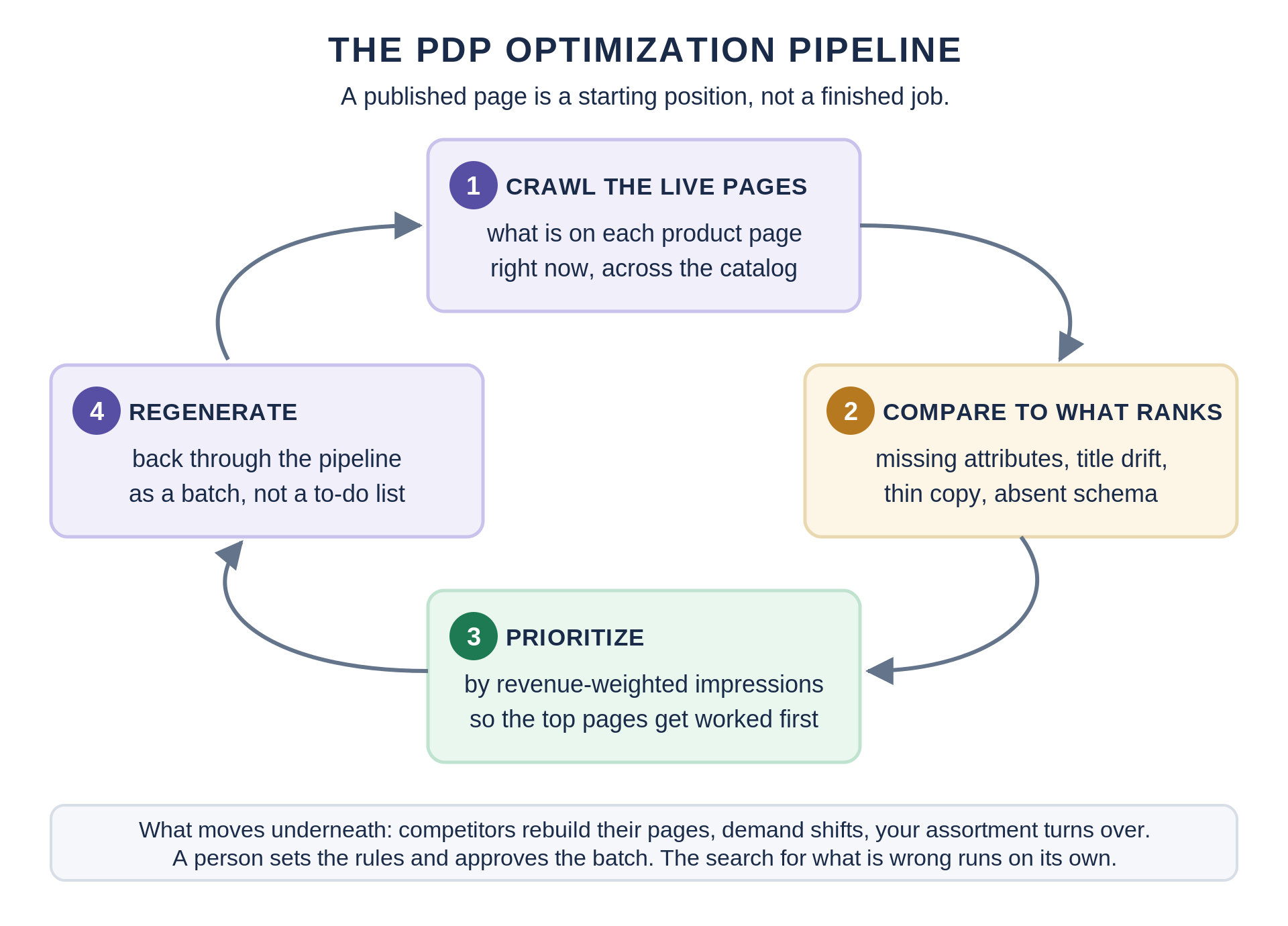
Doing all of this for one product is an afternoon. Doing it for a catalog is where most teams stop, which is why manufacturer copy survives on so many retailer sites. This is the problem Pumice's PDP optimization pipeline is built for: it crawls your live product pages, compares each one against the pages currently ranking for that product's terms, and reports the specific gaps, whether that's missing specs, description copy duplicated from the feed, or absent schema. The rewrite becomes a batch job instead of a backlog nobody gets to.
Reason 7: Your Site (or Product) Lacks Authority and Trust Signals
Even a well-optimized page struggles if the domain and product have little trust compared to established competitors. Lack of backlinks can lead to poor search rankings for product pages, and authority remains one of the strongest ranking factors in ecommerce.
The data is clear: pages ranking in position 1 have 3.8x more backlinks than position 10. Quality backlinks significantly enhance website authority and rankings, and links from reputable websites build authority around your site. A strong backlink profile can improve your site's credibility with Google.
E-E-A-T for product pages:
Display clear company information and contact details
Show expert reviews or endorsements
Include detailed shipping, return, and warranty policies
Use transparent pricing with no hidden fees
For YMYL product areas (health supplements, financial tools, safety equipment), Google expects stronger credentials and external trust signals before ranking product pages. High-quality content attracts more backlinks, improving rankings over time.
Authority-building strategies: PR coverage for flagship products, influencer reviews, partnerships with industry publications, and earning links from niche-relevant sites. Don't rely solely on traditional SEO or on-page work.
Reason 8: Slow, Frustrating User Experience on the Product Page
Mobile-friendly and fast-loading sites are prioritized by Google. Slow-loading websites frustrate users and search engines alike, and Google's Core Web Vitals include page speed as a ranking factor. Core Web Vitals-Largest Contentful Paint (LCP), Cumulative Layout Shift (CLS), and Interaction to Next Paint (INP)-directly influence where your product pages land in search results.
Slow-loading images and a poor mobile layout hurt rankings in Google. When your main product image takes over four seconds to load on a 4G connection, bounce rates climb and Google takes notice. Poor user experience can lead to decreased customer satisfaction and lost sales.
Common offenders:
Heavy scripts from review widgets, chat tools, and tracking pixels
Uncompressed product images
Render-blocking JavaScript on mobile
Practical fixes:
Compress product images and use modern formats (WebP, AVIF)
A website needs to be easy to navigate for better user experience. Clean layouts, readable typography, clear CTAs, and non-intrusive pop-ups support better engagement signals. Mobile optimization is crucial for a positive user experience, especially since most ecommerce browsing now happens on phones.
Reason 9: Local SEO and Google Business Profile Are Working Against You
For small businesses that sell products locally-retail stores, service-plus-product companies-local SEO plays a significant role in product visibility. A well-optimized Google Business Profile can outrank your website product page for branded or product-plus-location searches like "Acme Bikes city commuter 2026 Chicago."
Issues that dilute product visibility:
Incomplete profile with missing business details
Inconsistent business name or address across citations
Wrong website URL linked from the profile
No products or categories added inside the profile
Fixes: Link your Google Business Profile to the most relevant local landing page, add products and categories inside the profile, and ensure NAP (Name, Address, Phone) consistency across all citations. Accurate and detailed product feeds are vital for Google Shopping visibility, and your local presence should reinforce your product pages rather than compete with them.
When local SEO is weak, competitors with stronger profiles and hyper-local content win for product-related searches in your city-even if your product page is decent. Local results can dominate the first page and push organic product listings down significantly.
Reason 10: Your Site Is New or Recently Redesigned
A new website launched in 2025 or 2026 will not instantly rank against domains that have built authority since 2010. New websites may take days to weeks to be indexed, and several months to gain stable rankings for broader queries.
Common redesign and migration issues:
Missing 301 redirects from old product URLs to new ones
Lost internal links that previously pointed to products
Templates that accidentally add noindex tags or incorrect canonicals
Dramatically changed URL structures on platforms like WordPress or Shopify
Use Search Console's Performance and Page indexing reports to compare your website's performance before and after a redesign. If coverage errors spiked or impressions dropped suddenly, the migration likely broke something.
A platform switch can quietly wipe out years of SEO equity if redirects and canonicals aren't handled correctly.
Focus on consistent improvements-content, links, UX-rather than expecting overnight rank recovery. Submit your XML sitemap in Search Console and request indexing for priority product URLs to speed up discovery.
Diagnosing: Step-by-Step Process to Find Why a Specific Product Isn't Ranking
Here's a checklist you can follow for any single product URL:
Check indexing in Google Search Console using the URL Inspection tool
Identify which URL ranks for your product queries in the Performance report
Compare your page to the top 10 competitors for that keyword (format, depth, content, reviews)
Mini example: Your page /products/solar-backpack-2026 is indexed but doesn't rank for "solar laptop backpack." The Performance report shows impressions going to your blog post "Best Solar Backpacks 2026" instead. The blog has 12 internal links; the product page has one. Fix: add descriptive internal links from the blog, category page, and homepage to the product page.
Document findings in a simple table mapping each issue to a priority fix. Regular SEO audits can help identify and fix issues affecting product page rankings across your catalog. Run original research on your own data-Search Console is full of it.
Start with your top five revenue-generating products, apply this diagnostic framework, then scale to the rest of the catalog.
Scaling that last step is the part worth planning. The checklist above is roughly ten minutes per URL, which is reasonable for five products and impossible for five thousand. Pumice runs the same comparison as a pipeline: every product page is checked against the pages currently ranking for its terms, and what comes back is a prioritized list of specific gaps per URL rather than a single score. Sorting that list by revenue-weighted impressions puts the pages that already earn impressions and lose the click at the top of the queue, which is usually where the fastest wins are.
What to Fix First If Your Product Isn't Ranking
Not every issue needs fixing at once. Here's a prioritized approach for limited budgets and teams:
Submit corrected URLs and request indexing through Search Console
Next priority (weeks 2–4):
Align pages with correct intent and format (detailed product content, clear transactional focus, FAQs)
Ensure target keywords are realistic for your current authority
Optimizing metadata like title tags and meta descriptions can improve click-through rates
Add quality content that differentiates your page from competitors
Medium-term (months 1–3):
Strengthen internal links from core categories and top blog posts
Improve page speed and mobile optimization
Build backlinks-start with a few targeted links to key products or their categories
Add structured data and schema markup for enhanced search results
After four to twelve weeks, re-check Google rankings, impressions, and clicks in Search Console to measure which changes had the biggest impact on organic traffic.
One note on sequencing if your catalog is large. The order above assumes someone is working through products one at a time. If the list is long enough that it never finishes, invert it: run the diagnostic across everything first, then let the findings decide the order rather than the calendar.
Final Thoughts
The most common reasons a product page doesn't rank in Google come down to indexing failures, content that doesn't match what users want, weak internal and external link signals, and unrealistic keyword targeting. Pages must clearly signal relevance and quality to rank well in search results, and that requires systematic work rather than guesswork or aggressive tricks.
Start with a small group of high-value products, run the diagnostic process above, and let the data from Google Search Console and Google Discover impressions guide your next moves. An effective SEO strategy for product pages is iterative-improve, measure, adjust, repeat.
Google's algorithm and user behavior will keep evolving through 2026 and beyond. The sites that maintain strong website SEO fundamentals-quality content, clean technical foundations, genuine authority, and great user experience-will be the ones whose products consistently appear in front of potential customers.
Run This Diagnostic Across Every Product, Not Just the Top Five
Send us a crawl of your live product pages. We will run the comparison against the pages currently ranking for each product's terms and hand back the gaps per URL: missing specs, duplicated feed copy, title drift, absent schema, sorted by the pages losing the most impressions.
PDP optimization
Run this diagnostic across every product, not just the top five
Send us a crawl of your live product pages. We will run the comparison against the pages currently ranking for each product's terms and hand back what is missing, per URL.
Specs and attributes the ranking pages carry and yours leaves blank
Description copy duplicated from the manufacturer feed across every retailer
Title drift against the terms shoppers are actually searching now
Missing or invalid Product schema, sorted by the pages losing the most impressions
These questions address product-specific ranking issues not fully covered in the sections above.
Why is my product page indexed but not ranking on the first page?
Being indexed only means eligibility to appear in search results-it doesn't guarantee ranking. Check whether another page on your domain (a category page, blog post, or help article) is outranking your product for the same search terms. Improve on-page content, strengthen internal links to the product page, and build authority before expecting top-page positions. For highly competitive keywords, even strong product pages may sit on page two or three until more domain authority and backlinks are built.
How long does it take a new product to rank on Google?
Expect a few days to be crawled and indexed for low-competition model numbers, but several weeks to months for stable rankings on broader queries. Factors that speed things up include submitting sitemaps in Search Console, strong internal links from established pages, and publishing on an already trusted domain. Monitor impressions and average position in Search Console rather than expecting instant top-three visibility.
Can a product rank in Google without backlinks?
Yes, for low-competition product queries like specific model numbers or niche use cases, minimal or no backlinks can be enough. But in competitive markets (electronics, fashion, supplements), backlinks and overall domain authority become increasingly important. Focus on high-quality on-page work first, then selectively build links to your most profitable products. Internal links from strong service pages and blog posts on your own site act as "internal backlinks" and can partially offset low external link counts.
Why does my product rank when I search my brand name but not generic keywords?
Ranking for your own business name is easier because there's far less competition for that exact phrase. Generic queries like "office chair" or "gaming keyboard" pit you against massive retailers and established brands with far more authority and backlinks. Build pages and content around more specific, intent-rich phrases tied to features, use cases, or locations to gain traction. As you build brand awareness and authority over time, Google becomes more willing to show your products for unbranded, competitive keywords too.
Should I create separate pages for very similar product variations?
Too many near-duplicate pages (colour-only or minor spec changes) dilute ranking signals and cause duplicate content issues. Use a single product page with selectable variants where possible, or canonical tags pointing to a primary variant page. Exceptions exist when variants have distinct search demand-for example, "2026 solar backpack 30L" versus "2026 solar backpack 50L" may each deserve their own page. Base the decision on search data: if users search differently for each variant, separate optimized pages may be justified; otherwise consolidation is safer for rankings.







.png)