
SEO for Wholesale Distributors: The 2026 Playbook for Reseller Buyers and Bulk Orders
The 2026 playbook for wholesale distributor SEO: reseller queries, MOQ pages, wholesale marketplaces, Pumice at scale.
Matt Payne
September 8, 2026
More than 60% of US online shoppers start their product search on Amazon (eMarketer), not Google, which makes Amazon the place where ecommerce demand, pricing, and reviews are effectively decided. That is exactly why teams scrape Amazon product data: the structured prices, titles, ratings, and specs behind those listings are the single richest dataset in ecommerce for pricing and market analysis. This guide is informational: it covers why teams scrape Amazon product data, exactly what you can collect, the DIY approach and where it breaks, and the cleaner way to do it with an ai native system that works for all Amazon URLs.
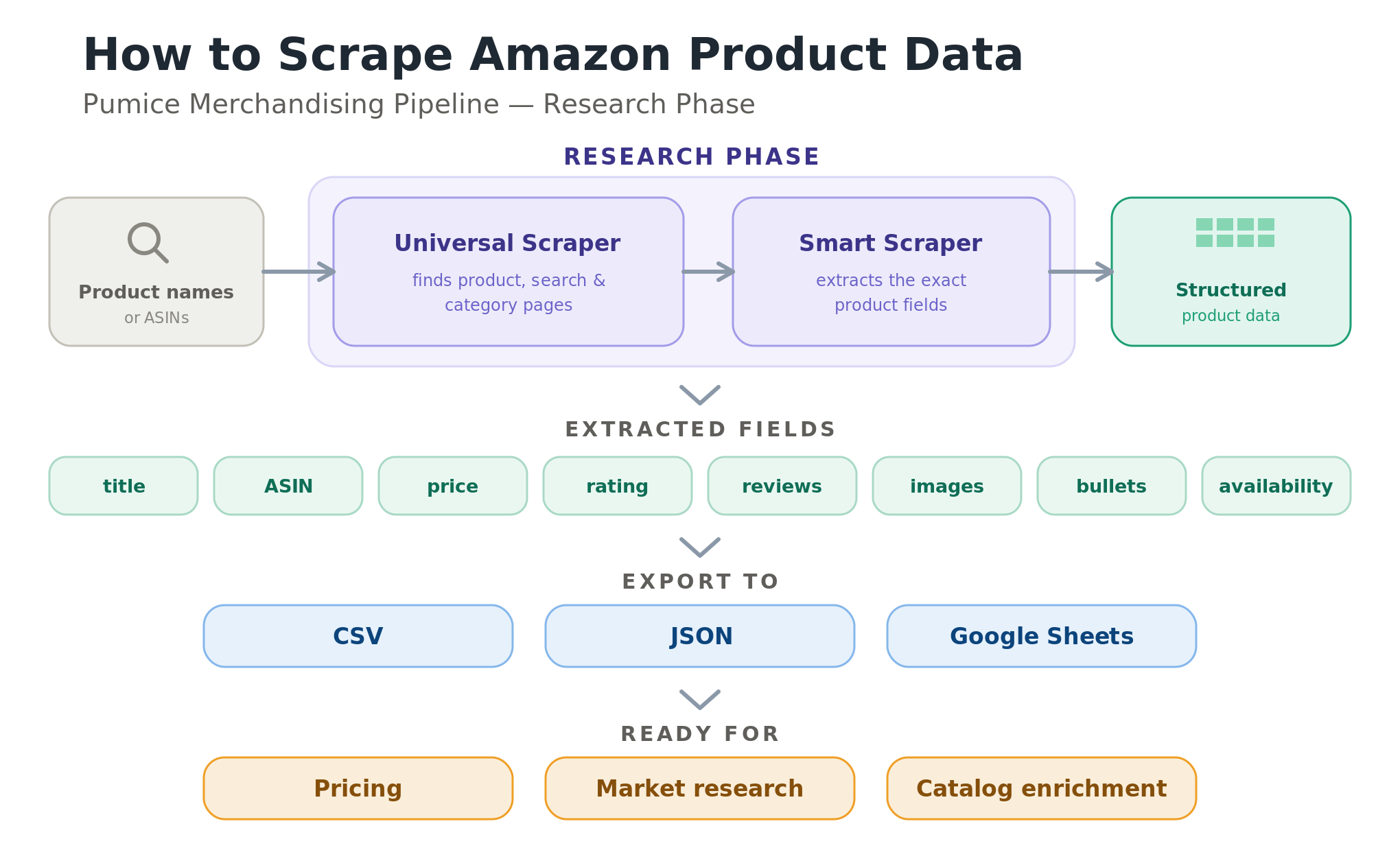
Before the deep dive, here is what this guide will leave you with:
Teams scrape the Amazon domain because it is the largest open dataset of real prices, ratings, and product details in ecommerce. The most common reasons are competitive and dynamic pricing, where you track competitor prices to set your own; market research and trend detection across categories; assortment and gap analysis to find products you do not yet carry; and catalog enrichment, where Amazon's titles, bullet points, specs, and images fill out your own thin product pages. Each of these workflows depends on the ability to extract product data reliably and at scale, whether you are monitoring headphone prices through a holiday season or pulling bestseller data for a quarterly market report.
Done well, scraping product data turns Amazon into a live feed of pricing and demand signals. Retailers use it to implement dynamic pricing, repricing their own SKUs as competitors move; merchandisers use it to study competitors' pricing strategies and find assortment gaps; and analysts mine the same data from Amazon for valuable insights into demand, seasonality, and which categories are heating up. The raw scraped data is only as useful as it is complete and current, which is why how you collect it matters as much as what you collect.
When teams say Amazon product data, they mean a specific set of fields on each product detail page: the product title, the product ASIN (Amazon's ten-character unique identifier), the product URL, the product price, availability or stock status, the product rating, the review count, the product image URL, the “About this item” bullet points, and the long product description. Store the ASIN with every row, because it de-duplicates your data from Amazon and lets you re-fetch a product later by its ID. Each field maps to a column in your output, and together they describe a product well enough for pricing, market analysis, or re-listing on your own store.
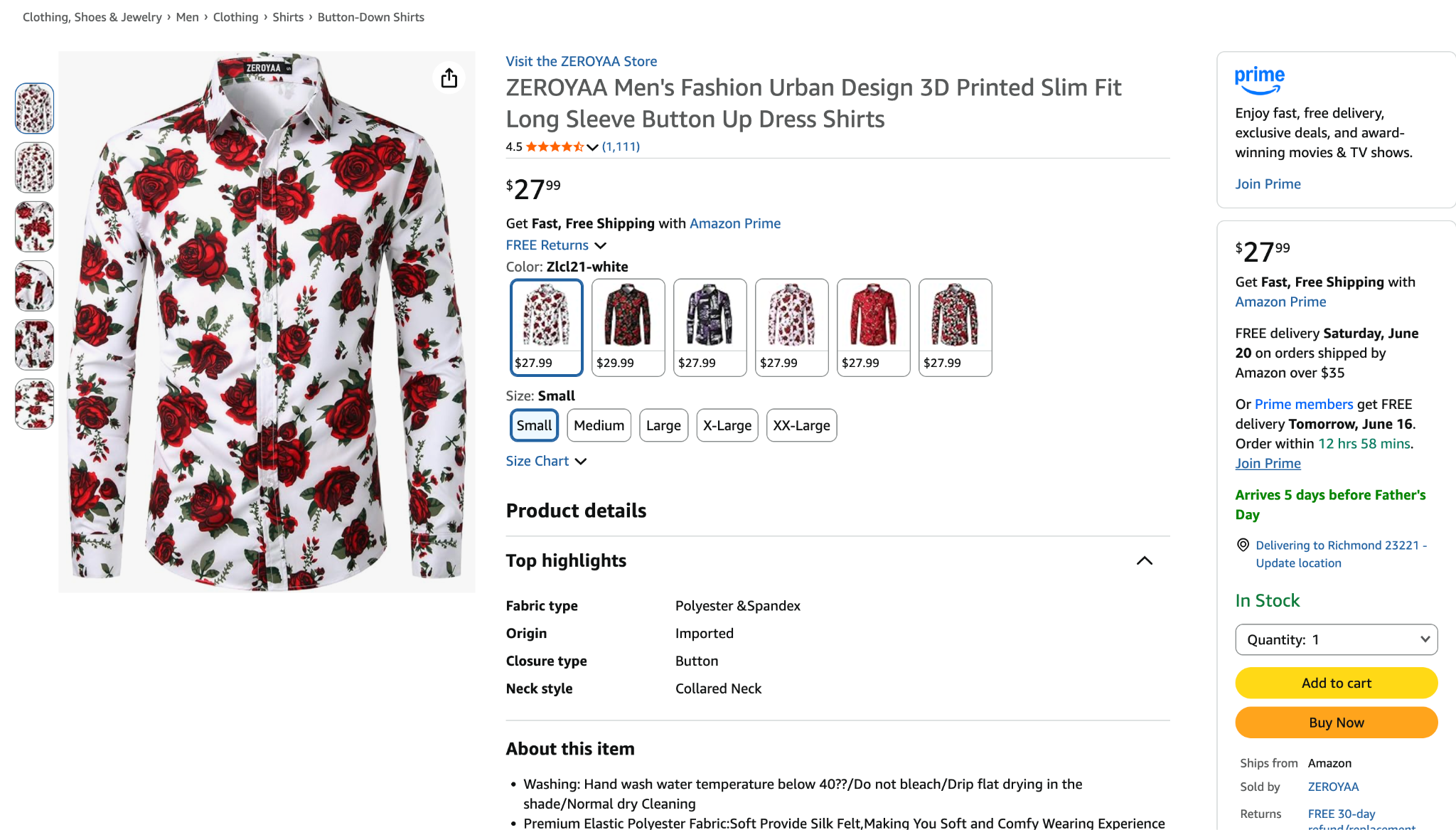
Beyond single product pages, you can scrape Amazon search results and category pages. A search query like “wireless earbuds” returns product listings in compact cards, each with a title, price snippet, rating, and thumbnail, plus a data ASIN attribute and a product link you can follow to scrape more data. Scraping a category page or search results is the fastest way to build a dataset of many products before pulling full details for each one.
Deeper fields are available too, though they take more work: seller information, the Buy Box price, product availability, delivery estimates, multiple product images, and the structured product descriptions and specs under the listing. Most teams start with the core fields across many amazon listings, then retrieve data on the deeper fields only for the multiple products that matter, since pulling everything for every SKU multiplies both the request volume and the cost.
The do-it-yourself route is a Python script that downloads a page and parses it. It is worth understanding even if you never ship it, because it shows exactly what a managed tool has to handle for you.
Most DIY web scraping tutorials reach for the same Python libraries: the requests library to send requests to Amazon, and BeautifulSoup to parse the HTML. The easier solution many of them recommend next is an Amazon scraper API, a third-party service that returns amazon data without manual parsing. Both paths run into the same wall, which is everything Amazon does to stop automated access.
A scraper sends an HTTP request for a product page and reads the HTML that comes back. Sent bare, those requests usually return a 503 error, because Amazon inspects headers and patterns. To look like a real browser you set realistic headers, including a believable user agent string and an accept language value, and you add random delays between requests. This raises your success rate, but it is a constant cat-and-mouse game, and a single IP making repeated requests still gets blocked.
Once a page loads, a library like BeautifulSoup turns the HTML into a soup object you query with CSS selectors, for example reading the title from a span with the id productTitle or the image from the src attribute of the main image. The catch is that Amazon changes its HTML structure often, so the selectors that work today silently return nothing tomorrow. Every field you scrape, price, rating, review count, bullet points, becomes a selector you have to monitor and fix.
Scraping a search or category page means selecting the product containers (the elements with a data-asin attribute), reading each product title and product link, then following those links for full details. Amazon paginates with a page parameter, but many search queries only expose roughly seven to ten pages of results before they cap or loop, so you cannot simply page to the end. You end up combining categories and search queries to reach more product listings and the related searches Amazon surfaces.
At any real volume, Amazon's AWS WAF, CAPTCHAs, device fingerprinting, and IP blocking force you into rotating residential proxies, request throttling, and exponential backoff. Then you still have to clean the values, convert prices to numbers, and write everything to a CSV file or JSON for analysis in Excel, Google Sheets, or a BI tool. A custom Amazon scraper is fine for personal use or a one-off run of twenty to fifty products. It becomes a maintenance liability the moment you need thousands of pages on a schedule - rarely mentioned in a video tutorial or blog post.
The Pumice Merchandising Pipeline is built to collect and enrich product data at catalog scale, and its Research Phase is the part that does the scraping. Instead of writing and babysitting a custom scraper, you configure a run that uses two endpoints: the Universal Scraper to find the right Amazon pages, and the Smart Scraper to extract the exact fields you need. Pumice handles the headers, proxies, anti-bot measures, and HTML changes behind the scenes, so you define what you want rather than how to fetch it. The result is the same structured product data a custom scraper would produce, without the script, the proxy pool, or the weekly breakage when Amazon ships a layout change.
The Universal Scraper handles discovery. Give it a product name or an ASIN and it finds the matching Amazon product page, search results, or category page, the same job your DIY script does when it loops through search containers and follows product links, without the pagination limits and selector fragility. Point it at a list of product names from your catalog or a list of ASINs you already track, and it returns the product pages ready to extract. Because discovery and extraction are separate steps, you can find thousands of products once and then re-extract their fields on a schedule, without re-running the search every time you need fresh prices.
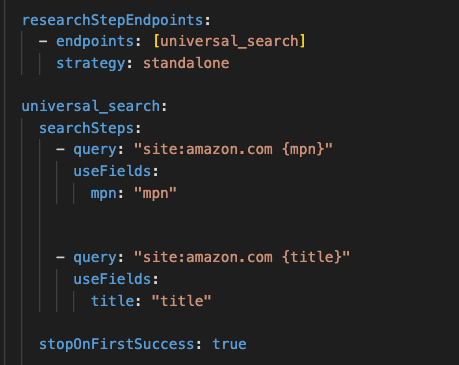
This configuration driven approach allows you to scrape other websites with a simple switch of the “site:” tag.
The Smart Scraper handles extraction. Rather than writing a brittle CSS selector for every field, you tell it, in plain language, exactly what to pull from each page: product title, ASIN, price, availability, rating, review count, image URLs, bullet points, and the full description. It returns structured product data in a consistent schema, as JSON or rows ready for a CSV file, even when Amazon changes its underlying HTML. Because you describe the fields you need, you get only the data you want, with no parsing code to maintain. You can also ask it for a sample response on one product first, confirm the fields look right, then run the same configuration across your whole list.
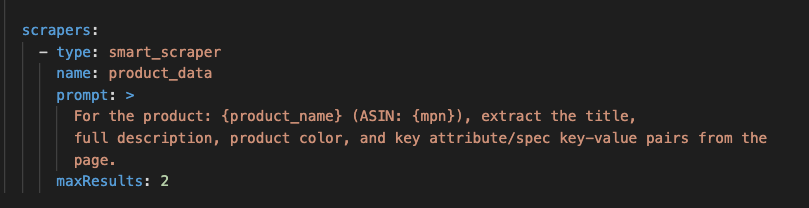
Upload your CSV of products and your configuration file and just hit run! It will return the same CSV columns plus your new ones containing the scraped data for each product. Our product matcher ensures that the scraped results are actually the same ASIN as the row provided, acting as an automated validation step.
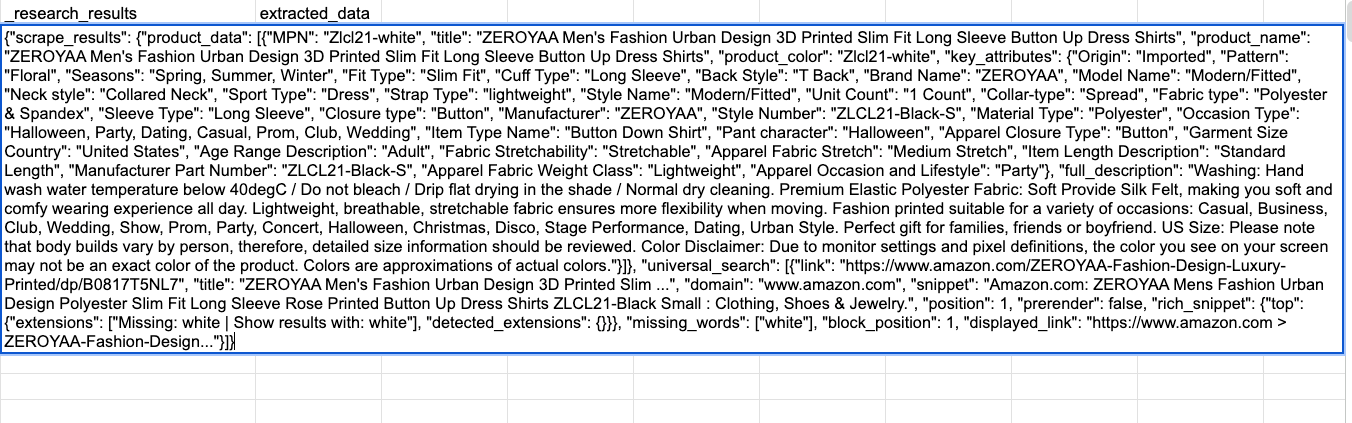
Because the Research Phase is the front of the Merchandising Pipeline, the data you scrape does not just sit in a spreadsheet. The same run can hand the structured product data to the pipeline's generation step, which rewrites enriched titles, descriptions, attributes, and Q&A for your own listings. In other words, scraping Amazon product data and turning it into better product pages become one workflow instead of two.

Whatever tool collects it, the scraped data is most useful once it is exported and joined to a decision. Export to a CSV file, a JSON format, or Google Sheets, keyed on ASIN, and you can compare price information across competitors, watch price changes over time, and feed the numbers into a model that helps implement dynamic pricing. The same product data from Amazon, titles, bullet points, and images, becomes the raw material for catalog enrichment and for the pricing strategies and valuable insights that justify the effort in the first place.
However you scrape, the value comes from doing it on a schedule. Daily runs suit competitive price monitoring and dynamic pricing, weekly runs suit catalog enrichment and availability tracking, and monthly runs suit long-term trend analysis. Split jobs by marketplace and category (https://www.amazon.com versus amazon.co.uk) to spread load, log every run, and keep a small canary test on a known ASIN so you notice if data quality drops. With a DIY scraper, all of this, proxies, backoff, and HTML fixes, is your problem; with the Pumice Research Phase, the anti-bot handling and schema stability are managed, so scaling is a configuration change rather than an engineering project.
Whichever path you choose, a few practices keep automated amazon scraping reliable. Add random delays and exponential backoff so you are not hammering the site; log every run with the URL, timestamp, and status so you can debug when something changes; schedule runs with cron jobs or a pipeline so they fire at predictable intervals; and use good-quality rotating residential proxies geo-matched to the target marketplace if you are running your own scraper. The Pumice Research Phase folds these concerns into configuration, which is what makes scraping product data across thousands of listings a routine job rather than a fire drill.
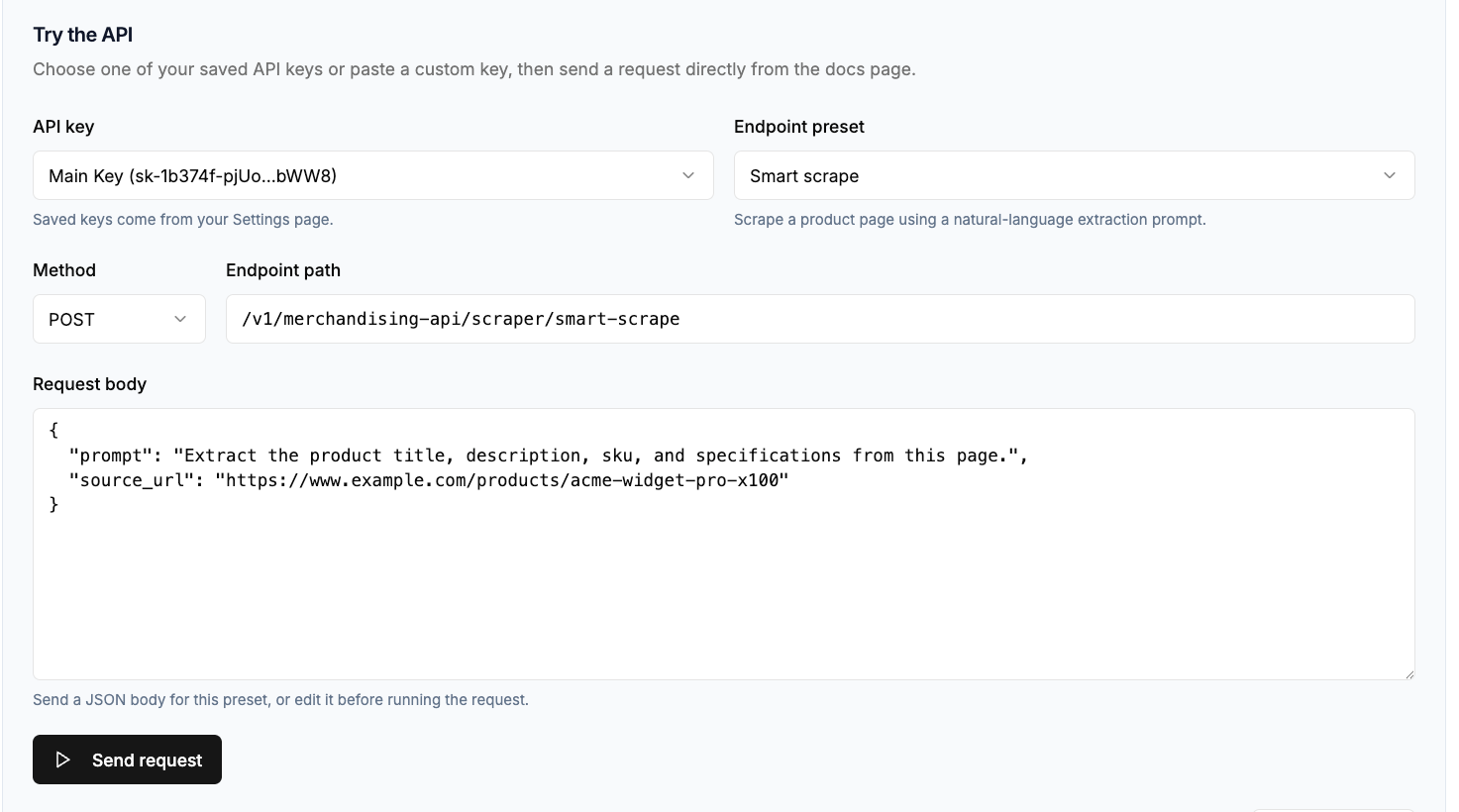
Scraping the Amazon website is straightforward in principle and fragile in practice: the fields are public, but Amazon's defenses and shifting HTML make a custom scraper expensive to maintain. If you only need a few dozen products once, a small Python script will do. If you need thousands of listings on a schedule, the Pumice Merchandising Pipeline Research Phase is the cleaner path: point the Universal Scraper at your product names or ASINs, tell the Smart Scraper which fields to pull, and export structured product data to a CSV file, with the option to turn that data straight into enriched product pages. Start with a small test of a hundred products, check the data quality, then scale.
Pumice.ai's Merchandising Pipeline scrapes Amazon for you: the Universal Scraper finds product pages by name or ASIN, and the Smart Scraper extracts the exact fields you need as structured data, with no proxies, CAPTCHAs, or HTML maintenance to manage. Free to try, no credit card required. Point it at a handful of ASINs and export clean product data in minutes. https://www.pumice.ai/contact-us
Scraping publicly available data like titles, prices, and ratings is generally legal in many jurisdictions, and the largest risk is usually contractual rather than criminal: Amazon's Conditions of Use prohibit automated access. Avoid scraping behind logins, never collect personal customer data, and consult a lawyer before large-scale operations. Nothing here is legal advice, and policies may evolve. As of May 2026, Amazon restricts access to product reviews.
For very low-volume testing, a basic VPN or a few residential proxies may be enough. But Amazon uses AWS WAF, device fingerprinting, and behavioral checks, so repeated requests from one IP or fingerprint get blocked. For reliable extraction across thousands of Amazon pages, use rotating residential proxies or a managed tool like the Pumice Merchandising Pipeline that handles rotation for you.
It depends on the use case. Refresh daily for competitive price monitoring and dynamic pricing, weekly for catalog enrichment and availability tracking, and monthly for long-term trend analysis. Fast-moving categories like electronics need more frequent updates than stable ones, but more frequent scraping means more cost and more friction with Amazon's rate limits.
Scraping star ratings and aggregated review counts from product pages is straightforward. Detailed review text, filters, and voting data are harder and increasingly sit behind logins or extra anti-bot challenges, so for review-heavy use cases a managed tool is more stable than DIY HTML scraping. Review scraping also generates high request volumes, so legal and technical limits apply.
With a DIY scraper, a structure change silently returns empty fields, so you watch for sudden drops in data volume or spikes in parsing errors and patch your selectors. The advantage of a managed approach like the Pumice Smart Scraper is that you describe the fields you want rather than hard-coding selectors, so the tool absorbs Amazon's HTML changes and keeps your output schema stable.


.png)