Amazon product title optimization is the process of reshaping every product title in your catalog to match the rules of Amazon's product title format, the demands of Amazon's search algorithm, and the click intent of potential buyers scanning the Amazon SERP. Done right, you take a sparse vendor catalog or an existing Shopify catalog and ship Amazon ready product titles for every SKU in minutes instead of weeks. Done wrong, your listings get suppressed, you end up keyword stuffing and tanking your search rankings, or worst - account bans.
Wholesalers, distributors, and large brands spend a ton of resources porting their own site catalog over to 3rd party channels to be able to sell. You use very different content structures when selling through your own site then what you do in different channels, and the issues only grow with more SKUs and more channels.
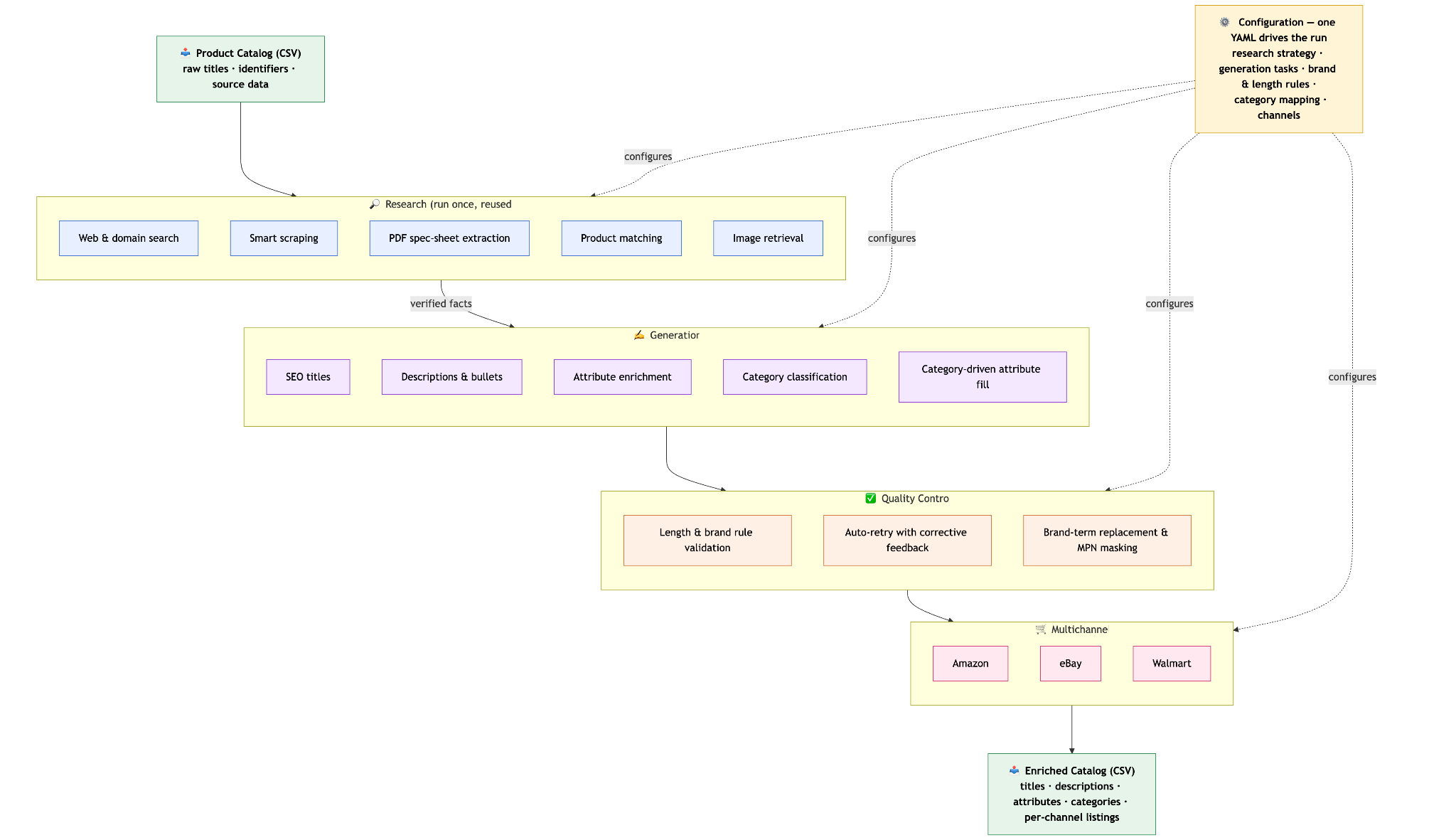
This guide walks through one Amazon PDP optimization focused workflow built on Pumice.ai. The whole job runs through the Pumice merchandising pipeline with rules, examples, and validations that mirror Amazon's title guidelines. The same pipeline runs two ways: one mode skips the research phase when your data is already complete, and the other mode kicks off ASIN research against the live Amazon search engine results before it writes a single character.
Pumice merchandising pipeline architecture for Amazon: CSV ingest, optional ASIN research from amazon.com, smart_scraper extraction, validation, generation against Amazon configuration rules, retry loop, results CSV.
What Is Amazon Product Title Optimization?
Amazon product title optimization is the practice of rewriting an Amazon listing's product title so it better surfaces in Amazon's search engine, satisfies Amazon's guidelines for the relevant category, and earns more click through rate from potential buyers and potential customers scanning the search results. A well optimized amazon product title leads with the brand, packs in the important keywords without keyword stuffing, includes the size, color, relevant keywords, and pack count where they fit, and respects Amazon's category character limit.
Two things make Amazon different from a generic ecommerce product title. First, the rules for what is allowed in a product title are written down by Amazon itself, are different per product category, and are enforced by Amazon's listing system. Second, the most relevant keyword data lives inside Amazon's own search results page, not in Google.
Why Amazon Titles Need a Different Optimization Approach
Optimizing for Amazon is not the same job as optimizing for Google. The buyer is already on a marketplace with strong search intent ready to purchase, the product title rules are stricter, and the algorithm that ranks your product detail page is built around Amazon search terms and conversion behavior.
Amazon's Search Algorithm vs. Google
Amazon's search ranking cares far more about exact match keyword presence in the title and conversion history than Google's algorithm does. If a customer searches a specific term in the Amazon search box, the matching keywords need to appear in your product title for the product listing to surface high in Amazon's search results. External search engines like Google still index Amazon listings, but the primary fight is for placement inside Amazon itself.
Because of that, optimizing product titles for Amazon as Amazon sellers means optimizing product titles starting with thorough keyword research into the search terms customers search and actually type into amazon, not generic Google keywords for the product title. The right keywords often come from the top ranking ASINs for your seed query, not from any external keyword research tool that helps you find relevant keywords.
Amazon Product Title Guidelines That Drive the Workflow
Amazon publishes specific product title guidelines that every seller has to follow. Product titles must be Title Case, free of promotional language, free of symbols like exclamation marks and dollar signs, and inside the product title character limit set for the product category. Most categories cap titles at 200 characters, with some categories tighter. Most experienced sellers and Amazon sellers also enforce a minimum around 140 characters so the title actually carries enough keywords and key details to compete.
These best practices and guidelines are the heart of the optimization workflow. Every rule and validation in the configuration file maps to one of them. You do not need a fancy SEO playbook on top. The configuration is the playbook of best practices.
The On-Listing Conversion Side
The second job of an amazon title is on listing conversion. After a shopper lands on the product detail page, the product title is the first thing they read. A product title that includes brand recognition signals, the right keywords, key attributes like material and size, and a short hint of unique selling points gives potential customers and potential buyers a reason to keep reading and ultimately purchase.
A Single Ai Workflow, Two Run Modes
Pumice handles every Amazon catalog with one system. The difference between approaches is whether you need the research phase or not. The pipeline simply turns research on or off based on the configuration file you upload.
Mode A: Skip Product Research When Your Product Data Is Higher Quality
Run Mode A to create titles when your catalog already has solid product information. The data you have for each SKU is enough to compose an Amazon compliant product title without needing augmentation. The pipeline still applies Amazon's rules, the product title format, the validation thresholds, and the retry loop, but it never grabs additional product context from other sources.
This is the fastest path to value. A catalog with 2,000 SKUs and clean attribute data can be reshaped into Amazon ready titles in a single batch run.
Mode B: Run Research Phase First to Augment Data for Sparse Catalogs
Run Mode B to create titles when the vendor flat file is thin. Short titles, missing attribute fields, no product images, and partial bullet points are common signals. Pumice fills those gaps before writing the title by pulling competitor data straight from Amazon.
In this mode, Pumice runs scraped ASIN research against the live Amazon search engine results for your seed keyword, picks the top ranking listings, and pulls the structured listing data back into the configuration. The generation step then writes the new amazon title using both your row data and the enriched competitor data.
Since Mode B also includes the step in Mode A, we’ll run through the full pipeline without skipping the Research Phase.
Step 1: Research Phase - Pull Competitor ASINs From Amazon
The research phase is the first step of Mode B. It is built around scraping ASINs from the Amazon search results page so the generation step has a grounded view of competitor keywords already ranking for the keyword you care about.
How the Research Phase Targets Top Ranking ASINs
The research phase configuration file for each product catalog run starts with a search query, just like the original Pumice merchandising pipeline. For Amazon specifically for a product listing, the first query is a tight Amazon search such as site:amazon.com plus the seed keyword and an optional brand qualifier. The search returns a list of Amazon listings, each one identified by its ASIN. Pumice keeps the top several ASIN pages based on search rankings (a form of live keyword research). We’ll use these to get additional context about our product information.
Like every other part of Pumice, this targeting logic is fully configurable. You can set the number of ASINs to retain, the categories to filter on, and the fallback queries to run if the first search comes up short. Some teams point the research at amazon.com directly. Others run a hybrid that pulls from amazon.com plus the manufacturer site for the same product.
Scraping Real Listing Data From Each ASIN
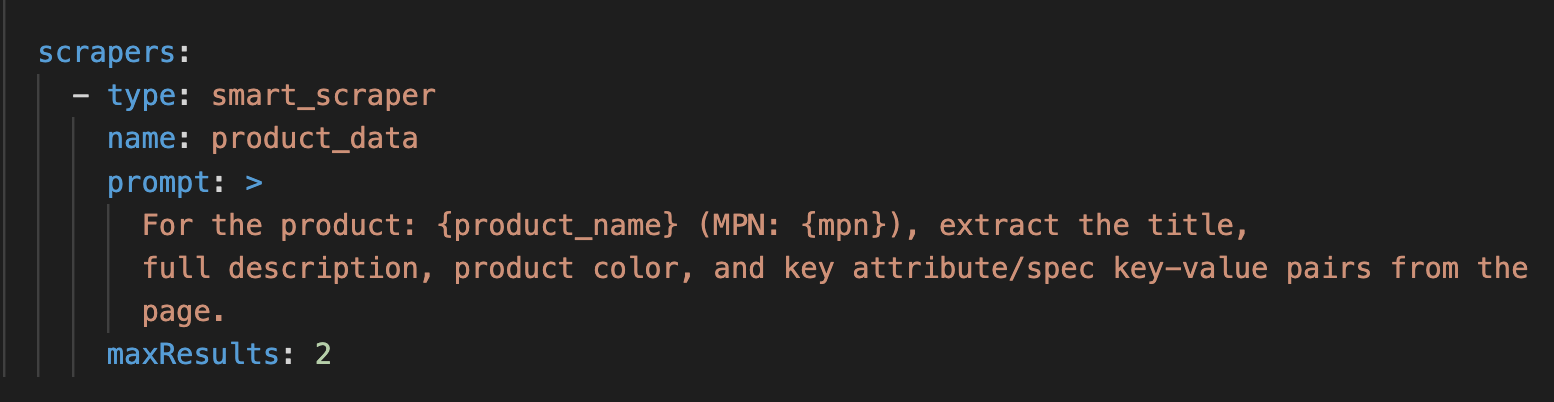
Scraper configuration in Pumice
Once the ASINs are selected, the smart_scraper opens each Amazon listing page and extracts the structured listing data: the current title, the bullet points, the description, the attributes table, and the relevant product images. The extraction prompt is part of the configuration, so you can tell the scraper to pull exactly the fields you want and ignore the rest.
The result is a clean, normalized view of the top ranking Amazon product listings for each product listing in your catalog for your seed keyword. That is the raw material for the generation step.
Validating That Each ASIN Matches Your SKU
Pumice will not enrich a product with competitor data from the wrong listing. After each ASIN is scraped, a validation agent compares the scraped data against the row in your CSV. The agent confirms the brand, product category, and core attributes line up before any of the data flows into the title generator.
Without that validation, the pipeline could grab a similar but distinct listing and inject the wrong size, the wrong color, or the wrong pack count into your final title. Validation is the difference between grounded enrichment and confident hallucination.
Using the focus Block to Trust Amazon Data First
When your CSV row and the scraped ASIN data disagree, you decide which one wins. The configuration's focus block accepts three sources: webscrape, domain, and pdf_catalog. For Amazon optimization, most teams set the focus block to prefer the scraped Amazon listing data on competitor terms (titles and search visibility cues) while keeping the brand's own values for protected fields like ASIN, MPN, and SKU.
Step 2: Generation Phase — Rules, Examples, and Validation for Amazon
After research finishes (or if you skipped it in Mode A) the generation phase of the Merchandising Pipeline takes over. It receives your CSV row, any enriched ASIN data (from research phase or , the rules you defined, the examples you provided, and the validation thresholds you set. It then creates a new Amazon ready product title and runs the result through validation before accepting it.
Translating Amazon Title Guidelines Into Configuration Rules
Every Amazon title guideline becomes a plain language rule in the YAML configuration. Rules read like a brief you would give a copywriter on your team: lead with the brand name, include key features, do not use banned symbols, follow this specific format, capitalize using Title Case. The model treats every rule as a constraint while it writes the title.
Rules directly from Amazon’s Seller Page.
Some brand teams call it done after five rules. Other teams write five rules and add as many keywords as the category needs. Others write thirty rules because Amazon's category requirements demand it, and that is fine. Pumice does not cap the rule count.
Examples That Anchor the Amazon Title Shape
Examples are sample Amazon titles that demonstrate exactly what a good output looks like. Where rules describe the target in words, examples show the agents the actual finished shape. Two or three concrete, compelling titles from your own top performing ASINs plus one pattern template gives the model a polished target plus a clear structure for your target audience to recognize.
Deterministic Validation: 140 to 200 Character Hard Limits
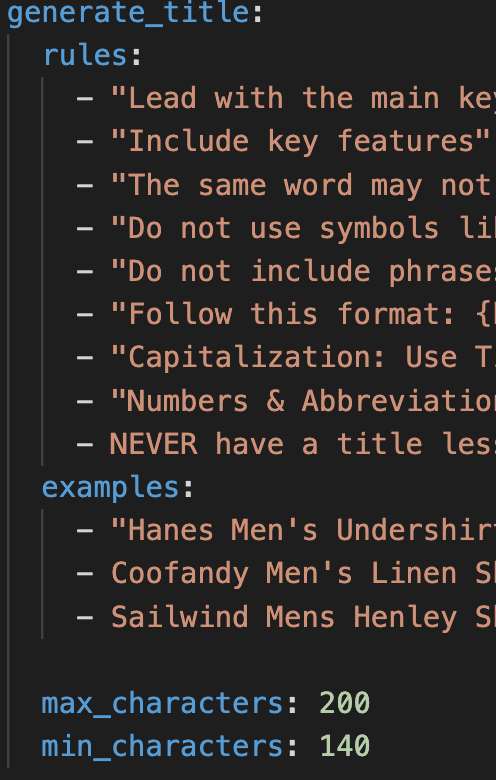
Deterministic Validation enforces hard rules the agents must obey, separate from the soft guidance of rules and examples. For Amazon, the most important validations are length: max_characters at 200 and min_characters at 140 for most categories. A candidate that comes back under 140 or over 200 fails validation and triggers an automatic retry. Amazon has a hard limit of 200 characters for titles.
Pumice configuration file with character validations set
The Retry Loop That Enforces Compliance
When a generated title fails any validation, Pumice does not just retry blindly. It tells the model exactly what failed, quotes the failing candidate, and updates.
Pumice runs multiple attempts by default. If none pass, it keeps the closest candidate, flags the SKU in the output file, and moves on so the rest of the batch finishes.
A Real Amazon Title Configuration File
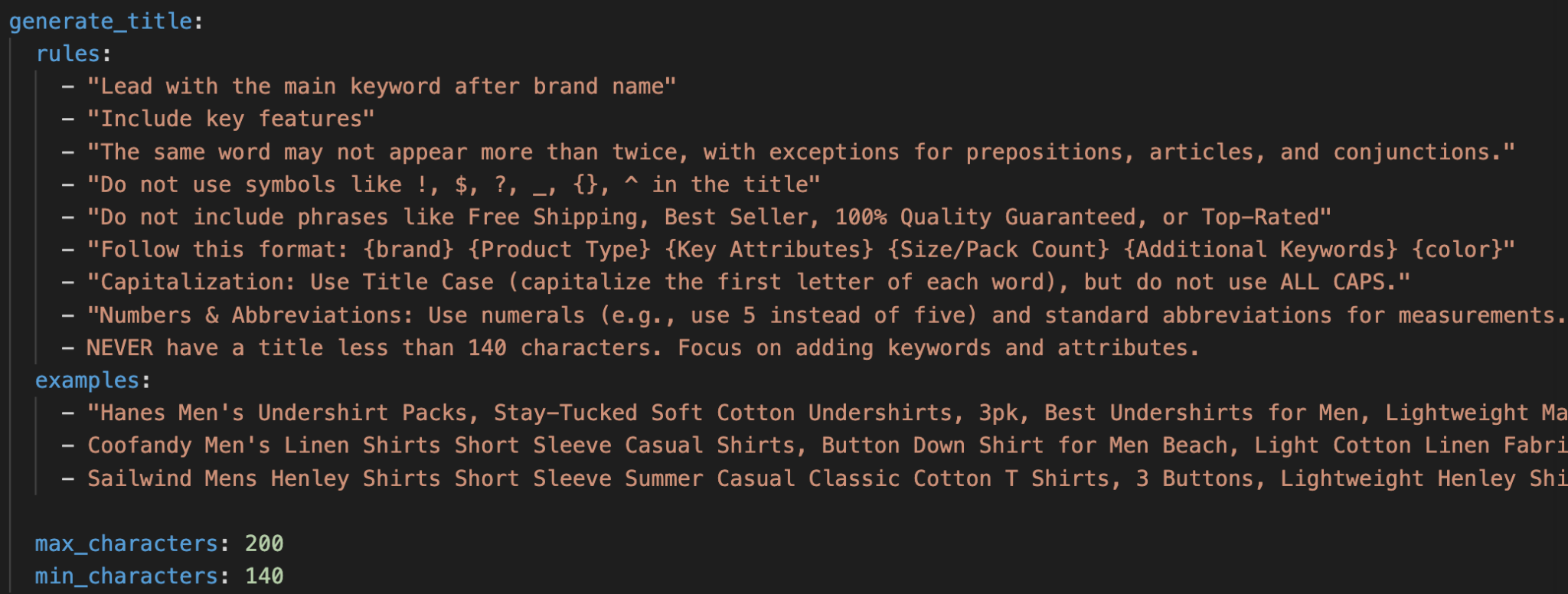
Below is a real generate_title configuration block from a Pumice run for an Amazon apparel catalog targeting a male target audience. It is a direct translation of Amazon's title guidelines into rules, examples, and validation:
Configurations work for titles, descriptions, categories, images, and bullet points!
Notice how the rules and examples reinforce each other. The format rule lays out a strict template (brand, Product Type, Key Attributes, Size or Pack Count, Additional Keywords, color), and every example follows that exact skeleton. The forbidden phrase rule blocks the kind of promotional language Amazon strips out automatically. The banned symbol rule prevents characters that break Amazon feeds. The 140 to 200 character window is enforced by validation after the title is created, not by the model itself. LLMs can struggle with very specific word and character counting, but Pumice finds a path with task specific agents.
Amazon Title Best Practices Baked Into the Configuration
The best practices below are the patterns that show up across high performing Amazon listings. The advantage of running them through Pumice is that they live inside the configuration file, not inside a checklist a human has to remember on every SKU.
Lead With Brand, Then Main Keyword
Amazon shoppers in your target audience scan the first few words of every product title, especially ones that include relevant keywords. A title that includes relevant keywords after the brand first signals brand recognition and helps brand visibility on the search results page. The main keyword should follow immediately so the listing matches the potential customers' specific query at a glance. Pumice enforces this through the format rule and the example titles.
Pack Key Features, Size, Color, and Pack Count
Amazon expects the product title to highlight key features and carry the buyer's key details that customers search for. Material, size, fit, pack count, and color (without overly technical terms) all belong in the title when they apply. These are the attributes shoppers filter on inside Amazon's search results, and they are the attributes (which Amazon also returns as keyword suggestions) that turn a generic Amazon product listing into a specific match for high intent potential buyers.
Block Promotional Phrases and Banned Symbols
Amazon strips titles that include promotional phrases like Free Shipping, Best Seller, or 100% Quality Guaranteed. Special symbols such as exclamation marks, dollar signs, curly braces, and circumflexes are also banned. The configuration's forbidden phrases rule and banned symbols rule keep all of that out without any human review.
Title Structure, Numerals, Standard Abbreviations, Format
Amazon expects Title Case capitalization on the first letter of each word, numerals instead of spelled out numbers (3 not three), and standard abbreviations for measurements (oz, lb, in). The same word may not appear more than twice, with exceptions for prepositions, articles, and conjunctions. These small style choices add up across thousands of SKUs and are easy to enforce inside the rules block.
Repurposing Your Existing Catalog for Amazon in Minutes
The whole point of running these best practices through Pumice is speed and reuse. A brand with a working Shopify catalog or a vendor flat file can repurpose every SKU into Amazon ready listings without rebuilding the catalog by hand.
Mapping the CSV Columns
Map columns from your csv in the Merchandising pipeline
Each row in your CSV represents one SKU. The pipeline needs at minimum a current title column, a current description column, and a main product identifier like a SKU or ASIN. A category column is strongly recommended because category drives which Amazon ruleset the run applies. A domain column is only needed if you plan to run the research phase against a manufacturer or vendor site in addition to Amazon.
Toggling Research On or Off Per Run
The configuration file is the single switch that toggles research. Mode A runs without any research endpoints and produces titles entirely from your row data. Mode B adds the universal_search endpoint, the smart_scraper, and the focus block. Flipping between the two takes one block in the YAML file, no code changes.
Running the Pipeline Across the Catalog
Once mapping is set and the configuration is locked in, the pipeline runs across the whole catalog as one batch. Each SKU goes through optional research, generation, and validation. The output is a CSV with every original column plus the new Amazon ready title, the raw research results, the validated extracted data, and any flags from the retry loop. You bring the catalog to Pumice, you point it at the right configuration, and you walk away with Amazon listings.
Frequently Asked Questions
What is the Amazon product title character limit?
The Amazon product title character limit depends on the product category but caps at 200 characters for most categories on amazon. Some categories, including Clothing, Shoes, and Jewelry, cap closer to 80 or 100 characters. A reliable rule for general categories is a max of 200 and a working minimum around 140 to make sure the title carries enough keywords and key attributes. If you need to expand you can always add keywords that fit the target category.
How do you avoid keyword stuffing on Amazon?
Avoid keyword stuffing on Amazon by writing titles that read like real product descriptions, not keyword lists. To improve search rankings with thorough keyword research, Pumice's rule that no word may appear more than twice in a single title (with exceptions for prepositions, articles, and conjunctions) blocks repetition automatically. Backend keywords in your amazon seller central account are a better place to capture additional search terms customers may use.
Can AI generate Amazon titles that follow the guidelines?
Yes, AI can generate Amazon titles that follow amazon's guidelines as long as the guidelines are written into the configuration as explicit rules, examples, and validations. Pumice does exactly that. Each generated title is created against the rule set and validated against the title character limit before it lands in your output file. AI without grounded rules tends to hallucinate features and miss the format, which is why off the shelf ChatGPT prompts struggle on Amazon.
How does Pumice handle category-specific Amazon rules?
Pumice handles category specific rules by letting you run different configuration files for different product categories. One configuration can target Clothing with tighter character limits and gendered attribute rules. Another can target Electronics with looser limits and stricter spec formatting. Brands often keep a folder of category configurations and pass the right one in when they launch a run.
Conclusion and Next Steps
Amazon listing optimization with Pumice comes down to one workflow with two run modes. Mode A reshapes a complete catalog using only your existing product information. Mode B pulls live ASIN data from Amazon's search results page first, validates each scrape against your row, then generates the final title against your rules, examples, and validation thresholds. Either way, the configuration file is where Amazon's guidelines, your brand voice, and the format you want live, side by side.
The next step is to bring a small sample of your catalog, around 20 to 50 SKUs, into a free Pumice run. Pick products where you know the current Amazon titles are weak or inconsistent. Run the pipeline once in Mode A and once in Mode B, compare the new optimized title and optimized amazon product title against the original, and measure click through rate from more customers over the next 14 days.
Once the configuration is dialed in, you can optimize listings at catalog scale. The same pipeline scales to thousands of SKUs across multiple Amazon categories, leaving you with an optimized amazon product listing for every product, and you can rerun the whole catalog whenever Amazon's guidelines change.
Headline: Optimized Amazon PDPs in Minutes
Pumice.ai runs the full Amazon title optimization pipeline described in this article: catalog ingest, ASIN research, rules driven title generation, and validation against Amazon character limits. Free trial available, no credit card required. Bring a sample CSV and see new Amazon ready titles in your first session. Reach out today.






.png)