You get two different answers. One is a list of pages for a printed catalog: a cover, a table of contents, product listings and contact details. The other is a list of data for digital catalogs and online stores: titles, descriptions, prices and identifiers.
Both answers are right, and both depend on the same thing. Every catalog, printed or online, is built from a product record for each of the company's products. If the record is thin, every catalog built from it is thin too.
Knowing which fields that record needs is the easy part. Filling them with accurate data is the work. Many gaps exist because the vendor file never had the data, and the fix is to fill each field from the manufacturer's own source rather than guess.
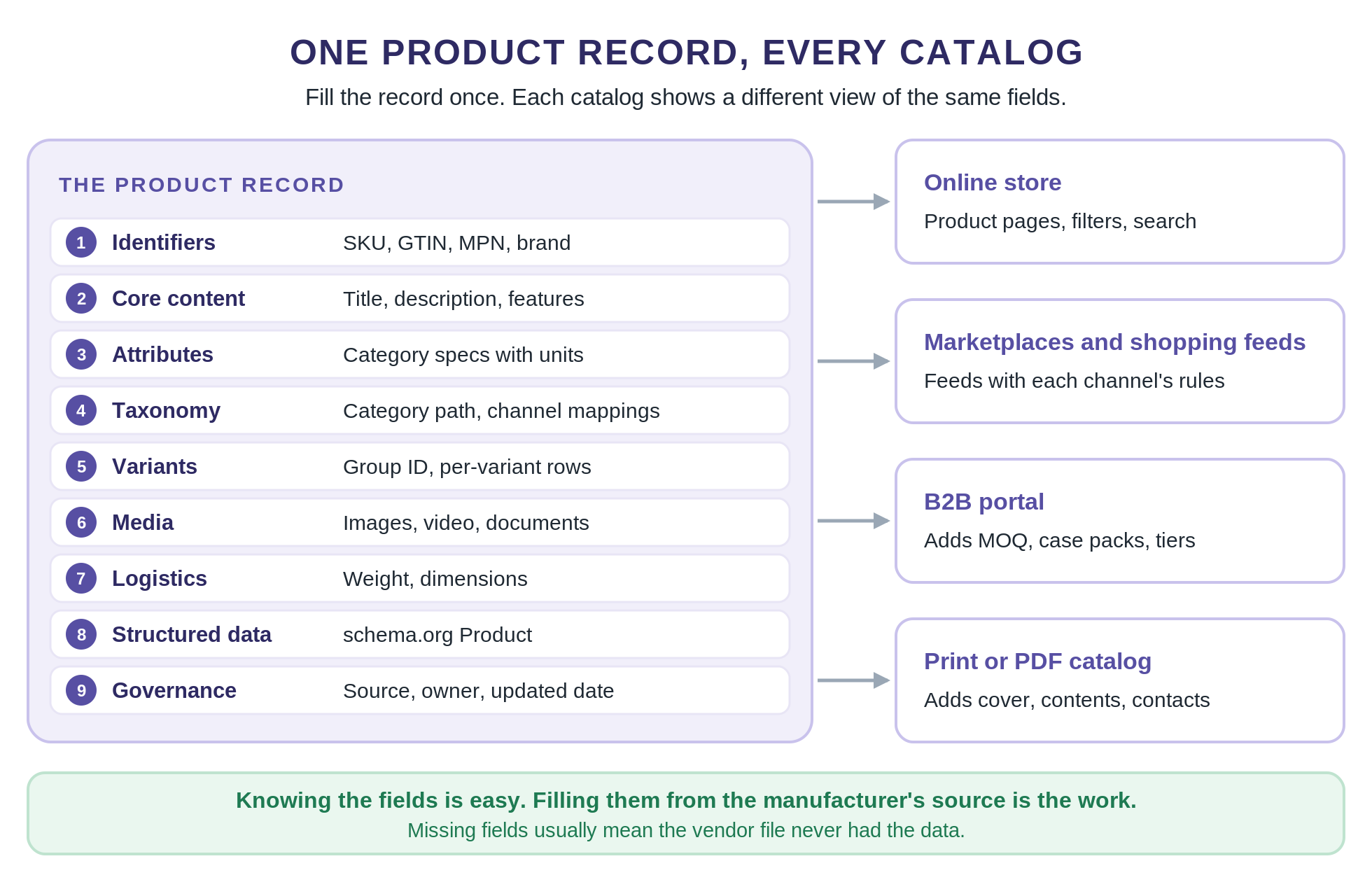
A product record needs fields in nine tiers, from identifiers to governance, and each field has a rule that keeps it usable on every channel. B2B buyers and printed catalogs add their own fields on top.
Key Takeaways
Every product catalog, printed or online, is built from one product record per item.
The essential elements of every record are identifiers, content, attributes, taxonomy, variants, media, logistics, structured data and governance. I have found that some of these matter much more than others for conversion.
Each sales channel sets its own required fields, so build the record to the strictest channel you sell on and let every feed take what it needs.
B2B catalogs add minimum order quantities, case packs, units of measure, tiered pricing and lead times. This information is incredibly important for conversion rate in B2B.
Print catalogs add the pages around the products: a cover, contents, ordering details and contact information.
Score completeness by category, and fill missing fields from the manufacturer's source rather than guessing.
What Should a Product Catalog Include? The Short Answer
What should a product catalog include, at minimum? A complete, accurate record for every product it lists.
✂️ The short answer
What should a product catalog include?
A product catalog should include a complete record for every product: identifiers (SKU, GTIN, MPN and brand), a title and description, category attributes with units, a category path, variants, images, shipping weight and dimensions, and a source for every value. B2B catalogs add order minimums, case packs and tiered pricing. Print catalogs add a cover, a table of contents and contact pages.
Product catalog checklist
What a product catalog should include, tier by tier
Tier
Fields
Why it matters
Identifiers
SKU, GTIN, MPN, brand
Tells every system which product a record describes
Core content
Title, description, key features
The first product details shoppers read
Attributes
Category specs with units: size, color, material, voltage
Powers filters, comparisons and search
Taxonomy
Category path, channel category mappings
Puts each product where buyers browse
Variants
Group ID, variant attributes, image per variant
Shows sizes and colors as one product
Media
Main image, extra images, video, documents
Lets buyers judge the product for themselves
Logistics
Shipping weight, dimensions, shipping class
Drives shipping cost, delivery options and fit
Structured data
schema.org Product markup
Describes the product to search engines
Governance
Source, owner, last-updated date, status
Shows where each value came from
Each sales channel, from Google Shopping to Amazon and eBay, adds its own required fields on top.
The table shows what each tier holds and why it matters. Sales channels such as Google Shopping, Amazon and eBay set their own required fields on top, which the channel section below covers.
If you are building a printed catalog, the same records fill the product pages. You then add the pages around them, which have their own section further down.
What Is a Product Catalog? Two Meanings, One Record
A product catalog is a structured collection of product records, published to a single store or across multiple channels where potential buyers browse and buy. Each record describes one item, and each place shows a different view of the same records.
The phrase has two common meanings. In print, a product catalog showcases items in a designed document, such as a mailed physical catalog, a downloadable PDF line sheet or a dealer price book. In ecommerce, it is the product data behind a store, a Google Shopping feed or a marketplace listing.
The two meanings share one foundation: a product database with one record per item. A printed page and a product feed pull the same name, specs, price and image from the same record, so the record shapes the customer experience everywhere the product appears. That is why this guide starts with the record and treats print as a layer on top.
Running that record day to day, with catalog management software, workflows and channel publishing, is product catalog management, a separate topic. Our guide to ecommerce catalog management covers it.
The Product Record, Field by Field
The product record
Every field, what it is, the rule and who requires it
Field
What it is
Rule
Why it matters
SKU (id)
Your unique ID for the item
Stable and never reused
Every system keys on it
GTIN
Global Trade Item Number (UPC, EAN)
Digits only: 8, 12, 13 or 14; one per variant
Matches the product across retailers and marketplaces
MPN
Manufacturer part number
Copied exactly from the manufacturer
Identifies products that have no GTIN
Brand
The maker's brand name
One spelling everywhere
Brand filters and search
Title
The product name shoppers see
Brand, type and key attributes; no promo text
The first thing buyers read
Description
Full product copy
About the product only
Answers questions before purchase
Key features
Short spec or benefit points
A few scannable points, one idea each
Quick comparison
Category attributes
The specs that matter for the category
One schema per category, allowed values, units stated
Filters and comparisons
Color, size, material
Common variant attributes
One controlled name per value
Variant selection and filters
Category path
Where the product sits in your store
One primary category, full path
Store navigation
Channel categories
Each channel's category for the product
One mapping per channel, stored with the record
Listing in the right place on each channel
Item group ID
Links the variants of one product
Same value on every variant
Shows variants as one product
Variant rows
One row per size, color or pack
Own ID and image per variant
Accurate options and images
Main image
The primary product photo
No watermarks, promo text or borders; high resolution
Required on every channel
Additional images
Angles, details, in-use shots
Several per product, each showing something new
Buyer confidence
Documents
Spec sheets, manuals, safety data sheets
A current PDF per product
B2B and regulated products
Shipping weight
Packed weight
Number plus unit
Shipping rates
Dimensions
Product and package size
Number plus unit; one unit system per field
Fit, freight and returns
Structured data
schema.org Product markup
Generated from the record, never by hand
Search engines
Source, owner, updated
Where each value came from and who maintains it
A source URL and an owner on every record
Internal checks and audits
Each sales channel adds its own limits on top of these rules.
One product record, nine tiers, and the catalogs built from it.
Unique Product Identifiers
Identifiers tell every system which product a record describes. The SKU is yours, so keep it stable and never reuse it for a different item.
The GTIN is the global barcode number, such as a UPC or EAN. GS1, the body that issues GTINs, says each distinct option needs its own GTIN, so every size and color gets one. Use the GTIN wherever the manufacturer assigned one, and the MPN when there is none.
Use one spelling of each brand everywhere, such as Nike rather than Nike Inc. Clean identifiers are also how you catch duplicates, the main use case in our guide to product matching.
Core Content
The title and description are the product details shoppers read first. Every channel caps their length, so keep titles short enough for the strictest one and leave promotional text such as free shipping out of the title.
A strong title follows a pattern: brand, product type, then the attributes buyers filter on. Each channel adds its own limits, such as eBay's 80-character titles in our eBay listing guide and Amazon's rules in our guide to Amazon product title optimization.
Detailed product descriptions should describe the product, not the store. Baymard Institute found in 2021 that 10% of the largest ecommerce sites did not keep a consistently high level of detail in their product descriptions.
Attributes
Attributes are the technical specifications that matter for a category: voltage for a drill, fabric for a shirt, capacity for a cooler. Each category needs its own attribute schema, with allowed values and a unit for every number.
Filters reflect customer preferences, so a missing attribute hides a product from filters and comparisons, even when the title is perfect. Our guide to product attribute enrichment covers category schemas and how to fill them. Tags work the same way, feeding search and personalized recommendations, and automated product tagging shows the tag groups most catalogs use.
Taxonomy
Product categorization starts with one primary category for every product, written as a full path such as Tools > Power Tools > Drills. Every channel and marketplace maps products to its own category tree, so your taxonomy is the anchor you map from. Our product taxonomy best practices explain how to design categories and attributes as separate schemas.
Map your own categories to each channel's tree once, and store that mapping with the record. When a channel changes its tree, you update one mapping instead of thousands of products, with far fewer errors.
Variants
Sizes, colors and pack counts are variants of one product. Give each variant its own row with its own ID, image and price, and link the rows with a shared group ID. Channels use that group ID to show the variants together, and schema.org's ProductGroup describes the same structure for search engines.
Media
The main image is required on every channel. Keep it clean, with no watermarks, promotional text or borders, which most channels reject. Add high quality images from multiple angles, plus one in-use shot.
Store images at high resolution so each channel can resize them down. Minimum sizes keep rising, and an image that barely passes today can fail a channel's check next year.
Spec sheets, manuals and safety data sheets belong in the record too, as links to current PDFs. How images, video and documents appear on the page is covered in what every product detail page needs.
Logistics
Shipping weight and dimensions drive shipping costs, delivery options and warehouse planning. Any channel that calculates shipping from carrier rates needs the packed weight.
Always store the unit with the number, and use one unit system per field. A weight of 3.1 means nothing until you know whether it is pounds or kilograms.
Record both product and package dimensions. The product size answers whether it fits, and the package size decides what shipping costs. Wrong dimensions lead to returns, which cost money and customer satisfaction.
Structured Data
Structured data describes each product to search engines in a standard format. schema.org's Product type has properties for name, description, image, brand, SKU, GTIN, MPN, color, material, size, weight and offers. Search engines read it to understand the product and show richer results, so fill at least the name, image and brand.
Generate the markup from the same record that feeds your product data, so the price and stock on the page always match the feed. Markup written by hand drifts out of date the first time a price changes.
If your record is complete, the markup is a straight mapping from fields you already have. If it is not, the markup inherits the same gaps.
Governance
Governance fields record where each value came from, who owns the record, when it last changed and whether it is ready to publish. They never appear on a product page, but they are how you answer the question every catalog team gets: where did this number come from?
A source URL on each record makes checks fast. When a buyer questions a spec, you can confirm it in a minute instead of starting a new search.
What about AEO?
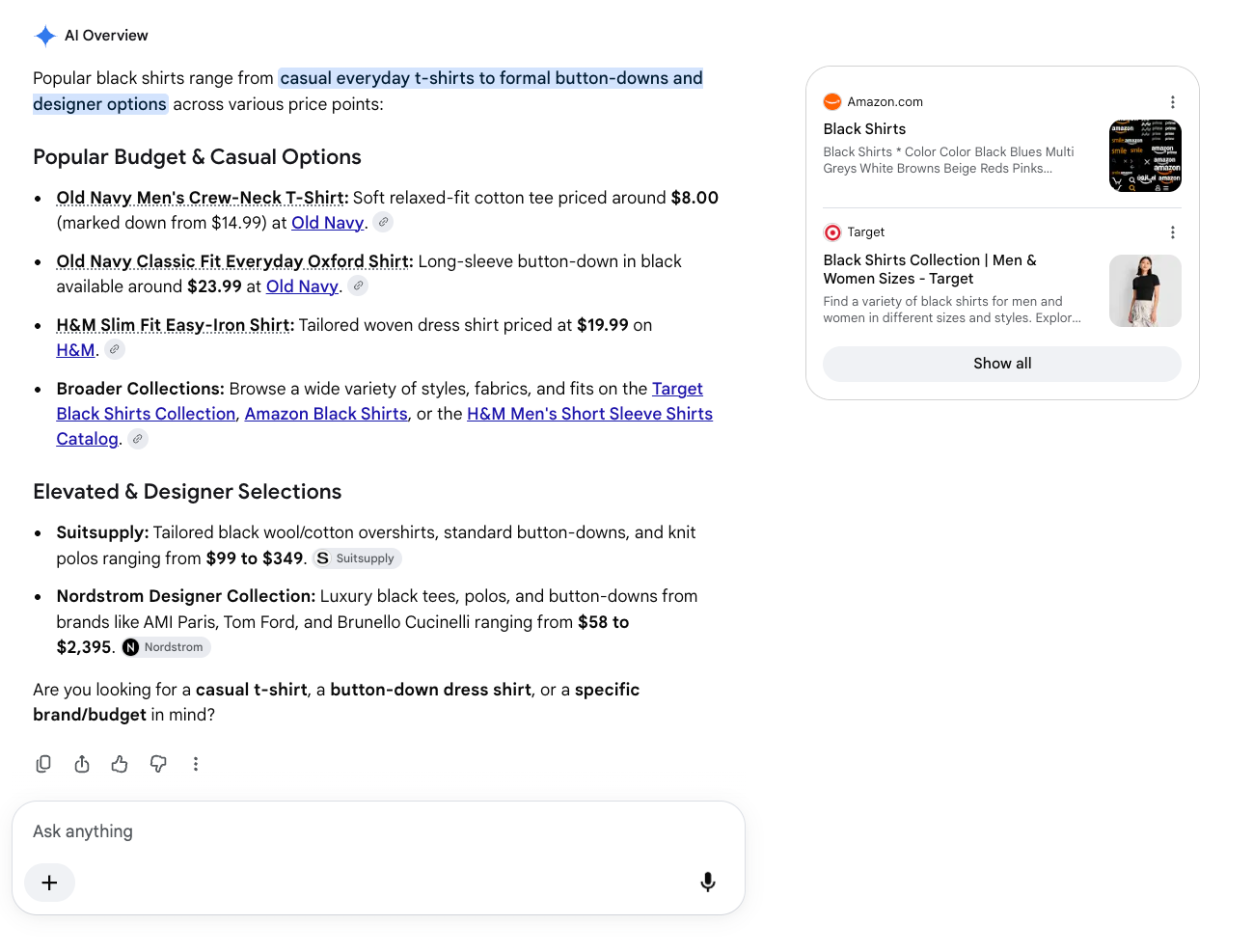
AEO (answer engine optimization) focuses on structuring product data to rank for ai powered search engines, LLMs, and generative ai tools. The goal is that your link pops up when someone searches in these tools.
Ai Overview in Google Search is the first thing that is seen when you search a query.
Ranking in ai search is a bit different from ranking in traditional search engines. The queries provided to ai search can be very broad compared to traditional search.
At the same time the optimizations you make to product records to rank in AEO are similar to that of SEO. Ai search is looking at the same catalog fields that search engines do, they just look differently at them. I’ve noticed some very specific updates to PDPs that lead to good AEO visibility.
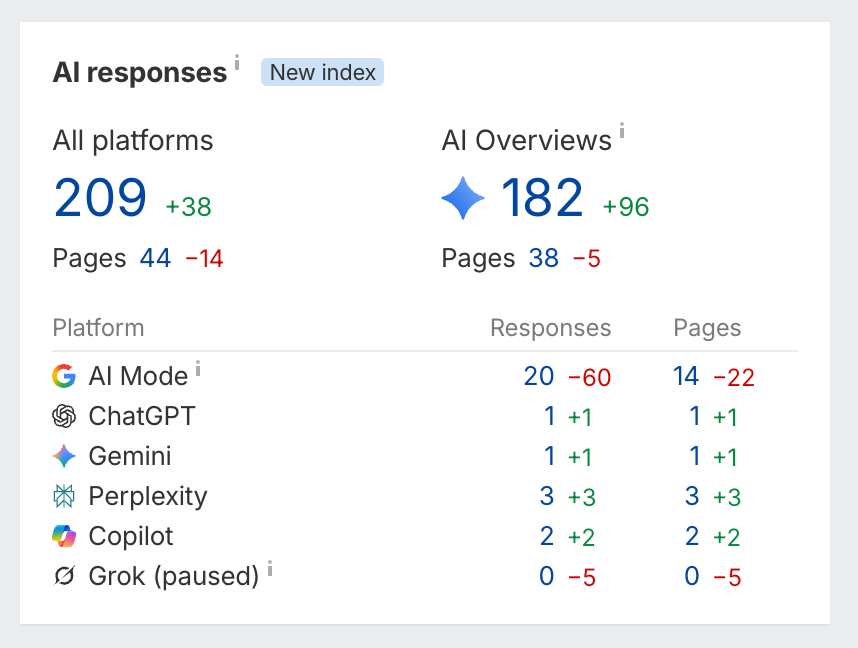
Real results for pages in ai search after 2 months
Our PDP Optimization playbook system does deep analysis of your product pages to surface recommendations to rank better in AEO. Ai agents tackle competitor analysis, gap analysis, query analysis, and live query testing. We generate a data rich playbook that breaks down the exact updates to make, and the data validation behind those updates.
Not every field carries the same weight. Start with what your main channels require, then add the recommended fields that help potential customers find and compare products.
Required almost everywhere: a unique ID, a title, a description and a main image. Most channels also ask for a brand and a GTIN or MPN to identify the product.
Required in some cases: a condition for used or refurbished items, a group ID that links variants, and size and color for apparel.
Recommended: additional images, key features and a category mapped to each channel's tree.
Each channel layers its own rules on top. Google Shopping publishes a product data specification for its feeds. Amazon sets required attributes by product type in its Product Type Definitions API, and eBay, Walmart and others work the same way. Required fields vary depending on the channel and the category.
Affiliate and partner networks are strict too. impact.com's catalog best practices warn that products missing required fields may be excluded from its marketplace.
If you cannot fill everything at once, work in order. Fill the required fields for your biggest channel first, then the attributes buyers filter on in your top categories, then the recommended fields that help products get compared.
Build the record to the strictest channel you sell on, then let each feed use the fields it needs. That is easier than keeping a separate version of the product for every channel.
B2B Product Catalog: The Fields Buyers Need That Shoppers Don't
A B2B product catalog includes everything in the core record, plus the fields that procurement teams, engineers and resellers need before they can order, and that your sales teams need to quote. Shoppers buy one item at a time. In a B2B buying process, buyers order in cases, on contracts and against specs.
B2B product catalog
The fields B2B buyers need that shoppers don't
Field
What it holds
Why buyers need it
Minimum order quantity
The smallest quantity you sell
Buyers plan orders around it
Case pack
Units per case or inner pack
Many orders come in full cases
Unit of measure
Each, box, case or pallet, with conversions
Stops a buyer ordering one case when they meant one each
Tiered or contract pricing
Price breaks by quantity or account
Buyers compare cost per unit at their volume
Lead time
Days to ship or restock
Procurement schedules around it
Cross-references
OEM and competitor part numbers, compatible models
Buyers search by the part number they already use
Spec sheets and SDS
Technical and safety data sheets
Engineers and safety teams check them before approval
Certifications
Standards the product meets
Many buyers can only order approved products
Pack-level dimensions
Size and weight per unit, case and pallet
Freight and warehouse planning
Add these on top of the core record. Pack-level dimensions and units of measure need clear conversions.
Pack levels deserve their own fields. A single item, an inner pack, a case and a pallet each have their own quantity, dimensions and weight, and freight quotes depend on the case and pallet values, not the item.
Units of measure need clear conversions, such as 1 case = 12 each. For tiered pricing structures, schema.org's eligibleQuantity marks the quantity range each price applies to, so any system reading your markup can see your volume breaks.
Cross-references are easy to overlook. Many buyers search by the competitor or OEM part number they already use, and a catalog without those numbers can be missed by those searches. Our guide to distributor product pages covers the pertinent details engineers look for.
Whether to publish MOQs and price tiers or keep them behind a login is a separate decision. The argument for publishing is in SEO for wholesale distributors.
Most B2B data arrives in supplier files, PDFs and line sheets, each in its own format. Our supplier catalog ingestion agent shows how those files become clean rows.
Print and PDF Catalogs: The Pages Around the Products
A printed or PDF catalog uses the same product records for its listings, then adds pages that help readers find things and place an order. Traditional print catalogs remain common in B2B and in the brick and mortar store, where buyers browse away from a screen.
Shopify's guide to what to include in a merchandise catalog lists a front cover, a table of contents, product listings, reviews, discounts and promotions, a return policy, contact details and a call to action. Pagination's catalog guide adds an introduction and a back cover, with category dividers, promotions and order forms as special sections.
Front matter: a cover that carries the brand image and the season or edition, a table of contents, and a short introduction.
Navigation: category dividers, page numbers and an index by product name or part number, which guide customers to the right page.
Ordering: order codes on every listing, price and terms pages, special discounts, minimums, and an order form for B2B.
Back matter: return and warranty policies, contact details, and a version date so readers know if the prices are current.
Catalog design decides whether readers use it. A well designed catalog is visually appealing but easy to scan. It uses high quality product images and repeats the same design elements on every page, so products appear in an organized manner. Printing costs grow with every page, so a professional catalog spends its space on what its target audience buys most.
Reviews earn their place when you have them, because social proof shapes purchasing decisions. In research from Northwestern's Spiegel Research Center, a product with five reviews was 270% more likely to be purchased than one with none.
Print adds one rule the web does not have: a printed price cannot update itself. Date every edition, and pull prices and product availability from the record at print time, so each edition starts with up to date information.
A PDF edition adds what paper cannot: clickable links from each listing to its product page, so a reader can order in just a few clicks. Online catalogs go further, with interactive features such as filters, zoom and video that make browsing an interactive experience. Each of those features reads from the record, so customer engagement starts with complete data.
Product Catalog Best Practices That Keep the Record Usable
A complete checklist on launch day is only the start. These ten practices keep the record complete and correct as products, prices, suppliers and market trends change.
Best practices
Ten habits that keep a product catalog complete and correct
Practice
What to do
One source of truth
Keep every field in one system, such as a PIM or one master sheet, and publish from it
Controlled vocabularies
One name per value: Navy, not navy blue, NVY and dark blue
Units stated, one system
Store the number and the unit separately, with one unit system per field
Completeness by category
Score required fields per category, not one average for the whole catalog
Update cadence
Price and stock daily; very large catalogs can send a full file weekly plus API updates
No placeholders
Leave a field empty and flagged rather than filling it with TBD or N/A
No duplicates
One record per product; match on GTIN, MPN and brand before adding a new one
New GTIN when the product changes
Follow GS1 rules, such as a new GTIN for a change in declared net content or primary brand
Version and date changes
Record who changed which field and when
Verify against the manufacturer
Check new SKUs against the maker's page or spec sheet before they publish
Every field should live in one system and flow out to every catalog from there. For most teams that system is a product information management (PIM) tool fed by ERP systems, and our comparison of PIM vs ERP explains which system should own which data. Our guide to product information management (PIM) covers roles and processes.
Use Controlled Vocabularies and Units
Pick one name for each value and stick to it. If navy, navy blue, NVY and dark blue all appear in the color field, filters break and buyers miss products.
Store numbers and units in a consistent way, and use one unit system per field. Converting later is easy only when the unit was recorded in the first place.
Score Completeness by Category
An overall completeness score hides the problem. A catalog can be 90% complete on average while every drill is missing its voltage. Score required fields per category, and fix the categories that sell the most first, as described in our guide to product data quality at catalog scale.
Update on a Schedule, and Never Use Placeholders
impact.com advises refreshing catalogs daily, and sending very large catalogs as a full file weekly with API updates in between. It also warns that missing or placeholder values block product visibility. Updating daily means providing customers with up to date prices and stock.
An empty field that is flagged for follow-up is honest. A placeholder looks complete, passes a quick check and misleads every system that reads it.
Remove Duplicates and Version Every Change
Keep one record per product. As impact.com notes, when a catalog holds duplicates, only the first instance is displayed, so the duplicate can hide the better record.
Match new products against existing ones on GTIN, MPN and brand before you add them. Record who changed each field and when, so a bad edit can be found and reversed.
Follow GS1 Rules When a Product Changes
A changed product may need a new GTIN. GS1's GTIN management rules say a new product needs a new GTIN, and changes such as a different declared net content or primary brand also call for one. Reusing the old number confuses every retailer that stocks it.
Verify New SKUs Against the Manufacturer
Check each new product against the manufacturer's page or spec sheet before it goes live. That single habit catches wrong specs, mixed-up variants and invented values. Providing accurate specs also protects customer trust, because a wrong value does more harm than a blank one.
Once the record is complete, improving titles, attributes and pages for search is the next step.
Audit Your Catalog Against This Checklist
A quarterly audit keeps the record from drifting. It starts with a spreadsheet export from your catalog software.
1. Export every product with all of its fields, one row per variant.
2. For each category, list the fields that are required for your channels and mark which rows are missing them.
3. Count blanks, placeholders and values without units per field, and sort categories by revenue.
4. Spot-check 20 products per top category against the manufacturer's page, and note every value that is wrong.
5. Fix the top categories first, then decide whether the rest can be filled by hand or need help.
The spot-check in step four matters most for data quality. A field can be full and still be wrong, and only a comparison with the source shows it.
Filling the Gaps: Where the Data Comes From
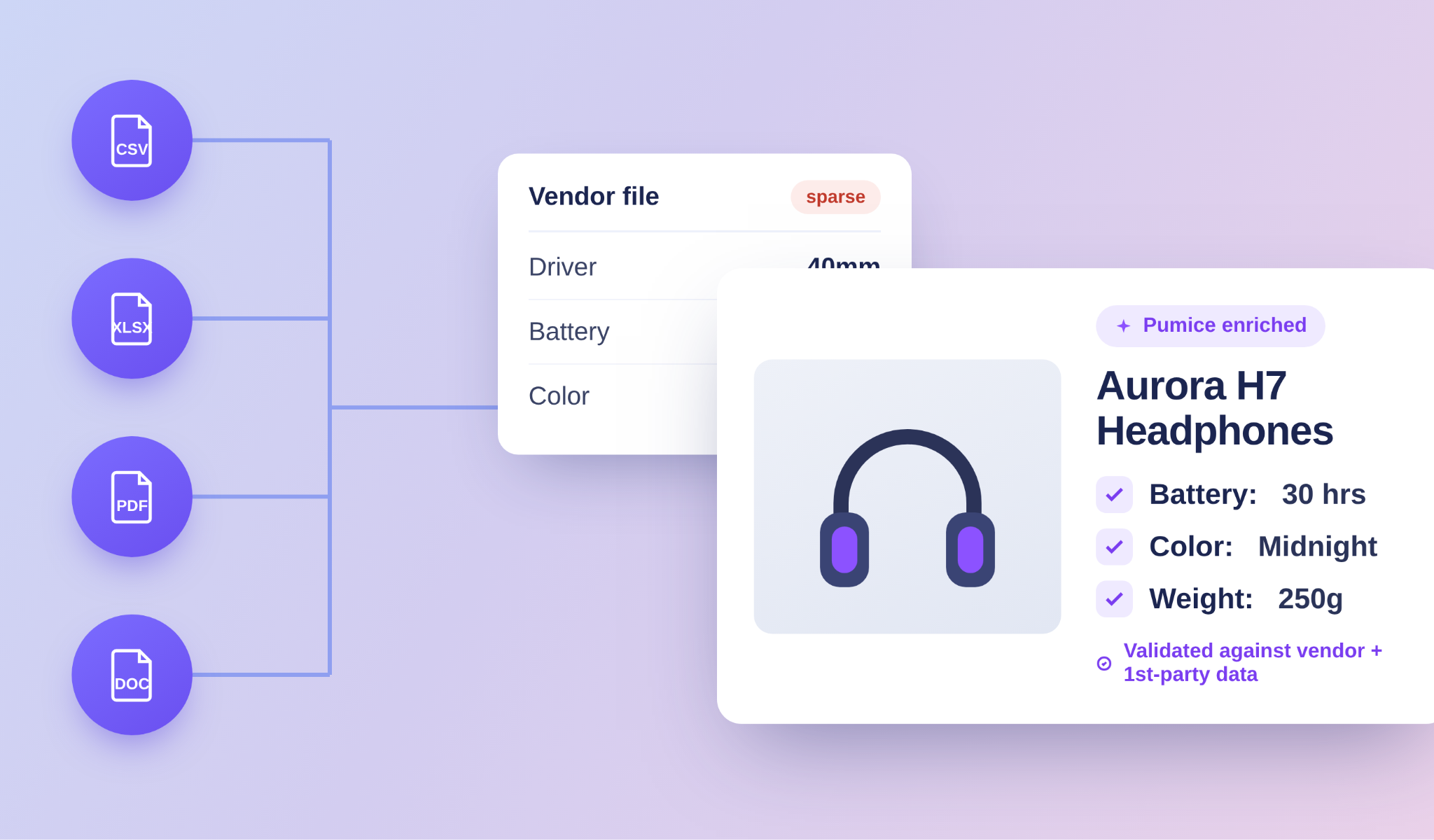
Then comes the harder question: where the data comes from. Most catalogs do not lack fields because nobody thought to add them. They lack data because the vendor file never had it. Many supplier sheets hold only a SKU, a price, a short name and a few specs, and the rest of the record is blank.
The best source for missing data is the manufacturer: its product page, spec sheet, manual or safety data sheet. GS1 data helps with identifiers, and supplier PDFs often hold specs that never made it into the spreadsheet.
If you fill fields by hand, work from the manufacturer's page, not a reseller's, because reseller pages often repeat each other's errors. Save the source URL with every value you add, and note the date you checked it.
Filling a few hundred records by hand is realistic. Filling tens of thousands is not, at least without the right tools, and that is the problem Pumice was built for.
Research: Pumice finds each product by name, SKU or model number, then scrapes the manufacturer page. A validation step confirms the data matches the right product, by brand and core attributes.
Extraction: it extracts and generates values against the keys you define per category, so the output lands in your schema. Vendor PDFs and flat files are broken into clean, structured rows.
Checks: required attributes must be present and character limits respected before a record moves on. Anything the pipeline could not verify is flagged rather than filled with something plausible.
Duplicates: incoming SKUs are compared against your catalog, so the same product does not enter twice under a different name.
Review: a person still sets the rules, reviews the batch and approves what goes live.
The checklist in this guide works with or without Pumice. If your catalog is too large to fill by hand, see how product data enrichment fills it from manufacturer sources.
Build the Record First, Then Every Catalog
What should a product catalog include? A complete record for every product, with key elements covering identifiers, content, attributes, taxonomy, variants, media, logistics, structured data and governance. B2B catalogs add ordering fields, and print catalogs add the pages around the products.
Knowing the fields is the easy part of a successful catalog. Fill each one from a real source, score completeness by category, and keep the record current, and every catalog you build from it will hold up.
Fill Your Catalog From the Source
Send a vendor file with a sample of your SKUs. We will run it through the Merchandising Pipeline and send back records filled against this checklist from manufacturer sources.
• Every field researched on the manufacturer's own page
• Attributes extracted to the keys you define per category
• Fields that cannot be verified are flagged, never invented
• Records checked before export, with your team approving what goes live
Pumice for catalog data
Fill Your Catalog From the Source
Send a vendor file with a sample of your SKUs. We will run it through the Merchandising Pipeline and send back records filled against this checklist from manufacturer sources.
Every field researched on the manufacturer's own page
Attributes extracted to the keys you define per category
Fields that cannot be verified are flagged, never invented
Records checked before export, with your team approving what goes live
Include a complete record for each product: identifiers, title, description, attributes, category, variants, images, shipping details and a source for each value. A printed catalogue also needs a cover, contents, ordering details and contact pages.
How to prepare a product catalog?
Creating product catalogs starts with complete product data for every item, checked against the manufacturer's source. Then choose the format, such as print, PDF or an online store, and lay out or publish the records.
Can you give me an example of a catalog?
An online example is a store's product feed, where each row holds a SKU, title, price, image and attributes. A B2B example is a distributor's PDF price book with part numbers, case packs and volume pricing.
Are catalogs still a thing?
Yes. Most catalogs today are product feeds and online stores, and many B2B sellers still send PDF and printed catalogs to buyers, dealers and new customers.
What fields does Google require in a product feed?
Google requires id, title, description, link, image link, availability and price for every product. Brand is required for most new products, and an MPN is required when a product has no GTIN.
How many images should each product have?
Use at least one clean main image at high resolution, and add more angles, details and an in-use shot where they help buyers decide. Check each channel's limit on additional images.