Most product taxonomy best practices guides say the same three things: know your customer, keep it simple, use clear names. All true, none sufficient, and the results show it. Baymard Institute's benchmark of 334 top-grossing ecommerce sites finds 76% perform at a mediocre-or-worse level on homepage and category navigation, with category taxonomy called out as one of the weakest areas. The advice is everywhere. The execution clearly is not.
This guide covers ecommerce product taxonomy: the classification structure behind your product catalog, categories, filters, and channel feeds. (Enterprise transformation frameworks use the same phrase for something unrelated; if you searched for product operating models, this is not that article.) You will find the core concepts, seven practices that hold up in production catalogs, the channel standards you will be forced to map to anyway, the failure modes that break taxonomies at scale, and a short section at the end on automating the categorization work itself. It draws on our experience building categorization systems that fit millions of products to real taxonomies every month.
✂️ Definition
Product taxonomy best practices for ecommerce:
Structure categories around how customers shop, not internal org charts.
Keep the hierarchy 2 to 3 levels deep.
Give every product one primary category.
Design attributes as a separate schema that powers filters and feeds.
Name categories in customer language, with synonyms handled behind the scenes.
Map your taxonomy to channel standards like the Google Product Taxonomy.
Assign an owner and iterate using production search data.
What Product Taxonomy Is (Core Concepts)
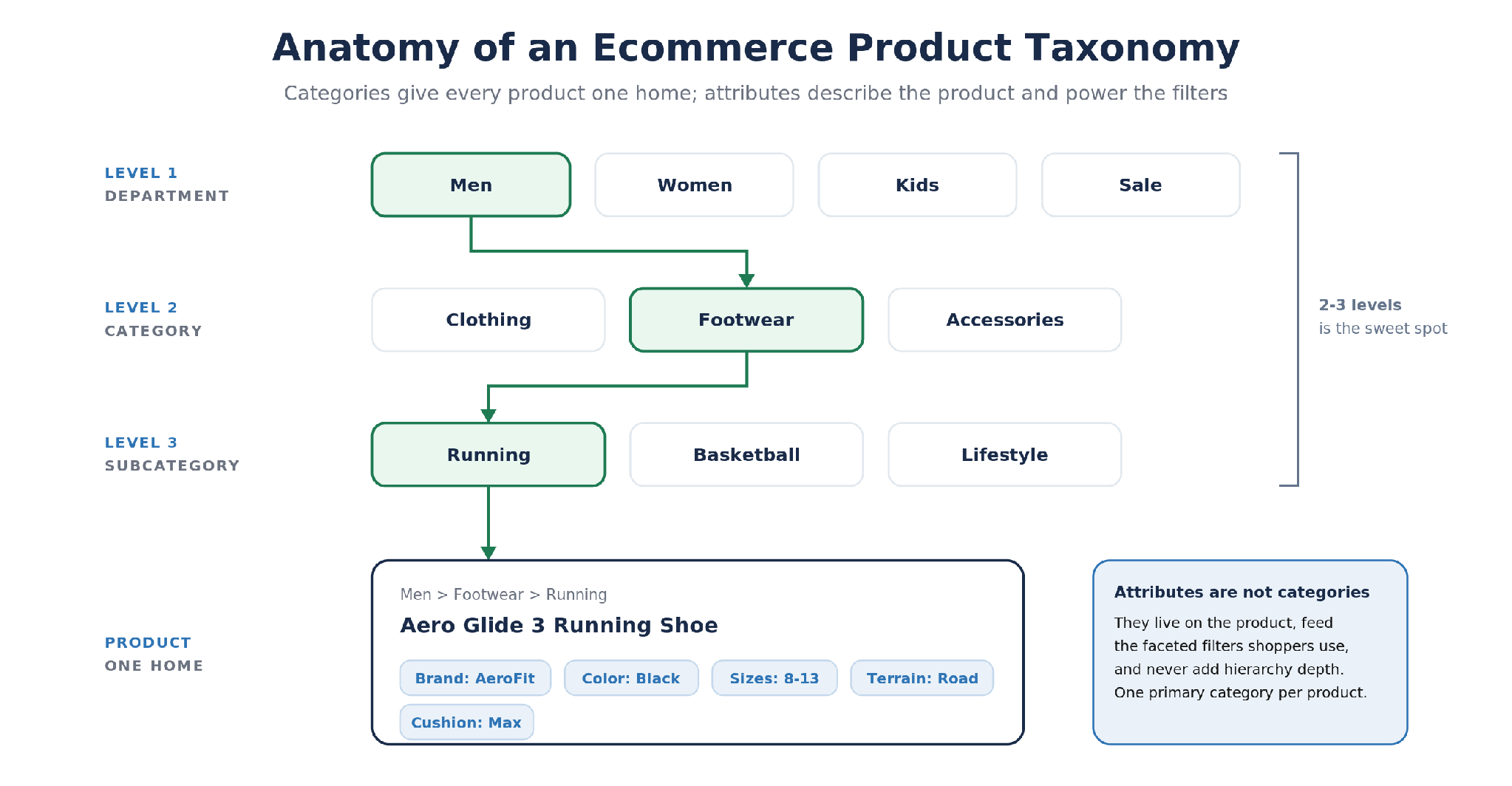
A product taxonomy is the hierarchical structure that organizes a product catalog into categories and subcategories, paired with the attribute schema that describes each product inside it. Customers navigate it as menus and breadcrumbs: Men > Footwear > Running, then filters for size, color, and price. Your systems experience it as digital commerce infrastructure: the backbone for site search, merchandising, analytics, and every channel feed you publish. One distinction worth fixing early because the terms get used interchangeably: the taxonomy is the structure, and product categorization is the ongoing work of fitting products into that structure. Creating the taxonomy happens once in a while; categorizing products happens every day you onboard SKUs.
The working anatomy: categories give every product one home in a shallow hierarchy, while attributes describe the product and power the filters.
Categories, Attributes, Tags, and Facets Are Different Things
Half of taxonomy debugging is vocabulary. The core components (categories and attributes, plus the tags and facets built from them) get blended together constantly, and each has a distinct job:
Term
What it is
Example
Where it shows up
Category
A node in the hierarchy; every product gets exactly one primary home
Men > Footwear > Running
Navigation menus, URLs, breadcrumbs
Attribute
Structured data on the product record, drawn from a controlled list of values
Color: Black · Size: 10 · Material: Mesh
Spec tables, channel feeds, filters
Facet
A filter control built from an attribute that users apply within a category or search result
The Color filter on the Running page
Filter sidebars, search results pages
Tag
A loose, often temporary label that cuts across the hierarchy
Bestseller · Summer Sale
Curated collections, promotions
What This Looks Like on a Real Storefront
Nike sells tens of thousands of products to customers through a top navigation of roughly four entries: Men, Women, Kids, and a featured slot like Sale or New. The main categories under Men are Shoes, Clothing, and Accessories; under Shoes sit Running, Basketball, Training, and a handful of other activities. That is the entire hierarchy, three levels from homepage to product grid, and everything else (size, color, price, technology, height of the collar) is a filter built on attributes. An online store that large surviving on a taxonomy that shallow is not minimalism for its own sake. It is the pattern the rest of this article keeps returning to: categories carry the customer to a browsable set, and attributes narrow it to precise results from there.
Why Product Taxonomy Matters to the Bottom Line in Ecommerce
Findability converts. In digital commerce, navigation is most of the customer experience on a first visit, and when a customer cannot reach a relevant product grid in a few clicks, they leave through the search box or they leave for good; Baymard's testing repeatedly ties navigation failures to users abandoning sessions on sites that spend millions acquiring the traffic. The same failures show up in analytics as rising bounce rates and falling conversion rates on category pages. The product taxonomy also drives SEO performance: category and subcategory pages are the pages that rank in organic search for non-brand commercial keywords, their names become URL slugs and internal anchor text, and a clean hierarchy controls how search engines spend crawl budget through faceted navigation instead of leaking it into infinite filter permutations. AI-driven search raises the stakes further, since AI Overviews and shopping agents parse structured category and attribute data to decide which products even qualify for an answer, and the same structured data powers personalization, down to a tailored shopping experience for signed-in users.
The operational side gets less attention and costs the business more. Marketplaces and ad channels enforce their own taxonomies: a product in the wrong category on Amazon or Google Shopping surfaces in the wrong searches, loses product visibility in the right ones, and in some cases is suppressed entirely, which is lost sales with no error message attached. Internally, category-level sales reporting, product performance analysis, demand planning, and inventory allocation all inherit whatever inconsistency the taxonomy structure carries. A broken taxonomy does not fail loudly; it leaks a little revenue from every workflow built on top of it, taxing operational efficiency and customer experience along the way.
7 Product Taxonomy Best Practices That Hold Up in Production
These are ordered roughly as you would apply them when creating a taxonomy: structure first, then naming and standards, then the operating habits that keep the structure healthy. Each one answers one of the key questions taxonomy teams actually face.
1. Structure Around How Customers Shop, Not Your Org Chart
The most common taxonomy failure is a hierarchy that mirrors the business instead of the customer: categories named after supplier product lines, internal teams, or warehouse zones. Customers do not know your org chart and never will, and your product offering should be organized the way it is shopped, not the way it is bought or stored. When creating the structure, work from demand data instead. Your site search logs are the cheapest customer behavior research that exists: pull the top zero-results queries and the search terms users type most, then compare them against your category names. The gaps between the two are customer needs your structure does not yet answer. If customers keep typing "black dress shoes" and your structure stops at Footwear > Dress, the data is telling you which subdivision (or filter) to add. User behavior data tells the same story from the other side: categories that users enter and immediately bounce from are usually named or scoped wrong.
2. Keep the Hierarchy Broad and Shallow: 2 to 3 Levels
Depth feels like organization and behaves like friction for users. Every added level is another decision a customer has to get right before seeing products, and another junction where they can guess differently than you did. Two to three levels between homepage and product grid handles the large majority of retail catalogs, exactly as the Nike example above shows. Two tests keep depth in check. The click test: users should reach a relevant product grid in three clicks or fewer. The population test: categories that hold only a handful of products, or exist only to contain a single subcategory, have not earned their place; fold them into their parents and let an attribute carry the distinction. Deep trees are sometimes legitimate (B2B parts catalogs, for example, routinely justify 5 or 6 levels because buyers navigate by fitment), but depth should be forced by the domain, never by tidiness.
3. Give Every Product One Primary Category
A product living in multiple product categories splits your analytics, produces duplicate URLs that dilute SEO signals, and teaches customers that your structure is arbitrary. Assign exactly one primary category per product and handle everything else through cross referencing. The exception that proves the rule is the curated collection: New Arrivals, Best Sellers, Gifts Under $50, and seasonal edits are real merchandising surfaces, but they are overlays built from tags and rules, not nodes in the taxonomy. A running shoe lives in Men > Footwear > Running and appears in Best Sellers; the moment the collection becomes the category, every downstream system has two sources of truth.
4. Design Attributes as a Separate Schema, Not an Afterthought
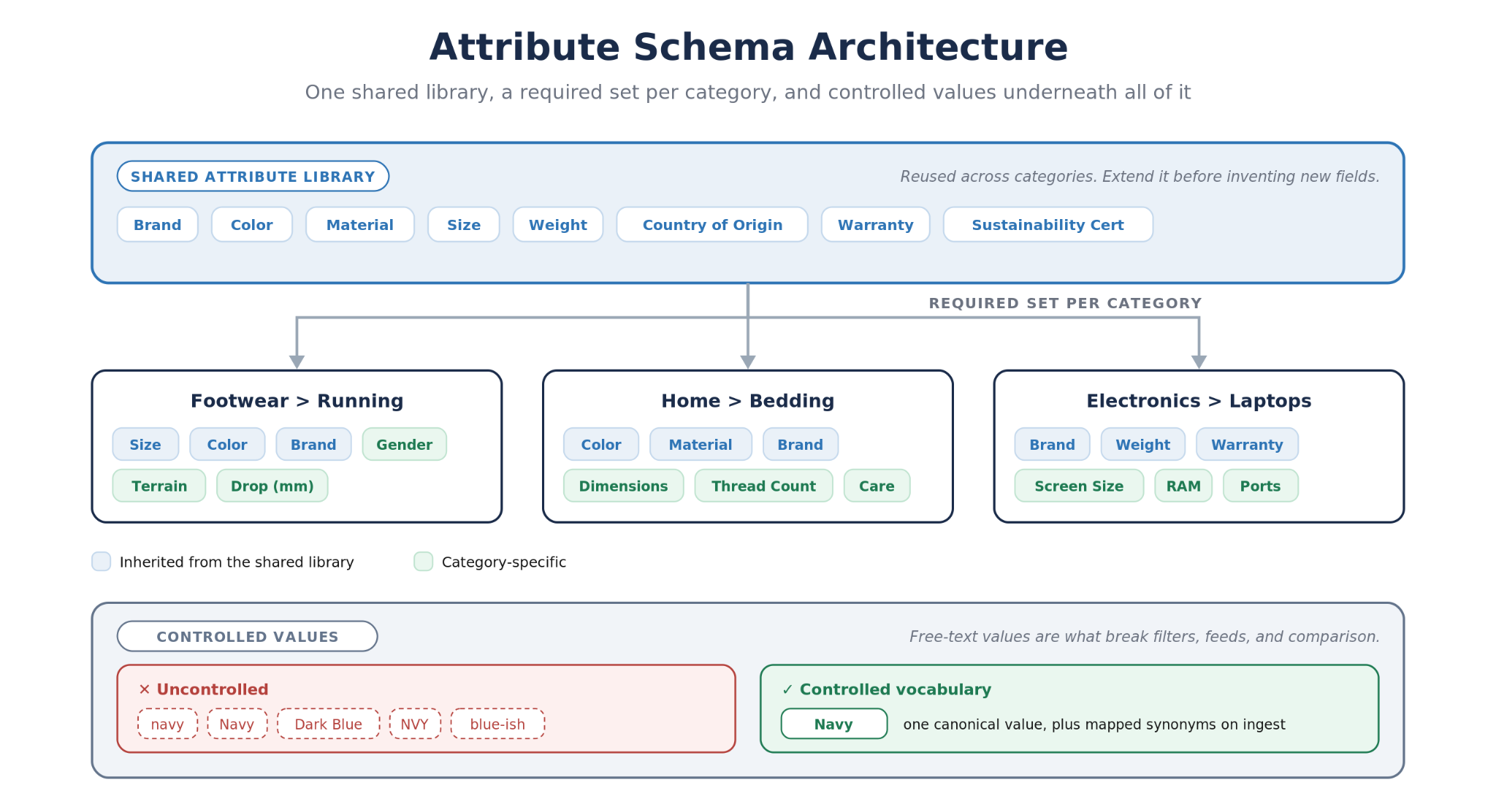
Every guide calls for a clear separation between categories and attributes. Almost none says the more useful thing: the attribute schema deserves as much design as the tree, because it is where product data quality is won or lost. Build a shared library of attributes (brand, color, material, size) that is reused across categories, then define a required set per category, so everything in Running carries size, gender, and terrain while bedding carries dimensions and thread count instead. Then control the values. One canonical Navy, not navy, Dark Blue, and NVY living side by side; standardized units; a defined format per field. Controlled vocabularies are what make faceted filters, channel feeds, and product comparison actually work, and free-text values are the usual cause of the broken filters that return nothing. When a new product type arrives, extend the library before inventing new fields; every reused attribute inherits working filters and feed mappings for free.
5. Name in Customer Language, and Handle Synonyms Behind the Scenes
Category names should be the words your customers type and say, for example sofa or couch, sneakers or trainers, hoodie rather than hooded fleece top. The decision is regional as much as stylistic, and your search logs and keyword research settle it with data rather than taste. Whichever term wins the label, the losing synonyms still deserve to work for the users who type them, so map them in your search synonym dictionary and metadata rather than cluttering the navigation with duplicates. Set naming conventions once and apply them everywhere: singular versus plural, ampersands, capitalization. Resist clever names entirely: a boutique can get away with calling footwear The Shoe Salon, but clever labels tax every first-time visitor and the search engines trying to understand the page. Clear beats cute, and the category name doubles as the URL slug and the page title, which makes naming SEO infrastructure, not decoration, and one of the cheapest sources of increased traffic you have.
6. Map to Channel Standards From Day One
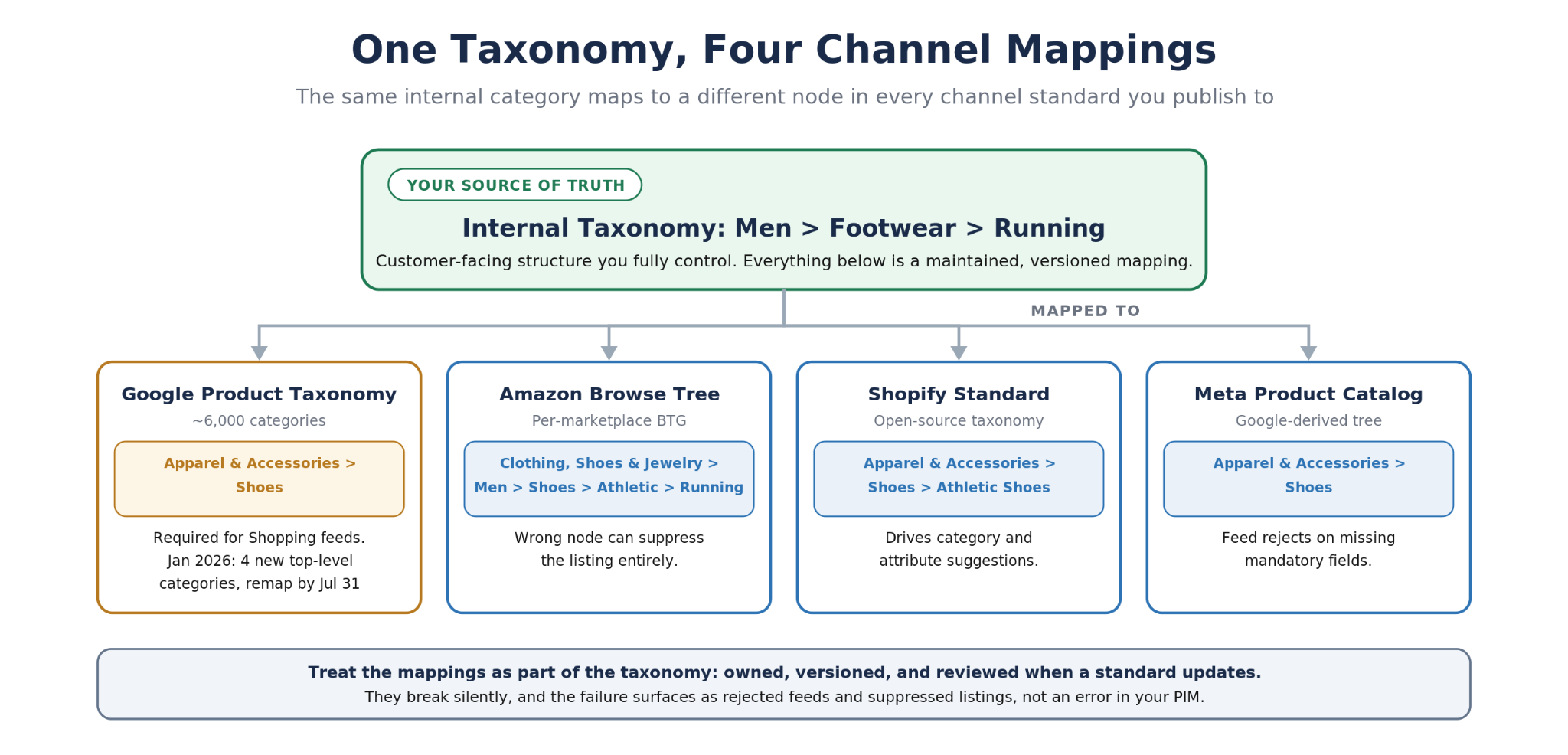
Your internal product taxonomy is not the one your channels speak. Google Shopping classifies listings against the Google Product Taxonomy, a tree of roughly 6,000 categories, and it moved in January 2026: four new top-level categories (Smart Home & IoT, Electric Vehicles, Sustainable Products, AI & Robotics) with deprecated paths due for remapping by July 31, 2026. Shopify's open-source Standard Product Taxonomy drives its category and attribute system, and GS1 GPC does the same for B2B syndication. The pattern that works is a hybrid: keep one customer-facing taxonomy you fully control, and maintain explicit mappings from it to each standard for syndication. Treat those mappings as part of the taxonomy itself, versioned and owned, because they break silently every time a standard updates, and the failure surfaces as rejected feeds and suppressed listings rather than an error in your PIM solution.
7. Assign an Owner and Iterate With Production Data
A product taxonomy is not a project; it is an ongoing effort, and it drifts the moment nobody in the business owns it. Taxonomy management needs clear ownership: a named steward with authority over category changes, additions and renames run through lightweight change control (a request, a rationale, a decision log), and the tree versioned in your PIM solution so channel mappings and analytics can follow. Then instrument it against real customer behavior. Four essential numbers tell you most of what you need: zero-results search rate, filter usage per category, average click depth to product, and channel listing rejection rate. Run regular reviews quarterly, A/B test category names and groupings the way you optimize landing pages, and retire seasonal structures on a schedule instead of letting Holiday Gifting 2024 fossilize in the navigation. The teams whose taxonomies stay healthy are not the ones who designed perfectly at the start; they are the ones with a feedback loop.
The Failure Modes That Actually Break Taxonomies
The best practices above are easier to internalize as the failures they prevent. Four pain points show up over and over in real catalogs, whatever the size of the business, and all four are taxonomy management failures as much as design failures:
Team drift. Marketing calls it Athletic Footwear, the warehouse calls it Sport Shoes, and the product team's channel feed says Shoes > Athletic. Three names for one category means manual reconciliation in every report and feed. The fix is structural, not cultural: one governed taxonomy as the single source of truth, usually living in your PIM solution, with views for internal teams derived from it.
Scale inversion. Scale is what makes taxonomy matter: a taxonomy structure built for 500 SKUs collapses at 50,000. The classic example is the landfill category: Accessories quietly absorbing 8,000 products because nothing else fit. Landfill categories are a signal that the level above them is scoped wrong, and they are where findability goes to die.
Channel mismatch. Every channel has mandatory fields and category rules of its own, and one internal category often maps to different nodes across Google, Amazon, and Meta. Teams that treat syndication mapping as a one-time CSV export rediscover this with every standard update, usually via a wave of rejected listings.
Seasonal clutter. Holiday and trend categories that were never designed to be retired accumulate in the tree, each one diluting navigation a little more. Overlay collections built from tags, with expiry dates, solve the merchandising need without a permanent structural cost.
Automating Product Categorization With AI
Everything above is design work. Categorization, the daily work of fitting incoming products into the right categories, is volume work, and it is the part that breaks first as a catalog grows. Manual categorization does not scale past a few thousand SKUs, and rules-based tools plateau hard because product data is too varied for keyword rules to hold: the same supplier file spells one product three ways, and a rule written for last quarter's assortment silently misroutes this quarter's.
Machine learning models that learn the relationship between your product data and your category structure are the production answer, and the essential number when evaluating them is accuracy at the lowest level of your taxonomy, measured on your data rather than a vendor demo. For calibration, here is what production systems we have built actually reach: 97% accuracy on a 5-level-deep taxonomy for an ecommerce solutions company, 92% at the lowest level of a 5,585-category multilingual taxonomy (97% at the top level) for a wholesale marketplace, and 97.62% accuracy at 50 million products per month for a growing marketplace. Those systems read text and image fields together, which matters because real vendor files are sparse: sometimes the title is all you get, and sometimes the image is the only field that disambiguates a category.
The deployment pattern that makes these systems trustworthy keeps a human element in the loop: auto-approve categorizations above a confidence threshold, queue the uncertain ones for a person so each still lands in the right category, and feed the corrections back into training to optimize the model. You get the throughput of automation with an accuracy floor a merchandising team can sign off on, and the queue shrinks every month as the model learns the catalog.
Automate the Whole Flow With the Pumice Merchandising Pipeline
If the categorization workload (and the enrichment work around it) is the part you want off your team's plate, that is what the Pumice Merchandising Pipeline does end to end. It takes a sparse vendor flat file and runs the full SKU onboarding flow: researches missing product data from the web and your defined sources, categorizes every product to your taxonomy (custom trees, Google Product, Shopify, or GS1, at any depth), generates attribute values and tags against your defined keys, writes titles, descriptions, and channel-specific product content that follows your brand rules, and dedupes incoming SKUs, catching the same product listed under different names, before anything lands. Categorization runs on models fine-tuned to your product-to-category relationships, and the accuracy guarantee is contractual: at least 90% on the lowest level of your taxonomy or you do not pay.
The practices in this article are the design half of a healthy product taxonomy. The pipeline is the operating half: it keeps products flowing into the structure correctly without your team dragging SKUs into categories by hand. The right PIM solution stores your taxonomy; the pipeline is what fills it at scale, working alongside the PIM systems you already run rather than replacing them. Request a demo to see it run on your own product file.
Frequently Asked Questions
What is product taxonomy in ecommerce?
Product taxonomy is the hierarchical classification system an ecommerce catalog uses to organize products into categories and subcategories, together with the attributes that describe every item. It powers site navigation, filters, search, analytics, and the category mappings channels like Google Shopping and Amazon require.
Why is product taxonomy important for ecommerce?
Product taxonomy is essential because it is the organization layer the rest of the online store depends on. A well organized product taxonomy gives the catalog a clear hierarchy that helps customers find relevant products in a few clicks, helps search engines understand and rank category pages, improves customer experience, search relevance, and conversion rates on site, and protects sales on channels that reject miscategorized listings. Creating one is only half the work; taxonomy management, meaning regular reviews, synonym updates, and channel mapping maintenance, keeps it healthy as the catalog grows.
How deep should a product taxonomy be?
Two to three levels between the homepage and a product grid fits most retail catalogs; customers should reach relevant products in three clicks or fewer. Deeper trees are justified when the domain demands it, such as B2B parts catalogs navigated by fitment, but each added level should be forced by real customer behavior, not tidiness.
What is the difference between product taxonomy and product categorization?
The taxonomy is the structure: the tree of categories and the attribute schema. Product categorization is the ongoing process of assigning products into that structure. Creating the taxonomy is an occasional project; categorization happens every time you onboard a SKU, which is why it is the part most worth automating.
Should I use the Google Product Taxonomy or build my own?
Both, in different roles. Your customer-facing taxonomy should be your own, built around how your customers browse. The Google Product Taxonomy is a syndication requirement for Shopping feeds, not a navigation design, so the working pattern is a custom taxonomy with maintained mappings to Google, Shopify, or GS1 standards for each channel you publish to.
Can AI automate product taxonomy management?
Yes, and categorization is the highest-value piece: fine-tuned models that learn your product-to-category relationships reach a high degree of accuracy on real taxonomies, 90%+ guaranteed floors and 97%+ in production systems we have deployed. AI also generates attribute values, flags duplicates, and maps products to channel standards, with low-confidence cases routed to human review.
Stop Categorizing Products by Hand
The Pumice Merchandising Pipeline researches, categorizes, enriches, and dedupes your SKUs end to end, with categorization accuracy guaranteed to 90%+ on the lowest level of your taxonomy, in the contract.



.png)