Paste a vendor part number into any eBay listing title generator and you get 80 tidy characters in a second. The title has a brand, an item type and a few keywords, and it fits eBay's limit. For a seller with two hundred SKUs to list this week, that looks like the job done.
Then you read it next to the product. The title leads with the words competing listings use, takes the size from supplier shorthand, and says 18 inch where the item specifics say 16. Searches for the right size miss it, and buyers who click on the wrong one send it back.
The product also sits on page five for the searches that matter, priced below every listing above it. Nothing is wrong with the price. The title borrows other sellers' keywords but describes the item wrongly, so eBay has little reason to show it to the buyers looking for this one.
Why rank these products for a keyword completely unrelated? Nobody is bidding and no watchers. The keyword is unrelated.
The generator did what it could with what it had. Some builders know which words competing titles use but have never seen the item. Others know the item from a photo but have no idea what buyers type. A title that ranks and converts needs both: the real product data and the eBay search data. I literally see this issue every time someone reaches out to Pumice and is trying to understand why their product listings aren’t performing.
The useful question is what the title is written from, and which of eBay's rules it is checked against. The title is just one field of the listing, and our AI eBay Lister guide covers the rest.
Key Focus Areas
An eBay title generator arranges whatever facts and keywords it is given, so its title can be no better than those inputs.
eBay's search leans heavily on the title, while buyers narrow results with item specifics.
Titles max out at 80 characters, and eBay Australia says titles of 65 to 80 characters are more likely to sell.
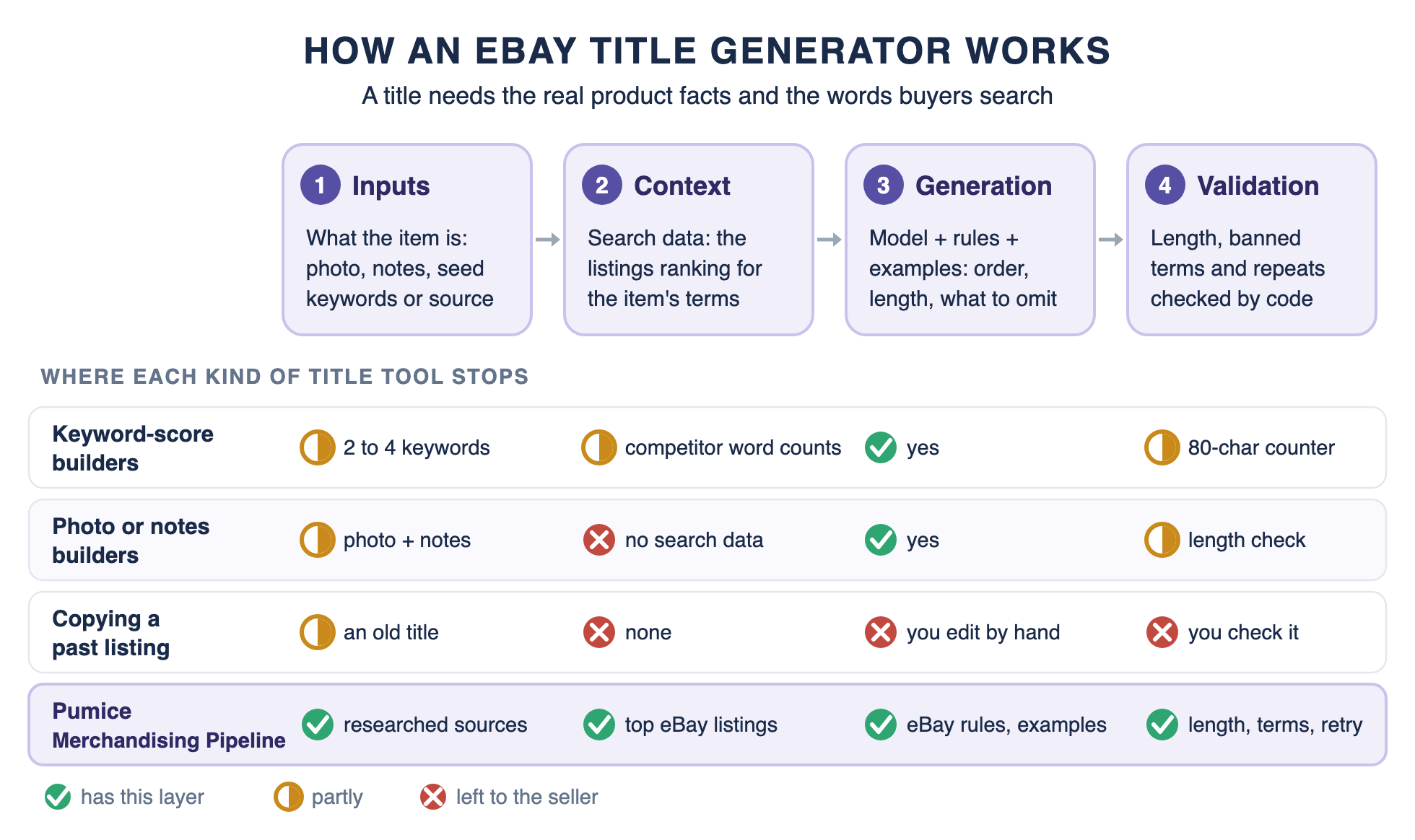
Every generator has four layers: inputs, context, generation and validation. Free tools leave most of the validation to you.
A title that ranks and converts needs both real product data and eBay search data.
Pumice researches both, writes to eBay's rules and validates every title before it publishes.
eBay Listing Title Generator: What It Does and What It Cannot Know
An eBay listing title generator can start from very different inputs: a few seed keywords, a photo and notes, or a full product record.
✂️ The short answer
What is an eBay listing title generator?
An eBay listing title generator is a tool that writes the 80-character title of an eBay listing from the facts and keywords it is given. A good one uses both halves a title needs: the real product data, such as brand, model, size and finish, and the words buyers actually search on eBay.
The tools come in three kinds. Keyword-score builders such as the 3Dsellers eBay title builder pull current eBay listings and suggest words, and photo and notes builders describe the item you show them. Catalog pipelines such as Pumice write titles for hundreds of repeatable SKUs from a researched product record. Each kind has a place, and each stops at a different layer.
All of them share one limit. A model writes from the facts in front of it, and when a fact is missing it fills the gap with what is typical. In a test we ran, a general-purpose model gave a mirror a walnut finish it never had; the real finish was honey brown.
What separates Pumice is the order of the work. We add to the product data first, from the manufacturer and the listings already ranking on eBay, and generate second. If every seller runs the same free builder on the same vendor copy, nobody's title stands out in search.
What eBay Does With Your Title
How Best Match Uses the Title
eBay's Best Match help page lists the factors behind search order. They include relevance, popularity, price, listing quality, completeness, listing terms and seller track record. Relevance is how closely a listing matches the buyer's search terms, and the title holds most of those terms. Its title advice is short: "Write a clear and concise title with correct spelling and no more than 80 characters".
3Dsellers describes eBay's search engine, Cassini, as "heavily based on the title of eBay listings" when it picks results. Item specifics do the other half of the work. According to eBay's item specifics guide, buyers use them to filter results, and a listing only appears in a filtered view if it carries the matching specific.
The 80-Character Limit and the Paid Subtitle
eBay's developer guide to listing titles sets the maximum at 80 characters, and a subtitle of up to 55 characters is available for an additional fee. The documentation does not say whether spaces count, but 3Dsellers states that spaces and punctuation count toward the 80-character limit.
Length matters below the cap too, because eBay links longer titles to more sales. eBay Australia's Seller Centre says "Longer titles (65-80 characters) are more likely to sell" in its listing guide. It recommends the structure [Condition] [Brand] [Product Name] [Model No.] [Variants] [Additional Keywords].
What eBay Says to Leave Out
The same Seller Centre page tells sellers to "avoid unnecessary words or repeated keywords" in a title. The search manipulation policy from eBay goes further: every word in a listing must be accurate and refer only to the item for sale. Popular keywords unrelated to the item, comparisons with other products and keywords with question marks are not allowed. A title that calls an item "like" a better-known brand is, in effect, a comparison with another product.
That rules out a common trick: adding a better-known brand to borrow its searches. RankHero notes that eBay treats brands the item does not carry as keyword spamming. Include the brand only when the item actually carries it. Hype, all caps, symbols and price or shipping claims stay out as well, since eBay shows price and shipping in their own fields.
Why the Title Has to Agree With the Item Specifics
eBay's item description policy says the item condition should be consistent across all areas of a listing, including the title, description and item specifics. The same logic applies to every value a title states. A title that says 18 inch on a listing whose item specifics say 16 confuses search, filters and the buyer at once.
On eBay, then, a well optimized title means three things. It is written in the words buyers search, it states exactly what the item is, and it agrees with the rest of the listing.
From eBay's own documentation
eBay title rules at a glance
Rule
What eBay says
Source
Title length
80 characters maximum.
eBay Trading API title guide
Subtitle
Up to 55 characters, for an additional fee.
eBay Trading API title guide
Best length
"Longer titles (65-80 characters) are more likely to sell."
Every word must be accurate and refer only to the item. No unrelated keywords or comparisons with other products.
eBay search manipulation policy
Consistency
The item condition should be consistent across the title, description and item specifics.
eBay item description policy
Sources: eBay Trading API user guide, eBay Australia Seller Centre, and eBay's search manipulation and item description policies.
How an AI eBay Title Generator Works, Layer by Layer
Every eBay listing title generator, from a free box to a catalog pipeline, is built from the same four layers. What differs is how many layers a tool has, and what it puts in each.
1. Inputs: What the Item Is
Inputs are where the facts come from: a photo, a few notes, two to four seed keywords, a CSV row or researched source data. Only researched data adds details the seller did not already have, such as the exact model number, size and finish from the manufacturer's page.
2. Context: The Words Buyers Search
Context is the search data the model sees while it writes: the listings ranking for the item's terms, the top eBay keywords those titles share, and the category and item specifics. A tool with no search data writes in the seller's words, which may not be the keywords buyers type.
3. Generation: Rules and Examples
Generation is the model plus instructions: the order of terms, the length to aim for, examples of strong titles in the category and a list of what to leave out. Without rules, a model writes a pleasant phrase, not a title built for search.
4. Validation: Checks Before the Title Goes Live
Validation checks the output before it publishes: length, banned and promotional terms, repeated words and agreement with the item specifics. A free eBay title generator checks some of this, such as length, and leaves the rest to you.
Where Title Generators Fail, by Layer
Each failure maps onto a missing layer. A wrong model number or size is a missing input, and supplier shorthand in place of the words buyers search is missing context. A 58-character title or a repeated keyword is a missing rule. A size that contradicts the item specifics is missing context and validation at once.
What an eBay Title Generator Uses for Keywords, and Where It Stops
Every eBay title generator gets its words from somewhere, and that source decides whether the title carries the right keywords and what it can rank for. There are three common sources, plus one that only looks like a source.
Your own past listings. eBay's bulk listing tools let you select existing listings in Seller Hub and choose Sell Similar to create new ones from them. That reuses a title that may have worked, mistakes included, and it knows nothing about a new product.
Live listing frequency. 3Dsellers pulls listings live from the eBay site you pick and scores a keyword by "how often a keyword appears in the listings that rank for your search" at that moment. That makes it real eBay data from the listings that already rank. It doubles as an eBay keyword tool, but it knows the item only through the two to four words you type.
Your photo and notes. Photo-based builders such as FlowLister stay "grounded to the photos and notes you supply" by design. FlowLister says its free tool does no sold-comp keyword research, so the words come from your notes, with no view of how much competition they face.
General AI writers are a fourth source in disguise. Ask a chatbot for an eBay title and it writes from what is typical for that kind of product, with no eBay data and no manufacturer page behind it. The result reads well and may name a feature the item does not have.
None of these sources knows the product the way its manufacturer does, and none joins the item's facts to the search data for every SKU. Joining the two for every SKU is the job of the pipeline described below.
eBay Listing Title Best Practices: The Structure a Generator Should Output
eBay listing title best practices come down to one formula applied with discipline. A perfect eBay listing title puts the words buyers search first, states exactly what the item is, and uses the space eBay gives you.
Free to copy
eBay listing title formula, with three category versions
[Brand] [Model or part number] [Item type] [Key spec buyers filter on] [Size / Color / Material] [Condition] Power tool: Brand + Model + Item type + Voltage + Chuck size + Kit contents Acme DR20 Cordless Drill Driver 20V 1/2 in Chuck Kit 2 Batteries Charger Apparel: Brand + Style + Gender + Feature + Item type + Size + Color + Material Acme Ridge Mens Waterproof Hiking Jacket Hooded Size L Navy Blue Nylon Shell Electronics: Brand + Model + Generation + Storage + Item type + Screen + Color + Condition Acme Tab 10 2nd Gen 64GB Wi-Fi Tablet 10.1 in Space Gray Refurbished Grade A
Example titles use a fictional brand and run 72 to 76 characters, inside eBay's 80-character limit.
Lead with the main keyword, usually the brand and model name, because buyers search for them. Then add the item type and the key feature buyers filter on, such as voltage, size or storage. On a used phone, that feature can be battery health. Use 65 to 80 characters, following eBay Australia's guidance, and write every value exactly as it appears in the item specifics.
Leave out repeated words, filler words, all caps, special characters such as exclamation marks, and brands the item does not carry. Condition belongs in the title when it changes what the buyer gets, such as refurbished or for parts. FlowLister publishes a similar electronics formula, Brand + Model + Generation + Storage/Config + Color + Condition, and the same pattern works in any category once the slots change.
Here is the formula applied to a vendor row. The supplier file reads "DRL 20V CRDLS 1/2 ACME DR20 KIT," which is the warehouse's shorthand, not a buyer's search, since buyers type full words such as “cordless drill.” Researched against the manufacturer page and the listings ranking for the model, it becomes "Acme DR20 Cordless Drill Driver 20V 1/2 in Chuck Kit 2 Batteries Charger" at 72 characters, with every value matching the item specifics. The specs at the end also match long tail keywords, such as a search for a 20V drill kit with 2 batteries.
How Pumice Generates eBay Titles From Real Data
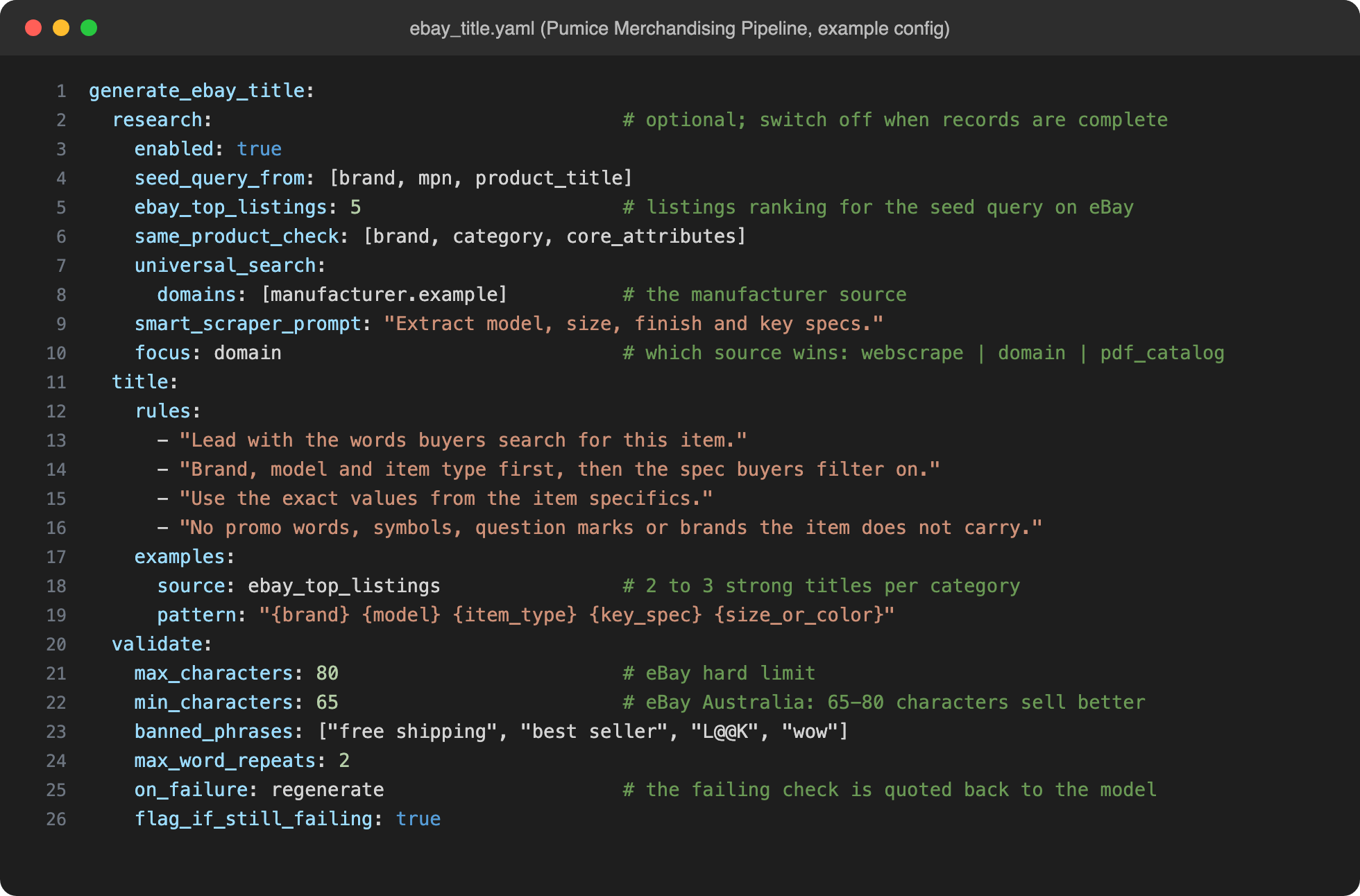
At Pumice, we write eBay titles with our Merchandising Pipeline, the same workflow we use for Amazon titles and for Amazon fields such as Item Highlights. Each run is driven by one configuration file, which sets the research steps, the rules and examples for each field, and the checks every title must pass. Moving from Amazon to eBay changes that file, not the tools.
Used as an eBay listing title generator, the pipeline runs in two phases. An optional Research Phase fills thin records with facts from the manufacturer and words from the listings already ranking on eBay. The Generation Phase writes the title, item specifics and description, then validates each one before it reaches your output file.
Inside the Merchandising Pipeline
What each Pumice tool adds to an eBay title
Pumice tool
What it does
What it adds to the title
Universal Search
Finds the manufacturer or vendor page from a part number, UPC or product name
The exact model, size and finish
Research Phase: eBay listings
Pulls the listings ranking on eBay for each item's seed query
The words and order buyers already respond to
Smart Scraper
Pulls the fields you name in a plain-language prompt
Specs worth putting in the title
Validation agent
Checks each scraped page against your row: brand, category and core attributes
Words from lookalike products caught before use
PDF catalog processing
Turns vendor catalogs and spec sheets into searchable context
Facts that never made it onto a web page
Attribute extraction and prediction
Fills the item specifics from text and images, using your allowed values
Title values that match the item specifics
Title generation
Writes the title from the record, your rules and your examples
80 characters in your format
Validation and retry
Code checks length, banned terms and repeats, and quotes any failure back to the model
Titles that pass before they publish
One configuration file decides which tools run, with what rules, and which checks every title must pass.
Research: The Product Facts and the Words Buyers Search
Research starts from what the row holds, usually a brand, a part number and a supplier description. Universal Search finds the manufacturer or vendor page, on domains you list or across the open web, and the Smart Scraper pulls the fields you name, such as model, size and finish. PDF catalogs work with or without the web search.
For search data, the pipeline builds a seed query from the record and pulls the listings ranking for it on eBay. Those titles show the most relevant keywords for each item, the order buyers respond to, and which specs the category leads with. A validation agent compares each page's brand, category and core attributes with your row, so words from a lookalike product are caught before they reach the title.
Research is a switch, not a requirement. If your records already hold complete, accurate specs, turn the Research Phase off and the pipeline writes titles from your record, rules and examples alone. Leave it on to bring in the manufacturer facts and the eBay listings ranking for each item, which a part number and a line of shorthand cannot supply.
When sources disagree, a focus block in the configuration says which one wins: the live page, the manufacturer sites you list or the uploaded PDF catalog. The result is one enriched record, and the title, item specifics and description are all written from it.
Rules and Examples Tuned to eBay's Title Field
The rules turn eBay's guidance into plain-language instructions, the way a brief works for a copywriter. Lead with the words buyers search, and put brand, model and item type first. Use the exact values from the item specifics, and leave out promotional words, symbols, question marks and brands the item does not carry.
An eBay configuration starts from the prebuilt rules Pumice ships for third-party channels, and there is no cap on the rules you add.
Examples come from the top-ranked listings in each category, two or three per category, plus a pattern such as brand, model, item type, key spec and size or color. Configuration is set per category, because a power tool title and an apparel title lead with different specs. A power tool configuration can require voltage in every title, while an apparel configuration requires size and color.
Example Merchandising Pipeline configuration for the eBay title field: research on the manufacturer source and the top eBay listings, eBay rules and examples, and validation with a retry.
Validate Against eBay's Rules, Then Retry
The model does not count characters; code does. Each title is checked against a maximum of 80 characters and a minimum near 65, a list of banned and promotional phrases, and a limit on how often any word repeats. These are the same kinds of checks the Amazon workflow runs, with eBay's limits in place of Amazon's. Because code runs the checks, a rule holds no matter how many titles you run, on the ten-thousandth exactly as on the first.
When a check fails, the pipeline tells the model exactly what failed, quotes the failing title and asks for a new one. If a title still fails after the retries, the SKU is flagged in the output file for a person to look at. In our AI eBay Lister work, generated titles followed the specified term order with 98% accuracy, a measure of format, not of product facts.
Rules that need judgment, such as whether condition belongs in a given title, can go to a checker agent. It reviews titles against the full rule set with a reasoning model and rewrites any that miss.
Running eBay Titles Across a Whole Catalog
Take a distributor with a new 500-SKU vendor line and an ERP export holding a part number, brand and one-line description per item. None of those descriptions is a title a buyer would search for. The pipeline researches each part number against the manufacturer's catalog and the eBay listings ranking for it. It then writes the title, item specifics and description from one record in a single batch.
The output file keeps every original column and adds the new title, item specifics and description, with the scraped source data and any retry flags. Teams that want a person in the loop review each value in the Pumice dashboard beside its source, then approve, refine or reject it. Approved records export to CSV or go out through the API.
The record outlives the eBay listing. For sellers on more than one marketplace, each marketplace is a formatting configuration applied to the same record, which can live in a PIM. Our supplier catalog ingestion agent works the same way, reformatting one run's output for each sales channel. Categorization runs on the same infrastructure at 97.6% accuracy at the top level and 93.6% six levels deep across 5,585 categories, at 50 million records a month.
Which eBay Title Generator Should You Use?
The right tool depends on what you sell and how much of it.
Pick by what you sell
Which eBay title generator fits your listings
If you are
Use
Because
Listing simple products now and then
A free title builder
You don't list at the scale that makes automating titles worth it.
Selling one-of-a-kind thrift or estate items
A photo-based builder such as FlowLister
A photo is the only input a unique item has.
A small seller checking one title against current listings
A keyword-score builder such as 3Dsellers
It shows which words competing titles use, and you write and check each title yourself.
A brand, distributor or multi-channel seller with repeatable SKUs
Pumice
It writes the title, item specifics and description from one record, for eBay, Amazon and Walmart. Research adds the manufacturer facts and the eBay listings ranking for each item.
Free builders write one title at a time. A catalog needs the research and checks done for every SKU.
How to Tell Whether Your Titles Are Working
eBay Seller Hub's traffic report shows impressions, click-through rate and sales conversion rate per listing. Impressions and click-through rate are the title's numbers, because titles drive traffic: they decide which eBay search results a listing appears in and whether buyers click. Pick a fixed set of SKUs, record both, optimize eBay titles for that set only, and compare after a full sales cycle for the category. Change titles one category at a time, so each category's seasonal swings stay out of the others' results.
Judge any eBay listing title generator the same way, against your own numbers rather than its claims. Better visibility only counts if it turns into eBay sales, so read conversion beside impressions. Watch not-as-described returns too, because a title that disagrees with the item specifics shows up there first. The Pumice PDP Optimization Playbook can then compare each live listing with the ones already winning its category and list what to change.
Write the eBay Title From the Product and the Search, Not the Prompt
An eBay listing title generator does the last step of the job. Know the item from the manufacturer source, know the best keywords from the listings already ranking, then write to eBay's rules: 80 characters, the buyer's words first, nothing eBay treats as keyword spamming.
Free builders create titles one at a time, most in one click with no signup required. 3Dsellers gives unlimited access to its builder. For sellers managing hundreds of SKUs, the research and the checks are the work, and that is the part we built Pumice to do.
Send Us 20 to 50 eBay SKUs
Bring a sample of the product data you have now: an ERP export, a supplier feed or PDF line sheets. We will run it through the Merchandising Pipeline and show you eBay titles written from the manufacturer source and the listings already ranking, validated before they publish.
• Titles built from the manufacturer source
• Buyer search terms first, inside 80 characters
• Titles that match their item specifics
• One record for eBay, Amazon and Walmart
Pumice for eBay sellers
Send Us 20 to 50 eBay SKUs
Bring a sample of the product data you have now: an ERP export, a supplier feed or PDF line sheets. We will run it through the Merchandising Pipeline and show you eBay titles written from the manufacturer source and the listings already ranking, validated before they publish.
The best eBay title starts with the brand and model, then adds the item type and the spec buyers filter on, followed by size, color or material. Use 65 to 80 characters. Every word should be accurate and refer only to the item, and every value should match your item specifics.
How to structure an eBay listing title?
Use Brand + Model + Item type + Key spec + Size, color or material, adding condition when it matters. The eBay Australia Seller Centre suggests [Condition] [Brand] [Product Name] [Model No.] [Variants] [Additional Keywords].
What is the eBay title character limit?
eBay titles can be up to 80 characters, and an optional subtitle of up to 55 characters costs extra. According to 3Dsellers, spaces and punctuation count toward the limit.
Should I repeat keywords in my eBay title?
No. Guidance from eBay says to avoid unnecessary words and repeated keywords. Using the same word multiple times is a mild form of keyword stuffing. Each extra copy uses space that more important keywords could fill.
Can I use AI to write eBay titles?
Yes, as long as the AI writes from accurate product facts and real search data. A title written from a guess can state the wrong size or model, and eBay requires every word to be accurate and refer only to the item.
Can AI create eBay listings?
Yes. eBay's own AI tools and dedicated listing tools can write the title, item specifics and description, but you should check every value for accuracy before the listing goes live.




.png)