Point a phone at a sneaker, a desk lamp or a jacket, and Google Lens finds it almost instantly: the listing, the price, the other stores that carry it. For a shopper, it is the fastest product search there is.
Then you try to build that into a product. A seller-onboarding tool that turns a supplier's photo into a listing. A price monitor that follows one SKU across retailers. A shop-this-look button on a storefront. You go looking for the Google Lens API, and there isn't one.
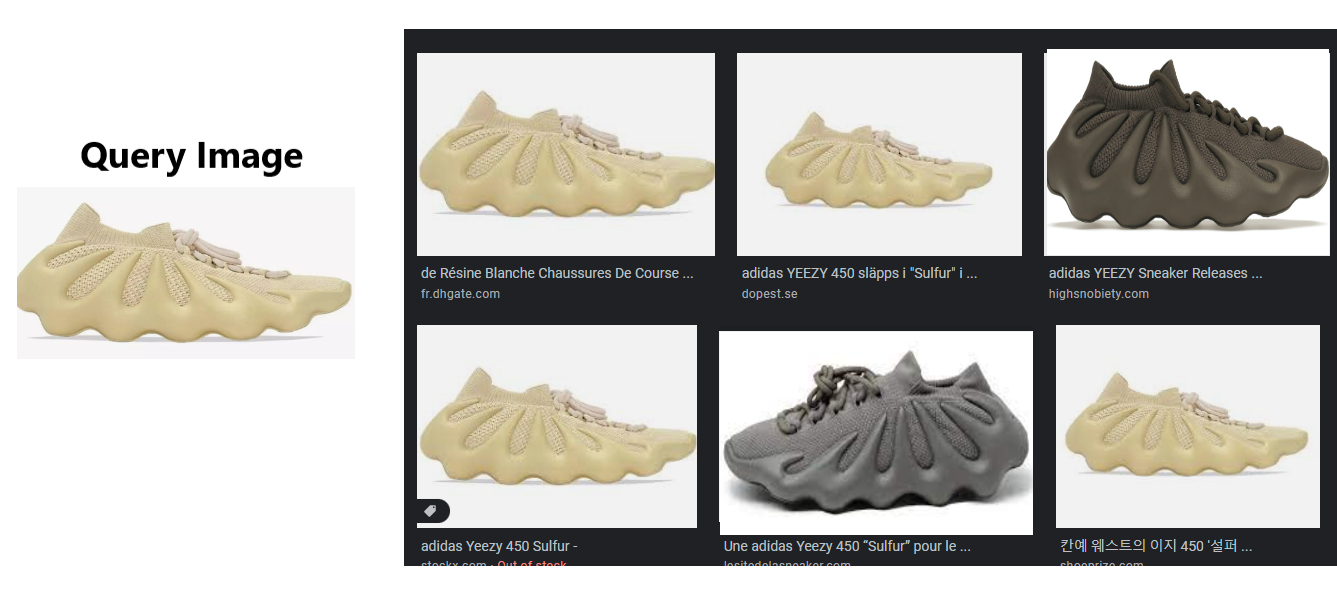
Google has never shipped a public Lens API. Lens is just a consumer feature inside Google Search. The third-party APIs that fill the gap hand back Lens's results in the order Google produced them, and Lens is built to show what looks like your photo, not to confirm which result is the same product. A lifestyle photo, three listings of the same shoe and a lookalike from another brand can all land in the first six results with nothing to tell them apart.
So the useful question is not how to get Lens results as JSON. Several services do that, and Pumice's Google Lens API does too. The question is how to get the best products back: this SKU, this colorway, these lookalikes, each with a score a system can act on. That is what the tools around Pumice's Lens API are for.
Key Takeaways
No official API. Google has never released a public Google Lens API. Lens is a consumer feature, not a developer product.
Cloud Vision is a different product. It is Google's official image API, and it does not return Lens results.
Third-party APIs return Lens results. They deliver Lens results as JSON, in the order Google produced them.
Google's order is not product order. Raw results mix lifestyle photos, repeat listings and lookalikes, with no score attached.
Pumice returns Lens results plus three tools. Re-ranking by product identity, SKU grouping with exact, variant and lookalike labels, and matching against your own catalog.
The model behind the re-rank has a published benchmark. It retrieved the right product first 92.44% of the time from a database of more than 10 million products.
Does Google Lens Have an API?
Does Google Lens have an API?
No. Google does not provide an official, public Google Lens API for developers. Lens is a consumer feature inside the Google app, Google Photos, Chrome and Google Search.
Developers who need Lens results in code use third-party Google Lens APIs, which return Lens results such as visual matches, product listings and exact matches as JSON. Google's official Cloud Vision API is a separate product and does not return Lens's results.
The closest thing Google offers is the Cloud Vision API, and it does a different job. Cloud Vision labels objects, reads text, and detects faces, landmarks and logos. Its Web Detection feature returns web entities, full and partial matching images, pages that contain matching images, and visually similar images. That sounds close to Lens, and Google's own team says it is not. In a reply on Google's developer forum, a Google staff member explains that Lens and Cloud Vision share foundations but not the same technology stack, and that Web Detection lacks Lens's ranking and filtering.
Google's route for matching photos against your own catalog, Vision API Product Search, is now in maintenance mode. Its documentation points to Vision Warehouse instead, part of Vertex AI Vision, which Google deprecated in June 2026 and retired at the end of September 2026.
Product Search use cases also work differently from Lens. You upload your own product images into an index, and it searches only that index, never the open web. If the goal is to find where a photo appears online, Web Detection is the official tool. If the goal is Lens's shopping results, there is no official tool at all.
So in practice, a Google Lens API is a third-party service that returns Lens results to your code. None of them is an official Google product, and none of them should claim to be.
What a "Google Lens API" Means in Practice
Several companies sell one: SerpApi, SearchApi, Scrapingdog, Oxylabs, Bright Data and Apify among them. Most share a basic shape: you send an image URL, usually a public https link (some also accept an uploaded image), and you get JSON back. The more complete ones let you choose which kind of result you want and set a country and language; the simpler ones return a single list.
Your goal use case defines the Google Search result you are looking for.
Visual matches. A Google Lens visual matches API tool returns the broadest list: pages across the web whose images resemble yours. Each result carries a title, link, source, thumbnail and image, plus a price, stock status or rating when the page is a shopping listing. Use it for discovery and for finding where else a product appears.
Products. A Google Lens products API tool narrows the search to shopping results: listings with a title, link, source, price, rating, review count and stock status. In SerpApi's version, product results come back in the same structure as visual matches, filtered to listings. Use it for where-to-buy and price comparison.
Exact matches. A Google Lens exact matches API returns the source pages where Lens found the same image rather than a similar one, with price, stock status and a date where they exist. Use it for provenance, for duplicate detection, and for finding every page that carries a supplier's photo.
Image sources. A Google Lens image sources API no longer works in its original form. SerpApi labels its image sources endpoint legacy, citing changes to Google's layout, and points users to exact matches instead. It has also discontinued its separate About this image endpoint. About this image still exists in Google Search's image viewer in some regions, where it shows when Google may have first seen an image and other pages that use it.
Every one of these services returns Lens's list in the order Google produced it. For research and one-off lookups, that is exactly what you want. It is the wrong starting point when the question is which result is the product.
Why Raw Lens Results Aren't a Product Answer
Lens is built to answer "what does this look like, and where can I see more of it." For a person scrolling on a phone, that is ideal. For a system that has to decide which result is the same product, five things get in the way.
Lifestyle photos sit beside product pages. A photo of the shoe on someone's feet is a strong visual match and a useless product record.
One SKU shows up again and again. A product listed on several marketplaces comes back as several results, each with its own title and price, and nothing marks them as the same item.
Variants interleave. Another colorway, or a near-identical model from the same line, looks almost the same to an image search.
Lookalikes from other brands mix in. A similar silhouette from a different brand can sit above the real listing.
Nothing carries a score. Position one comes with no confidence value, so there is no threshold to automate against. Every result needs a person to check it.
The cost shows up downstream. In a seller onboarding use case, a wrong top result attaches a supplier's product to someone else's specs, or creates a duplicate of a SKU the catalog already carries. In price monitoring, a lookalike's price lands in the comparison and triggers a repricing that should never have happened. In brand protection, a colorway you do not sell looks like an unauthorized listing. Each one is an error a person would catch in a second, repeated thousands of times by a system that cannot tell the difference.
Width's product-similarity case study shows why the image matters. Its example is the same jacket sold on two marketplaces, listed so differently that matching the two by keyword, by rules or by text similarity would be nearly impossible. In cases like that, the photo carries the signal the text does not.
None of that is a flaw in Lens. Lens does its own job well. The gap is between what Lens is for and what a catalog operation needs, and closing that gap is what the tools on top of Pumice's Lens API are built to do.
Pumice's Google Lens API
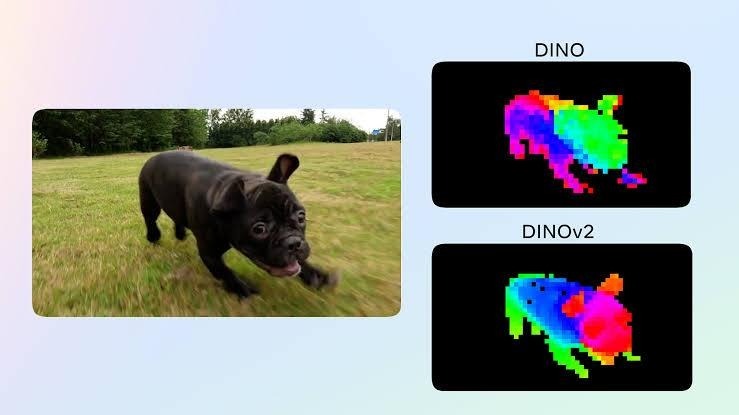
Our model understands color similarity and product design similarity
Pumice provides a Google Lens API. Send it a product photo and it returns Google Lens results as structured data: visual matches, product listings and exact matches, with the titles, links, sources, images and prices Lens returns. If Lens's list as JSON is all a project needs, that is what comes back, and on that core job Pumice sits in the same category as the services above.
Each result comes back with the fields Lens provides: a title, a link, the source site, the image and, for shopping results, a price and stock status. With the tools described below switched on, each result also carries a product-identity score, the group it belongs to, a match label and, when a catalog is connected, the SKU it matches in that catalog.
Alongside the search API sits Pumice's product matching API, which works on Lens results or on its own. This system takes in the query image and a list of images, and actually defines if the product is a match or not. It uses both image matching and text matching for a deeper relationship. In the example results above, the product matching api will tell you which product is actually the same sku as the provided input.
That second question is the one catalog operations actually have. Pumice's work sits in seller onboarding, attribute enrichment and automated product tagging, where a photo is only useful once it resolves to one specific SKU. That is why its Lens API does not stop at Google's list.
Teams calling it are rarely building a search box for shoppers. They are onboarding thousands of supplier products, cleaning up a catalog, or watching how their products are listed and priced across the web, and they need an answer they can act on without checking every result by hand.
Three Tools for Turning Image Search Results Into Product Matches
Each tool is optional. Leave them off and the Lens results come back as Google returned them. Turn them on and the same results come back organized around the product.
1. Refinement re-rank. Every Lens result is scored against your photo for whether it is the true product rather than something that looks like it, using the similarity model described in the next section, and the list reorders by that score. Each result gains a number a system can set a threshold on, which is the thing raw Lens results never carry. This can also be used to simply rerank the google lens results to move better matches up further in the results.
Heatmap showing feature recognition in image similarity
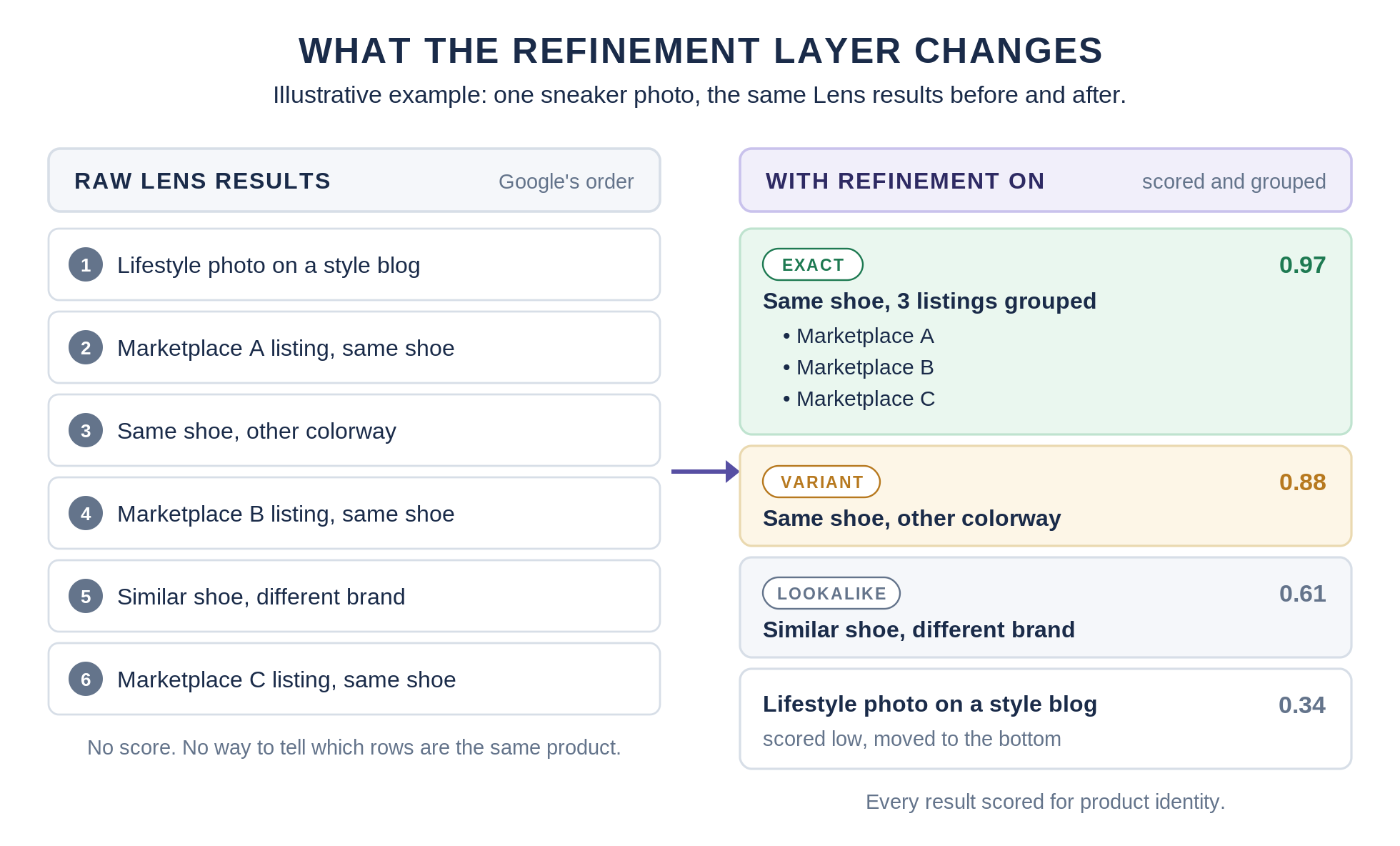
2. SKU grouping and match labels. Listings of the same product collapse into one group instead of repeating down the page, and every result is labeled exact, variant or lookalike. Three marketplace copies of one shoe become one entry with three sources, and the other colorway stops pretending to be the same item.
3. Catalog matching. Match the photo, or any Lens result, against your own SKUs and get back the SKU it belongs to, with a score. Lens cannot do this at all, because Lens has never seen your catalog.
A score changes how the work gets done. Instead of a person checking every result, a pipeline can accept matches above a threshold automatically, send the uncertain middle band to a person, and discard the rest. Where the thresholds sit depends on what a wrong match costs: tighter for onboarding, where a wrong match creates bad data, looser for discovery, where a wrong match costs a click.
Illustrative example: the same Lens results for one sneaker photo, before and after refinement.
The tools matter differently depending on the result type. Visual matches gain the most from grouping and labels, because they are the noisiest list, and a lifestyle photo that scores low for product identity simply drops down the order instead of sitting at the top. Product results gain the most from catalog matching: "listed at six retailers" becomes "your SKU, listed at six retailers, at these prices," which is the whole of price monitoring. Exact matches gain from catalog matching too, turning a page that carries a supplier's photo into the SKU that photo belongs to.
How the Refinement Re-Rank Works, and Where 92.44% Top-1 Accuracy Comes From
The re-rank runs on a product similarity model that Width built. The method is documented in its product similarity case study: a fine-tuned image similarity model combined with an in-house feature-understanding model, trained with a custom loss function to match an input product photo to the image of the same product in a large database.
Fine-tuning means starting from a model that already understands images in general and training it further on product photos, so it learns the differences that separate one product from another rather than the ones that separate one photo from another, like lighting, angle and background.
The benchmark is specific, and worth reading exactly. On a product image dataset of more than 10 million products, drawn from every category of the Google Product Taxonomy with a focus on apparel, tech and home goods, the model put the correct product first 92.44% of the time and in its top three 99.3% of the time.
The two numbers point to different designs. A high top-1 rate is what makes it reasonable to accept the first result automatically. A high top-3 rate is what makes a review step efficient: on this benchmark, the right product was in the first three 99.3% of the time, so a reviewer is almost always choosing among three candidates rather than searching from scratch.
The same case study's t-SNE analysis found that the product images in the database vary much more than the input images used to search them. A separate test shows how much fine-tuning changes the result. Width's comparison of image embedding models measured how often each model matched retail shelf photos to the correct SKU: base CLIP 41% of the time, Fashion CLIP 50%, and Width's fine-tuned SKU image classification model 89%.
The pipeline judges the product in the image and does not lean on titles or descriptions, so it can match two listings that describe the same product in completely different words.
Width's image similarity work also runs in production. The visual search write-up describes a customer using Width's custom image similarity algorithm for 3 million visual searches a month across a catalog of 10 million SKUs.
Google Lens API Use Cases for Catalog Teams
Seller and supplier onboarding. A supplier sends a photo and a part number. Exact matches find the manufacturer's page and a spec source, and catalog matching checks whether the product already exists before a duplicate gets created. This is the front door of seller onboarding and supplier catalog ingestion, and it decides whether a batch of supplier photos turns into clean listings or a cleanup project.
Catalog deduplication. Two vendors send the same product with different titles and different part numbers. Catalog matching checks each incoming product photo against the SKUs you already carry, so both resolve to one record instead of two listings competing with each other. Because the match works on the product in the photo, it catches duplicates that share nothing in their text.
Competitive price monitoring. Follow one SKU across retailers, not every product that happens to look like it. The labels keep the other colorway and the lookalike out of the price comparison, because a price monitor that compares against lookalikes produces confident, wrong numbers.
Unauthorized sellers and copied listings. Exact matches find pages using your product photos, and catalog matching ties each one back to the SKU, so a brand team can review a short list instead of a long search.
Reverse image search and visual search in your own storefront. Catalog matching on its own works as a reverse image search API over your catalog: a photo in, the matching SKU from your catalog out, with a score. That is the core of a visual search API for a storefront, and Width's visual search work covers the storefront side in depth.
Photo-to-listing. A seller photographs an item, the photo resolves to a product with known specs, and the listing is written from that data rather than from memory. The same pattern sits behind our AI eBay lister.
Pumice vs SerpApi vs Google Cloud Vision
Google Lens API options compared
Pumice
SerpApi
Google Cloud Vision
Official Google product
No
No
Yes
Returns Google Lens results (visual matches, products, exact matches)
Yes
Yes
No. Web Detection returns matching images and pages, not Lens's results
Re-ranks results by product identity
Yes
No
No
Groups listings of the same SKU and labels exact, variant, lookalike
Yes
No
No
Matches against your own catalog
Yes
No
Product Search, now in maintenance mode
Published benchmark for the product-matching model
92.44% top-1, 99.3% top-3 retrieving from 10M+ products (Width)
Not applicable: returns Google's order
None published
Pricing
Custom, by volume
250 free searches a month, then from $25 a month for 1,000
1,000 free units a month per feature; Web Detection $3.50 per 1,000
Pumice and SerpApi both return Google Lens results. The purple rows are where they differ. Neither is affiliated with Google.
Bright Data, Scrapingdog, SearchApi and Oxylabs belong in the same column as SerpApi: they deliver Lens results without re-ranking them, with a free allowance or trial to start and usage pricing after that.
Getting Access to Pumice's Google Lens API
Pumice's Google Lens API and product matching API are available to catalog, marketplace and brand teams, with pricing based on volume. Both are web APIs, so they integrate with an onboarding pipeline, a PIM or a marketplace back end the way any other API does. The quickest way to judge the refinement is on your own products: send 50 product photos and your catalog export, and we will return the Lens results with refinement on, scored, grouped and matched to your SKUs. The catalog export can be as simple as a spreadsheet with a SKU, a title and an image link for each product. You get the raw and refined results back side by side in a file you can download, so the comparison is yours to make.
Send Us 50 Product Photos and Your Catalog Export
We will run them through Pumice's Google Lens API with refinement on and send back the matches with scores, so you can judge the difference on your own products.
Pumice Google Lens API
Send us 50 product photos and your catalog export
We will run them through Pumice's Google Lens API with refinement on and send back the matches with scores, so you can judge the difference on your own products.
The Lens results for each photo, as returned
The same results scored for product identity and labeled exact, variant or lookalike
Listings of the same SKU grouped, instead of repeated down the page
Each photo matched to the SKU in your catalog it belongs to, where there is one
Pumice is a third-party service and is not affiliated with Google.
Frequently Asked Questions
Is there an official Google Lens API for developers?
No. Google has not released an official, public Google Lens API. Lens is a consumer feature in the Google app, Google Photos, Chrome and Google Search. Google's official image API is Cloud Vision, which is a different product and does not return Lens's results.
Is the Google Lens API free?
Lens itself is free to use in Google's apps, but there is no official API to be free or paid. Third-party Google Lens APIs charge per search after a free allowance: SerpApi includes 250 free searches a month, Bright Data advertises 5,000 free requests a month, with pay-as-you-go pricing at $1.50 per 1,000 requests, Scrapingdog starts with 100 free credits, and SearchApi with 100 free requests. Google Cloud Vision gives 1,000 free units a month per feature, then charges $3.50 per 1,000 for Web Detection. Pumice's pricing is custom, based on volume.
What is the difference between Google Lens and the Google Cloud Vision API?
Google Lens is a consumer search feature that returns web results for a photo, ranked and filtered by Google. Cloud Vision is Google's official developer API for labels, text, faces, landmarks, logos and web detection. A Google staff member on Google's developer forum describes them as sharing foundations but not the same technology stack, and Cloud Vision does not return Lens's results.
What does a Google Lens API return?
Three kinds of result: visual matches, which are pages whose images resemble yours; products, which are shopping listings with price, rating and stock status; and exact matches, which are pages carrying the same image. Each result includes a title, link, source and image, though simpler services return a single combined list. Pumice returns the same result types and can add a product-identity score, SKU grouping, match labels and a catalog match.
Can I use a Google Lens API from Python?
Yes. Every Google Lens API, Pumice's included, is a web API, so any language that can send an HTTP request and read JSON works. Python is the most common choice: a few lines send the request and print the top results so you can check them. For access to Pumice's API and an example request for your use case, contact Pumice.
Can a Google Lens API identify the exact product in a photo?
Not on its own. A Google Lens API returns results that look like the photo, in the order Google ranked them, and the same product, its other colorways and lookalikes from other brands can all appear together. Identifying the exact product takes a second step that scores each result for product identity and groups listings of the same SKU, which is what Pumice's refinement tools add.
What is the best Google Lens API?
It depends on the job. For Lens results as JSON with thorough documentation, SerpApi is the reference option. For an official Google product that labels images and checks them against Google's web index, use Cloud Vision, knowing it does not return Lens results. For Lens results resolved to the actual product, with scores, SKU grouping and catalog matching, use Pumice.
How accurate is Pumice's product matching?
The model behind the refinement re-rank retrieved the correct product first 92.44% of the time, and in its top three 99.3% of the time, from a database of more than 10 million products on Width's benchmark. That measures retrieving the same product for a product photo, not Lens results after re-ranking. Results on your own catalog are best judged with your own photos.
Can I match Google Lens results against my own catalog?
Yes, with Pumice's catalog matching, which returns the SKU each photo or Lens result belongs to, with a score. Lens alone cannot, because it has never seen your catalog, and Google's own catalog-matching product, Vision API Product Search, is in maintenance mode.




.png)