The SEO world runs on convention. Write a meta description for every page, set canonicals, add more content to category pages. Most of that advice is reasonable, and almost none of it tells you whether a given change will move traffic on your site.
SEO A/B testing is how you find out. It changes half of a group of similar pages. Then it checks whether those pages gain organic traffic the other half does not.
One question decides whether a testing program pays off: which change should you test first? A test can prove a hypothesis, but it cannot choose one. The tests most worth running start from evidence about what the pages ranking for your target queries do that yours do not.
The unit of the test is the page, not the visitor. The goal is increasing organic traffic, so the result is measured in organic sessions. If the changed group gains traffic beyond what the control and a forecast predict, the change worked.
A conversion test, like most user testing, shows different versions of one page to different users and measures user behavior, such as who buys. An SEO test cannot do that, because search engines have to see a single version of every page.
SEO A/B testing borrows the logic of conversion rate optimization and user testing, but not their mechanics. Three problems force the change.
Search changes are slow. A change to a page does nothing for search until Google crawls and reindexes it. Changes take days or longer to show up in search engines, so tests run for weeks, not hours.
There is only one Googlebot. A conversion test assigns each visitor a variant. Googlebot, like other search engine crawlers, is one visitor, and if it saw two versions of a page on different crawls, the results would be meaningless.
Switching back and forth does not work. Some tests alternate two versions over time. Rankings build over time, and changes interact heavily with them, so alternating versions muddies the result.
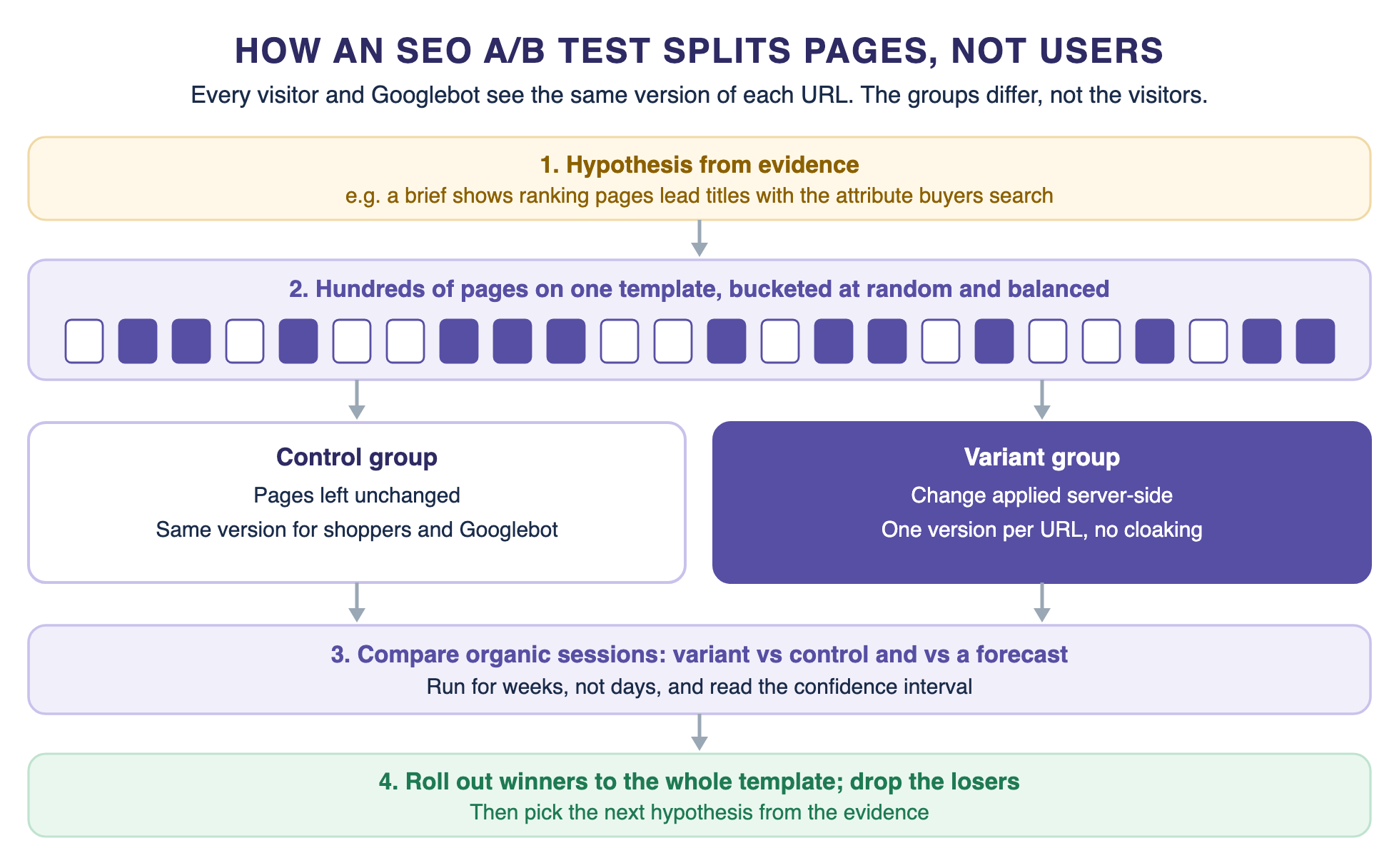
The fix is to randomize by URL instead of serving different page versions to different visitors. Each page belongs to one group for the whole test, and everyone who visits it, including Googlebot, sees the same version. Here are the key differences between the two kinds of test.
Where the change is made matters too. Search engines may never see changes that client-side tools or a tag manager apply in the browser. Make SEO test changes server-side, so the HTML Google fetches already contains them. Conversion tests on page layout are a separate program, so keep them off the pages in an SEO test.
The method has two limits. Some sites do not have enough pages to split. The change must also be one you expect to act the same way on every page it touches.
Not every site can run a valid SEO test. Check these before you build anything.
Large ecommerce catalogs fit this model well. Product detail pages, category and collection pages, and brand pages each share one template across hundreds or thousands of URLs. That scale is the advantage. One template change reaches every page on it, so one test settles the question for all of them.
If a section of your site has less traffic, you can still test it. Expect to need a bigger change to reach a clear result, or a longer test.
Start with the template that brings the most organic traffic and changes the least. Check which template brings the most organic sessions on your store. It is often the product detail page or the category page, each with many URLs on one layout, followed by brand and collection pages.
How much traffic a group gets decides the smallest change it can detect. A large group can detect a small change, such as a few percent more sessions. A small group can only detect a large one. If your groups are small, test bold changes first, and save fine-tuning for the templates with the most traffic.
When you select testing pages, leave out the ones that will not behave like the rest. Seasonal landing pages, pages with a sale running and pages that are about to be redirected all add noise. Exclude them from the control and variant pages before you bucket, not after the results come in.
Running a test comes down to five steps. Get the first three right and the measurement mostly takes care of itself.
Choose one template and one change that applies to every page on it. Good candidates include dropping company branding from product titles, putting the key attribute in category H1s and adding product schema.
Avoid changes that only make sense on a few pages. A test measures the average effect across the group, so the change has to mean the same thing on every page.
Write down what you will change, which ranking signals you expect it to improve and how big you expect the effect to be. For example: removing the brand from product titles will free space for the attribute buyers search and raise organic sessions to those pages.
The strongest hypotheses come from evidence, not convention. If the pages ranking for your target queries all lead their titles with an attribute yours bury, that is worth testing. Compare your pages with the ones ranking above them, and test the differences most of them share.
Split the pages into control and variant groups at random, then check that the groups are balanced. Both groups should have similar traffic and similar trends over recent weeks. Stratified sampling fixes uneven groups. It balances them on a metric you pick before the test starts, such as the last 100 days of organic sessions.
Never group by product type or category. Picture a pet store that puts every cat product in the variant group. A cat-themed holiday lifts those pages, and the test reports a false win. An outside event hit one group, not the other, and made the result look better than it was.
Do the bucketing in code. Pass each page's URL to your testing tool's assignment call, or hash the URL yourself. Either way, each page always lands in the same group.
Apply the change server-side to variant pages only, with one version per URL. Leave the control pages exactly as they were. Log what changed and the date it went live.
Start the test once the groups look balanced on recent traffic. Then wait. Google says crawling can take anywhere from a few days to a few weeks, and the test cannot show anything until the changed pages are recrawled.
Test ideas fall into three levels of effort. The simplest change specific elements such as title tags, meta descriptions, H1s and where existing page content sits. The next level changes HTML structure or adds structured data. The hardest change internal linking or redesign landing pages.
Here are a few examples of how those ideas map onto ecommerce templates.
Title tests are the classic starting point, because they are cheap to ship across a whole template. Published title tests range from clear wins to no effect at all. Treat a result from another site as an idea to test on yours.
A change that wins for one catalog can lose for another, because Google weighs many ranking signals together. Fix basic problems before you test, such as blocked pages, duplicate content and thin product data. A test on a page search engines cannot rank tells you nothing.
Structured data tests deserve a note. Markup is easy to change across a template, and it matters for AI search too. Search engines and answer engines can use the same markup to understand what a product is.
Run tests on one idea per template at a time. Two tests on the same pages at once make both results impossible to read, so queue the next idea until the current test ends.
Pick from this list with care. Start with the change your own evidence says your pages are missing.
Measure organic sessions to each group, every day. Use organic traffic as the main metric and treat search engine rankings and Search Console data as secondary, because a gain in search rankings that does not bring visits is not a win, and click-through rate moves traffic as much as position does. Track user engagement on the variant pages too, but judge the test on organic sessions.
Compare the variant group against two things: the control group and a forecast. The control shows what happened to similar pages without the change. The forecast shows what the variant pages would have done on their own, based on their historical data.
Build that forecast from about 100 days of historical data, then report the difference with a confidence interval, typically at the 95% level. A result is statistically significant when the whole interval sits above zero, or below it for a loss. If the interval crosses zero, the test has not shown a clear effect yet.
Reduce noise where you can. CUPED adjusts each page's metric using data from before the test, which narrows the confidence interval. Stratified bucketing stops one big page from swinging the result, like a page with 40% of a group's traffic.
Report test results as a range, not a single number. Saying a change added between 2% and 9% more organic sessions is more honest than saying it added 5%, and it tells the team how confident to be before a full rollout.
Most SEO tests take 2 to 4 weeks to reach statistical significance. Smaller effects and lower-traffic groups take longer.
Decide the length before you start, and do not stop the moment the numbers look good. Checking early and stopping on a good day is called peeking, and it makes false wins more likely, because random swings look like effects in the first days of any test.
Many tests end without statistically significant results. A flat result still tells you something: the change did not move traffic by enough to detect, so it is not worth the risk of a full rollout.
A negative test is just as useful. Revert the change on the variant pages, write down what you learned, and do not rerun the same test until it happens to look positive. Rerunning until you win is peeking by another name.
Whether it is a positive or negative test, end it once it reaches its planned length. Then roll the winner out to the whole template, or remove the change if it lost.
Most failed SEO A/B tests fail in setup, before any data comes in. These are the mistakes to check for before you launch.
Seasonality and updates from search engines are less of a problem than they look, as long as an update does not hit one group harder than the other. Both groups live through the same season and the same algorithm changes, which is the point of having a control. The risk comes from external factors that hit one group and not the other.
A/B testing in SEO needs a tool that can assign pages, not people. Any setup has to do four things.
There are three ways to meet those requirements. Each fits a different team.
Dedicated SEO testing platforms: tools such as SearchPilot and seoClarity are built for page-split SEO tests, with bucketing, forecasts and reporting in one place.
General experimentation platforms: tools such as Statsig can run SEO tests if they can randomize by URL and run server-side, next to your conversion tests and other digital marketing experiments.
In-house: bucket pages in code with a stable hash of the URL, pull organic sessions from your analytics or Search Console, and build a simple forecast. This works when you have an engineering team and run SEO experiments a few times a quarter.
A simple in-house setup sorts pages into traffic bands first, using the last 100 days of organic sessions. Within each band, a hash of the URL decides the group, so assignment is random but stable. Then check that the two groups have similar totals and trends before any change goes live.
Whichever you choose, check it against the four requirements. A tool that only assigns users is a conversion testing tool, whatever its marketing says.
When a test wins, roll the change out to every page on the template, including the control group. Keep watching organic sessions from search engines for a few weeks, because a change that wins on half the pages should hold on all of them.
Keep a log of all your SEO experiments: the hypothesis, the pages, the dates, the test results and the decision. Over a year that log becomes the most useful input to your SEO strategy, because it records what works on your site rather than on someone else's.
Google publishes search engine guidelines for testing websites so that tests do not hurt how sites appear in search. Four of them matter for SEO tests.
No cloaking: do not show one set of URLs to Googlebot and a different set to human users. Google treats that as against its spam policies, whether you are running a test or not.
Use canonical tags, not noindex: if a test involves creating multiple versions of a page at alternate URLs, point them at the original page with rel="canonical", so search engines do not treat them as duplicate content. Google warns that noindex can have unexpected bad effects.
Use temporary redirects: if a test redirects users to another URL, use a 302 redirect, not a 301, so search engines keep the original URL as the preferred version.
End tests promptly: do not run a test for an unnecessarily long time, and remove alternate URLs, testing scripts and markup as soon as it ends.
Google is not against testing. In a 2012 post on website testing, it told site owners it was glad they were testing, and the rules exist so tests do not mislead people using Google Search.
A page-split SEO test fits these rules by design. Each URL serves only one version to everyone, so search engines see exactly what human users see. Cloaking means showing Googlebot something different from what people see.
Two published title tests show how differently the same kind of change can land. In one SearchPilot test, adding the brand name and location to titles produced a 9% uplift. That result came at a lower confidence level than the standard 95%.
In another, a first test of shorter titles showed no effect. A later re-run in the US showed a 5% uplift at 90% confidence, below the 95% standard. Neither result would justify copying the change to another site without testing it there first.
Here is how a full test runs on an ecommerce category template. The retailer is illustrative, so read this as a worked example rather than a reported result.
1. A retailer has 1,200 category pages on one template, and the group gets well over 30,000 organic sessions a month.
2. Evidence from the pages ranking for its category queries shows most of them link to their subcategories near the top. The retailer's pages do not.
3. The team buckets the 1,200 pages at random, stratified on the last 100 days of organic sessions, and checks the groups are balanced.
4. Variant pages get a subcategory link block, rendered server-side. Control pages stay the same.
5. The test runs for its planned four weeks. The team reads the result against the control and the forecast, then rolls it out or reverts it.
It is easy to test conventions, such as shorter titles or more copy, and wait weeks to learn little. Better hypotheses come from what the pages ranking above yours actually do.
Pumice's Product Optimization Playbook starts from that evidence. You give it a SKU and a target search query. It pulls live search volume and difficulty, scrapes the top pages for that search and runs gap analysis between those pages and yours.
The result is an optimization report, which we call a brief: which terms the ranking listings share and where they place them, what the top results claim that you do not, and specific changes with the evidence behind each one and a count of how many competitors make them.
That list is a ready-made set of hypotheses. Here is how it plugs into a test.
1. Run briefs for a sample of SKUs on one template, and group the ones that recommend the same change.
2. Split those pages at random into balanced control and variant groups.
3. Apply the change to the variant group only. The Merchandising Pipeline starts from a CSV or feed you supply, so you can give it only the variant SKUs.
4. Measure organic sessions against the control and a forecast. Then roll the winner out across the SKUs that share the pattern.
Pumice writes briefs and applies changes; it is not an SEO testing platform. Use it with whichever testing setup you choose. The same brief-first idea runs at enterprise scale in an agentic system the Width.ai team built for IPG, where a strategist reviews every brief before any listing changes.
SEO A/B testing turns SEO advice into results you can trust. Split pages, not users. Bucket them at random but balanced, change only the variant pages, measure organic sessions against a control and a forecast, and follow Google's rules.
Then spend your SEO efforts on changes with evidence behind them. Every test takes weeks, so the order you test in matters as much as the method.
Send us a sample of SKUs and the queries you want them to win. We will run the Product Optimization Playbook and send back a brief for each SKU in your sample: the changes the ranking pages suggest, with the evidence behind each.
• Know which change to test first, before you spend weeks testing
• Tests built on what the pages ranking above you actually do
• Fewer flat results from testing conventions that never mattered
• A ready-made hypothesis list for your next SEO A/B test
Yes. Google tests changes to Search on a small share of users and compares them with a control group. It ran 16,871 of these live traffic experiments in 2023. It also expects site owners to test, and its rules for doing it safely cover cloaking, canonicals, redirects and test length.
SEO testing is the part of digital marketing that measures whether a change to your pages improves organic search traffic. The most reliable method is an SEO A/B test that compares a changed group of pages with an unchanged control group.
A common SEO example is removing the brand name from product page titles on half of a store's product pages. The team then compares organic sessions to those pages with the unchanged half.
Not if you follow Google's rules. Serve one version per URL to everyone rather than multiple versions, use canonical tags and 302 redirects for test URLs, and end tests promptly.
In SEO the terms usually mean the same thing: a test that splits pages into groups. Where teams draw a line, A/B tests split users for conversions and SEO split tests split pages for traffic.
Plan for at least 2 to 4 weeks, which is how long most tests take to reach significance. Set the length before you start and do not stop early on a good day.


